<?xml version="1.0" encoding="utf-8"?><feed xmlns="http://www.w3.org/2005/Atom" ><generator uri="https://jekyllrb.com/" version="3.10.0">Jekyll</generator><link href="https://learningbydoing.cloud/feed.xml" rel="self" type="application/atom+xml" /><link href="https://learningbydoing.cloud/" rel="alternate" type="text/html" /><updated>2026-09-22T20:39:23+00:00</updated><id>https://learningbydoing.cloud/feed.xml</id><title type="html">LearningByDoing.cloud</title><subtitle>Practical notes on Microsoft Entra, identity, access and cloud security.</subtitle><author><name>Stian Strysse Bjørge</name></author><entry><title type="html">New feature in PIM - fire custom extensions on role activation</title><link href="https://learningbydoing.cloud/blog/pim-custom-extensions/" rel="alternate" type="text/html" title="New feature in PIM - fire custom extensions on role activation" /><published>2026-09-07T00:00:00+00:00</published><updated>2026-09-07T00:00:00+00:00</updated><id>https://learningbydoing.cloud/blog/pim-custom-extensions</id><content type="html" xml:base="https://learningbydoing.cloud/blog/pim-custom-extensions/"><![CDATA[<p>I recently <a href="https://learningbydoing.cloud/blog/pim-shortcomings/">wrote about the things I would fix in Microsoft Entra Privileged Identity Management</a> if Microsoft made me Product Manager for a day. While researching that post, one preview feature caught my attention: <strong>custom extensions for role activation</strong> - which is something I helped test in private preview earlier.</p>

<p>The idea is simple. A user requests activation of a role and writes a justification. PIM sends the activation request to a REST API that you control. Your API evaluates the request and tells PIM to continue, automatically approve it, or deny it.</p>

<p>That REST API can apply whatever business logic your organization needs. It can validate a ticket, check an HR system, look at the requested duration, apply different rules for different roles, or let an AI model reason over the justification written by the user.</p>

<p>And the really interesting part is that the current PIM portal can require an extension both before and after the normal human approval step. So of course I had to build one together with my favourite AI companion to see how it actually works.</p>

<p>In this blog post we will look at:</p>

<ol>
  <li><a href="#what-is-a-pim-custom-extension">What PIM custom extensions actually are</a></li>
  <li><a href="#before-approval-or-after-approval">Pre-approval and post-approval calls</a></li>
  <li><a href="#the-request-from-pim">What the API receives and must return</a></li>
  <li><a href="#protect-the-api-with-microsoft-entra-id">How to protect the API with Microsoft Entra ID</a></li>
  <li><a href="#create-the-custom-extensions-with-microsoft-graph">How to create the custom extensions with Microsoft Graph</a></li>
  <li><a href="#attach-the-extension-to-a-role">How to attach an extension to a PIM role</a></li>
  <li><a href="#an-admin-console-makes-this-much-easier">Why I added an admin console</a></li>
  <li><a href="#things-i-learned-the-hard-way">What I learned while testing the preview</a></li>
</ol>

<p>Note: I am not going to spend this blog post walking through every line of API code. Your favorite AI coding tool can likely build it for you, as long as you give it the correct requirements and verify the output. The interesting part is to show how PIM, Entra ID and the API fit together.</p>

<h2 id="what-is-a-pim-custom-extension">What is a PIM custom extension?</h2>

<p>A PIM custom extension is an HTTPS endpoint that PIM calls during activation of an eligible assignment.</p>

<p>It is available for:</p>

<ul>
  <li>PIM for Groups</li>
  <li>PIM for Microsoft Entra roles</li>
  <li>PIM for Azure resources</li>
</ul>

<p>The feature is currently in preview and requires Microsoft Entra ID Governance or an Entra Suite license. Microsoft has documented the feature here: <a href="https://learn.microsoft.com/entra/id-governance/privileged-identity-management/privileged-identity-management-custom-extensions">Configure custom extensions for PIM role activation</a>.</p>

<p>PIM sends the activation request directly to your API using <code class="language-plaintext highlighter-rouge">HTTP POST</code>. There is no Logic App, connector or shared secret sitting between PIM and the API. PIM gets an access token from Entra ID for your API and puts it in the Authorization header.</p>

<p>For the documented pre-approval flow, your API then returns one of three outcomes:</p>

<ul>
  <li><code class="language-plaintext highlighter-rouge">Approved</code> lets the request continue through the normal PIM workflow</li>
  <li><code class="language-plaintext highlighter-rouge">AutoApproved</code> lets the activation continue without normal human approval</li>
  <li><code class="language-plaintext highlighter-rouge">Denied</code> blocks the activation</li>
</ul>

<p>That makes this a real policy decision point. It is not just another notification webhook, although you can use it for that too.</p>

<h2 id="before-approval-or-after-approval">Before approval or after approval</h2>

<p>When editing the activation settings for a role, the current PIM portal can require a custom extension at two different stages.</p>

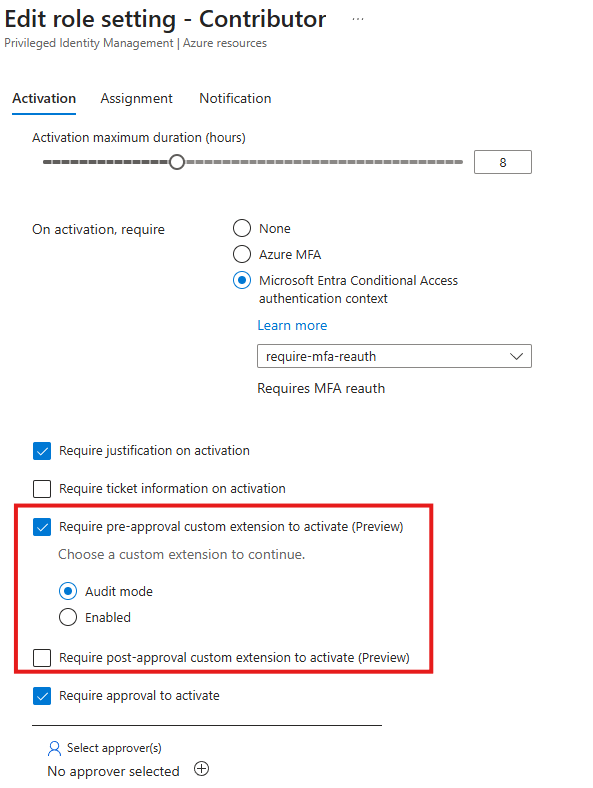
<p><img src="/assets/img/posts/2026-09-07/pim-pre-or-post-approval.png" alt="PIM activation configuration pre or post approval" /></p>

<h3 id="pre-approval">Pre-approval</h3>

<p>The pre-approval extension runs before the normal PIM human approval step, if you have that configured. This is useful when the custom API should reject requests that should never reach an approver. It can also return <code class="language-plaintext highlighter-rouge">AutoApproved</code>, which skips the normal approval step completely.</p>

<p>In my dev tenant the portal provided two modes for the pre-approval extension:</p>

<ul>
  <li><code class="language-plaintext highlighter-rouge">Audit</code> mode calls the extension but does not enforce its decision</li>
  <li><code class="language-plaintext highlighter-rouge">Enabled</code> mode calls the extension and enforces its decision</li>
</ul>

<p>Audit mode is exactly what I want from a preview feature. It lets you see what the extension would have decided before giving it the power to block or automatically approve anything.</p>

<h3 id="post-approval">Post-approval</h3>

<p>Note: Post-approval isn’t covered in the Microsoft Learn docs as of <code class="language-plaintext highlighter-rouge">2026-09-07</code>, but it’s available as configuration properties in Graph and the PIM Portal so I guess it’s work in progress to just finalize the documentation.</p>

<p>The second checkbox in the screenshot above is called <strong>Require post-approval custom extension to activate</strong>. The wording and its position in the activation settings show the intended order. Normal PIM human approval happens first, then the custom extension is called before activation completes. Post-approval does not mean that access has already been granted. It means that a human has approved the request and the custom logic gets one final check before PIM completes activation.</p>

<p>This could be useful if the API needs to check that a ticket is still open, verify that an emergency condition is still active, or run a final compliance check after the human decision.</p>

<p>The same API application can serve both stages. I would still create separate extension registrations with different endpoint paths. This makes the intended stage visible in logs without depending on undocumented payload fields.</p>

<p>For example:</p>

<div class="language-text highlighter-rouge"><div class="highlight"><pre class="highlight"><code>https://pim-api.learningbydoing.cloud/api/v1/pim/preapproval
https://pim-api.learningbydoing.cloud/api/v1/pim/postapproval
</code></pre></div></div>

<h2 id="what-could-we-use-this-for">What could we use this for?</h2>

<p>Microsoft lists ticket validation, HR checks, compliance workflows and dynamic approval logic as examples. This is where it gets interesting, because there are many other possibilities.</p>

<p>An API could check whether:</p>

<ul>
  <li>The justification says what the user is going to do</li>
  <li>The requested role makes sense for that task</li>
  <li>The requested duration is reasonable</li>
  <li>A valid change or incident ticket exists</li>
  <li>The ticket belongs to the person or team requesting access</li>
  <li>The user is currently on call</li>
  <li>The device or user risk is acceptable</li>
  <li>The target resource is inside an approved maintenance window</li>
  <li>A highly privileged role always requires human approval</li>
</ul>

<p>My test API looks at the reason entered by the user. It applies some normal deterministic rules first and is prepared to send the reason and relevant request context to an AI model. When that integration is enabled, the model returns a structured assessment with a verdict, confidence, risk and a useful explanation.</p>

<p>Something like <code class="language-plaintext highlighter-rouge">need access</code> tells us almost nothing and should not be enough to activate a powerful role. A reason explaining what needs to be changed, why it needs to happen now, which system is involved and which ticket tracks the work is much more useful.</p>

<p>AI is not magic here. The model is one policy component, not an all knowing security administrator. Start in audit mode, measure the results, keep critical roles away from automatic approval, and make sure failures never silently turn into approvals.</p>

<h2 id="the-request-from-pim">The request from PIM</h2>

<p>The request body differs between the three PIM providers.</p>

<p>For Groups, PIM sends a <code class="language-plaintext highlighter-rouge">privilegedAccessGroupAssignmentScheduleRequest</code>.</p>

<p>For Microsoft Entra roles, PIM sends a <code class="language-plaintext highlighter-rouge">unifiedRoleAssignmentScheduleRequest</code>.</p>

<p>For Azure resources, PIM sends an Azure role assignment schedule request with the values inside a <code class="language-plaintext highlighter-rouge">properties</code> object.</p>

<p>The object names are different, but fortunately the useful information is mostly the same:</p>

<ul>
  <li>Request ID</li>
  <li>Principal ID</li>
  <li>Role or group ID</li>
  <li>Scope</li>
  <li>Justification</li>
  <li>Requested start time and duration</li>
  <li>Ticket number and ticket system, when configured</li>
</ul>

<p>I normalize all three payloads into one internal request model before applying policy. That keeps the evaluation logic independent of the PIM provider.</p>

<p class="box-warning">Warning: Do not assume that the justification is safe input. A user can write anything in that field, including instructions intended to manipulate an AI model. If you use AI, treat the text as untrusted data, clearly separate it from system instructions, use structured model output, and apply normal policy rules before AI reasoning.</p>

<h2 id="the-response-to-pim">The response to PIM</h2>

<p>The response is refreshingly small:</p>

<div class="language-json highlighter-rouge"><div class="highlight"><pre class="highlight"><code><span class="p">{</span><span class="w">
  </span><span class="nl">"evaluationId"</span><span class="p">:</span><span class="w"> </span><span class="s2">"7bb822c8-550c-42c7-98b3-1a4d095f95ee"</span><span class="p">,</span><span class="w">
  </span><span class="nl">"evaluationOutcome"</span><span class="p">:</span><span class="w"> </span><span class="s2">"Approved"</span><span class="p">,</span><span class="w">
  </span><span class="nl">"reason"</span><span class="p">:</span><span class="w"> </span><span class="p">[</span><span class="w">
    </span><span class="s2">"The request explains the planned change and references a valid incident."</span><span class="w">
  </span><span class="p">]</span><span class="w">
</span><span class="p">}</span><span class="w">
</span></code></pre></div></div>

<p><code class="language-plaintext highlighter-rouge">evaluationId</code> should identify the evaluation for troubleshooting and audit purposes. I recommend making it deterministic for the PIM request and stage, so a retry does not create conflicting decisions.</p>

<p><code class="language-plaintext highlighter-rouge">evaluationOutcome</code> must be <code class="language-plaintext highlighter-rouge">Approved</code>, <code class="language-plaintext highlighter-rouge">AutoApproved</code> or <code class="language-plaintext highlighter-rouge">Denied</code>.</p>

<p><code class="language-plaintext highlighter-rouge">reason</code> is an array of messages explaining the decision. This is especially important for denials because the user needs to know what was missing and how to write a better request.</p>

<p>Microsoft currently uses <code class="language-plaintext highlighter-rouge">10000</code> milliseconds and three retries in its Graph example. The documentation describes these fields as the time PIM waits and the number of retry attempts, but does not publish their supported ranges. Do not assume that the example values are hard limits. Use values accepted by your tenant and keep the API timeout shorter than the PIM timeout so there is still time to return a controlled response if an external service or AI model is slow.</p>

<h2 id="protect-the-api-with-microsoft-entra-id">Protect the API with Microsoft Entra ID</h2>

<p>PIM custom extensions supports proper Entra authentication. Create a single tenant app registration for the API. In this example, the endpoint is:</p>

<div class="language-text highlighter-rouge"><div class="highlight"><pre class="highlight"><code>https://pim-api.learningbydoing.cloud/api/v1/pim/preapproval
</code></pre></div></div>

<p>The host name in the Application ID URI must match the host name of the endpoint, and the URI must end with the Application client ID. Follow Microsoft’s documentation for doing this properly.</p>

<p>If the client ID is <code class="language-plaintext highlighter-rouge">11111111-2222-3333-4444-555555555555</code>, the Application ID URI becomes:</p>

<div class="language-text highlighter-rouge"><div class="highlight"><pre class="highlight"><code>api://pim-api.learningbydoing.cloud/11111111-2222-3333-4444-555555555555
</code></pre></div></div>

<p>No client secret or certificate is required for PIM to call the API. PIM requests a token for the Application ID URI itself.</p>

<h2 id="validate-more-than-just-the-token-signature">Validate more than just the token signature</h2>

<p>Validating that a token was signed by Entra ID is not enough. The API should validate all of the following:</p>

<ol>
  <li>The signature is valid and uses current Entra signing keys</li>
  <li>The token has not expired</li>
  <li>The issuer belongs to your tenant</li>
  <li>The audience is your Application ID URI</li>
  <li>The calling application is Microsoft Entra PIM</li>
</ol>

<p>For a version 2 access token, the calling application is found in the <code class="language-plaintext highlighter-rouge">azp</code> claim. For a version 1 token, it is found in <code class="language-plaintext highlighter-rouge">appid</code>.</p>

<p>The Microsoft Entra PIM service application ID in the token I received was:</p>

<div class="language-text highlighter-rouge"><div class="highlight"><pre class="highlight"><code>1c67c054-65c8-4f7f-92a1-eb7ba6e48627
</code></pre></div></div>

<p>The API should reject the request if that value does not match. Otherwise, another application that manages to request a token for your API could potentially submit its own fake activation payload.</p>

<p>Here is a nice preview documentation trap. The English Microsoft Learn article currently shows what looks like an example client ID in the caller validation sentence. Several localized versions show the PIM service ID above, and that value also matched the <code class="language-plaintext highlighter-rouge">azp</code> claim in my live request. Confirm the caller claim with a controlled test in your own tenant before hard coding it.</p>

<p>I would also recommend:</p>

<ul>
  <li>Accepting POST only on the evaluation endpoints</li>
  <li>Limiting request size and JSON depth</li>
  <li>Keeping the service single tenant</li>
  <li>Using HTTPS with a valid certificate</li>
  <li>Avoiding raw request and justification logging</li>
  <li>Giving the API runtime identity only the permissions it actually needs</li>
  <li>Keeping any administrator interface behind a separate Entra role, locked behind GSA Private Access</li>
  <li>Using managed identities instead of API keys when calling Azure services</li>
</ul>

<p>The activation reason can contain operational details, incident numbers and resource information. I choose to store the decision evidence, but deliberately did not store the raw justification.</p>

<h2 id="check-the-app-registration-and-enterprise-application">Check the app registration and Enterprise application</h2>

<p>The Application ID URI is stored as <code class="language-plaintext highlighter-rouge">identifierUris</code> on the app registration. PIM also checks that the same value exists in <code class="language-plaintext highlighter-rouge">servicePrincipalNames</code> on the Enterprise application.</p>

<p>You can verify both with Microsoft Graph PowerShell:</p>

<div class="language-powershell highlighter-rouge"><div class="highlight"><pre class="highlight"><code><span class="n">Connect-MgGraph</span><span class="w"> </span><span class="nt">-Scopes</span><span class="w"> </span><span class="s1">'Application.Read.All'</span><span class="w">

</span><span class="nv">$clientId</span><span class="w"> </span><span class="o">=</span><span class="w"> </span><span class="s1">'11111111-2222-3333-4444-555555555555'</span><span class="w">

</span><span class="nv">$appUri</span><span class="w"> </span><span class="o">=</span><span class="w"> </span><span class="s2">"https://graph.microsoft.com/v1.0/applications?</span><span class="se">`$</span><span class="s2">filter=appId eq '</span><span class="nv">$clientId</span><span class="s2">'&amp;</span><span class="se">`$</span><span class="s2">select=id,appId,identifierUris"</span><span class="w">
</span><span class="nv">$spUri</span><span class="w"> </span><span class="o">=</span><span class="w"> </span><span class="s2">"https://graph.microsoft.com/v1.0/servicePrincipals?</span><span class="se">`$</span><span class="s2">filter=appId eq '</span><span class="nv">$clientId</span><span class="s2">'&amp;</span><span class="se">`$</span><span class="s2">select=id,appId,servicePrincipalNames"</span><span class="w">

</span><span class="nv">$application</span><span class="w"> </span><span class="o">=</span><span class="w"> </span><span class="p">(</span><span class="n">Invoke-MgGraphRequest</span><span class="w"> </span><span class="nt">-Method</span><span class="w"> </span><span class="nx">GET</span><span class="w"> </span><span class="nt">-Uri</span><span class="w"> </span><span class="nv">$appUri</span><span class="p">)</span><span class="o">.</span><span class="n">value</span><span class="p">[</span><span class="mi">0</span><span class="p">]</span><span class="w">
</span><span class="nv">$servicePrincipal</span><span class="w"> </span><span class="o">=</span><span class="w"> </span><span class="p">(</span><span class="n">Invoke-MgGraphRequest</span><span class="w"> </span><span class="nt">-Method</span><span class="w"> </span><span class="nx">GET</span><span class="w"> </span><span class="nt">-Uri</span><span class="w"> </span><span class="nv">$spUri</span><span class="p">)</span><span class="o">.</span><span class="n">value</span><span class="p">[</span><span class="mi">0</span><span class="p">]</span><span class="w">

</span><span class="nv">$application</span><span class="w"> </span><span class="o">|</span><span class="w"> </span><span class="n">Select-Object</span><span class="w"> </span><span class="nx">appId</span><span class="p">,</span><span class="w"> </span><span class="nx">identifierUris</span><span class="w">
</span><span class="nv">$servicePrincipal</span><span class="w"> </span><span class="o">|</span><span class="w"> </span><span class="n">Select-Object</span><span class="w"> </span><span class="nx">appId</span><span class="p">,</span><span class="w"> </span><span class="nx">servicePrincipalNames</span><span class="w">
</span></code></pre></div></div>

<p>Both objects should contain:</p>

<div class="language-text highlighter-rouge"><div class="highlight"><pre class="highlight"><code>api://pim-api.learningbydoing.cloud/11111111-2222-3333-4444-555555555555
</code></pre></div></div>

<h2 id="create-the-custom-extensions-with-microsoft-graph">Create the custom extensions with Microsoft Graph</h2>

<p>Custom extensions are currently managed through the Microsoft Graph <code class="language-plaintext highlighter-rouge">beta</code> endpoint.</p>

<div class="language-powershell highlighter-rouge"><div class="highlight"><pre class="highlight"><code><span class="n">Connect-MgGraph</span><span class="w"> </span><span class="se">`
</span><span class="w">  </span><span class="nt">-Scopes</span><span class="w"> </span><span class="s1">'PrivilegedAccess-CustomExt.ReadWrite.All'</span><span class="w">
</span></code></pre></div></div>

<p>The following function creates a custom extension. The timeout and retry values match Microsoft’s current example:</p>

<div class="language-powershell highlighter-rouge"><div class="highlight"><pre class="highlight"><code><span class="kr">function</span><span class="w"> </span><span class="nf">New-PimCustomExtension</span><span class="w"> </span><span class="p">{</span><span class="w">
    </span><span class="kr">param</span><span class="p">(</span><span class="w">
        </span><span class="p">[</span><span class="n">Parameter</span><span class="p">(</span><span class="n">Mandatory</span><span class="p">)]</span><span class="w">
        </span><span class="p">[</span><span class="n">string</span><span class="p">]</span><span class="w"> </span><span class="nv">$DisplayName</span><span class="p">,</span><span class="w">

        </span><span class="p">[</span><span class="n">Parameter</span><span class="p">(</span><span class="n">Mandatory</span><span class="p">)]</span><span class="w">
        </span><span class="p">[</span><span class="n">ValidateSet</span><span class="p">(</span><span class="s1">'entraGroups'</span><span class="p">,</span><span class="w"> </span><span class="s1">'entraRoles'</span><span class="p">,</span><span class="w"> </span><span class="s1">'azureResources'</span><span class="p">)]</span><span class="w">
        </span><span class="p">[</span><span class="n">string</span><span class="p">]</span><span class="w"> </span><span class="nv">$ResourceType</span><span class="p">,</span><span class="w">

        </span><span class="p">[</span><span class="n">Parameter</span><span class="p">(</span><span class="n">Mandatory</span><span class="p">)]</span><span class="w">
        </span><span class="p">[</span><span class="n">string</span><span class="p">]</span><span class="w"> </span><span class="nv">$TargetUrl</span><span class="p">,</span><span class="w">

        </span><span class="p">[</span><span class="n">Parameter</span><span class="p">(</span><span class="n">Mandatory</span><span class="p">)]</span><span class="w">
        </span><span class="p">[</span><span class="n">string</span><span class="p">]</span><span class="w"> </span><span class="nv">$ApplicationIdUri</span><span class="w">
    </span><span class="p">)</span><span class="w">

    </span><span class="nv">$body</span><span class="w"> </span><span class="o">=</span><span class="w"> </span><span class="p">@{</span><span class="w">
        </span><span class="s1">'@odata.type'</span><span class="w"> </span><span class="o">=</span><span class="w"> </span><span class="s1">'#microsoft.graph.roleManagementCustomCalloutExtension'</span><span class="w">
        </span><span class="nx">id</span><span class="w"> </span><span class="o">=</span><span class="w"> </span><span class="p">[</span><span class="n">Guid</span><span class="p">]</span><span class="err">::</span><span class="nx">NewGuid</span><span class="err">().</span><span class="nx">ToString</span><span class="err">()</span><span class="w">
        </span><span class="nx">displayName</span><span class="w"> </span><span class="o">=</span><span class="w"> </span><span class="nv">$DisplayName</span><span class="w">
        </span><span class="nx">description</span><span class="w"> </span><span class="o">=</span><span class="w"> </span><span class="s1">'Evaluates PIM role activation requests'</span><span class="w">
        </span><span class="nx">endpointConfiguration</span><span class="w"> </span><span class="o">=</span><span class="w"> </span><span class="p">@{</span><span class="w">
            </span><span class="s1">'@odata.type'</span><span class="w"> </span><span class="o">=</span><span class="w"> </span><span class="s1">'#microsoft.graph.httpRequestEndpoint'</span><span class="w">
            </span><span class="nx">targetUrl</span><span class="w"> </span><span class="o">=</span><span class="w"> </span><span class="nv">$TargetUrl</span><span class="w">
        </span><span class="p">}</span><span class="w">
        </span><span class="nx">clientConfiguration</span><span class="w"> </span><span class="o">=</span><span class="w"> </span><span class="p">@{</span><span class="w">
            </span><span class="s1">'@odata.type'</span><span class="w"> </span><span class="o">=</span><span class="w"> </span><span class="s1">'#microsoft.graph.customExtensionClientConfiguration'</span><span class="w">
            </span><span class="nx">timeoutInMilliseconds</span><span class="w"> </span><span class="o">=</span><span class="w"> </span><span class="mi">10000</span><span class="w">
            </span><span class="nx">maximumRetries</span><span class="w"> </span><span class="o">=</span><span class="w"> </span><span class="mi">3</span><span class="w">
        </span><span class="p">}</span><span class="w">
        </span><span class="nx">authenticationConfiguration</span><span class="w"> </span><span class="o">=</span><span class="w"> </span><span class="p">@{</span><span class="w">
            </span><span class="s1">'@odata.type'</span><span class="w"> </span><span class="o">=</span><span class="w"> </span><span class="s1">'#microsoft.graph.azureAdTokenAuthentication'</span><span class="w">
            </span><span class="nx">resourceId</span><span class="w"> </span><span class="o">=</span><span class="w"> </span><span class="nv">$ApplicationIdUri</span><span class="w">
        </span><span class="p">}</span><span class="w">
        </span><span class="nx">resourceType</span><span class="w"> </span><span class="o">=</span><span class="w"> </span><span class="nv">$ResourceType</span><span class="w">
        </span><span class="nx">customAttributes</span><span class="w"> </span><span class="o">=</span><span class="w"> </span><span class="p">@()</span><span class="w">
    </span><span class="p">}</span><span class="w">

    </span><span class="n">Invoke-MgGraphRequest</span><span class="w"> </span><span class="se">`
</span><span class="w">      </span><span class="nt">-Method</span><span class="w"> </span><span class="nx">POST</span><span class="w"> </span><span class="se">`
</span><span class="w">      </span><span class="nt">-Uri</span><span class="w"> </span><span class="s1">'https://graph.microsoft.com/beta/identityGovernance/privilegedAccess/customExtensions'</span><span class="w"> </span><span class="se">`
</span><span class="w">      </span><span class="nt">-Body</span><span class="w"> </span><span class="p">(</span><span class="nv">$body</span><span class="w"> </span><span class="o">|</span><span class="w"> </span><span class="n">ConvertTo-Json</span><span class="w"> </span><span class="nt">-Depth</span><span class="w"> </span><span class="nx">10</span><span class="p">)</span><span class="w"> </span><span class="err">`</span><span class="w">
      </span><span class="nt">-ContentType</span><span class="w"> </span><span class="s1">'application/json'</span><span class="w">
</span><span class="p">}</span><span class="w">
</span></code></pre></div></div>

<p>The three resource type values that worked in my tenant are:</p>

<div class="language-text highlighter-rouge"><div class="highlight"><pre class="highlight"><code>entraGroups
entraRoles
azureResources
</code></pre></div></div>

<p>Create one extension for each PIM provider you plan to use:</p>

<div class="language-powershell highlighter-rouge"><div class="highlight"><pre class="highlight"><code><span class="nv">$applicationIdUri</span><span class="w"> </span><span class="o">=</span><span class="w"> </span><span class="s1">'api://pim-api.learningbydoing.cloud/11111111-2222-3333-4444-555555555555'</span><span class="w">
</span><span class="nv">$preApprovalUrl</span><span class="w"> </span><span class="o">=</span><span class="w"> </span><span class="s1">'https://pim-api.learningbydoing.cloud/api/v1/pim/preapproval'</span><span class="w">

</span><span class="n">New-PimCustomExtension</span><span class="w"> </span><span class="se">`
</span><span class="w">  </span><span class="nt">-DisplayName</span><span class="w"> </span><span class="s1">'Reason validation for PIM Groups'</span><span class="w"> </span><span class="se">`
</span><span class="w">  </span><span class="nt">-ResourceType</span><span class="w"> </span><span class="nx">entraGroups</span><span class="w"> </span><span class="se">`
</span><span class="w">  </span><span class="nt">-TargetUrl</span><span class="w"> </span><span class="nv">$preApprovalUrl</span><span class="w"> </span><span class="se">`
</span><span class="w">  </span><span class="nt">-ApplicationIdUri</span><span class="w"> </span><span class="nv">$applicationIdUri</span><span class="w">

</span><span class="n">New-PimCustomExtension</span><span class="w"> </span><span class="se">`
</span><span class="w">  </span><span class="nt">-DisplayName</span><span class="w"> </span><span class="s1">'Reason validation for Entra roles'</span><span class="w"> </span><span class="se">`
</span><span class="w">  </span><span class="nt">-ResourceType</span><span class="w"> </span><span class="nx">entraRoles</span><span class="w"> </span><span class="se">`
</span><span class="w">  </span><span class="nt">-TargetUrl</span><span class="w"> </span><span class="nv">$preApprovalUrl</span><span class="w"> </span><span class="se">`
</span><span class="w">  </span><span class="nt">-ApplicationIdUri</span><span class="w"> </span><span class="nv">$applicationIdUri</span><span class="w">

</span><span class="n">New-PimCustomExtension</span><span class="w"> </span><span class="se">`
</span><span class="w">  </span><span class="nt">-DisplayName</span><span class="w"> </span><span class="s1">'Reason validation for Azure roles'</span><span class="w"> </span><span class="se">`
</span><span class="w">  </span><span class="nt">-ResourceType</span><span class="w"> </span><span class="nx">azureResources</span><span class="w"> </span><span class="se">`
</span><span class="w">  </span><span class="nt">-TargetUrl</span><span class="w"> </span><span class="nv">$preApprovalUrl</span><span class="w"> </span><span class="se">`
</span><span class="w">  </span><span class="nt">-ApplicationIdUri</span><span class="w"> </span><span class="nv">$applicationIdUri</span><span class="w">
</span></code></pre></div></div>

<p>If you want separate behavior after human approval, create another extension for each required provider and point it to the post-approval endpoint instead. That stage is not yet covered by the current Microsoft Learn article, so test the actual call and response in your tenant before enabling it for an important role.</p>

<p>You can list the registered extensions with:</p>

<div class="language-powershell highlighter-rouge"><div class="highlight"><pre class="highlight"><code><span class="nv">$uri</span><span class="w"> </span><span class="o">=</span><span class="w"> </span><span class="s1">'https://graph.microsoft.com/beta/identityGovernance/privilegedAccess/customExtensions'</span><span class="w">

</span><span class="p">(</span><span class="n">Invoke-MgGraphRequest</span><span class="w"> </span><span class="nt">-Method</span><span class="w"> </span><span class="nx">GET</span><span class="w"> </span><span class="nt">-Uri</span><span class="w"> </span><span class="nv">$uri</span><span class="p">)</span><span class="o">.</span><span class="nf">value</span><span class="w"> </span><span class="o">|</span><span class="w">
    </span><span class="n">Select-Object</span><span class="w"> </span><span class="nx">id</span><span class="p">,</span><span class="w"> </span><span class="nx">displayName</span><span class="p">,</span><span class="w"> </span><span class="nx">resourceType</span><span class="p">,</span><span class="w">
        </span><span class="p">@{</span><span class="w"> </span><span class="nx">Name</span><span class="w"> </span><span class="o">=</span><span class="w"> </span><span class="s1">'TargetUrl'</span><span class="p">;</span><span class="w"> </span><span class="nx">Expression</span><span class="w"> </span><span class="o">=</span><span class="w"> </span><span class="p">{</span><span class="w"> </span><span class="bp">$_</span><span class="o">.</span><span class="nf">endpointConfiguration</span><span class="o">.</span><span class="nf">targetUrl</span><span class="w"> </span><span class="p">}</span><span class="w"> </span><span class="p">},</span><span class="w">
        </span><span class="p">@{</span><span class="w"> </span><span class="nx">Name</span><span class="w"> </span><span class="o">=</span><span class="w"> </span><span class="s1">'ResourceId'</span><span class="p">;</span><span class="w"> </span><span class="nx">Expression</span><span class="w"> </span><span class="o">=</span><span class="w"> </span><span class="p">{</span><span class="w"> </span><span class="bp">$_</span><span class="o">.</span><span class="nf">authenticationConfiguration</span><span class="o">.</span><span class="nf">resourceId</span><span class="w"> </span><span class="p">}</span><span class="w"> </span><span class="p">}</span><span class="w">
</span></code></pre></div></div>

<h2 id="create-the-extension-in-the-portal">Create the extension in the portal</h2>

<p>You can use the Entra admin center instead of Graph.</p>

<ol>
  <li>Open <strong>Identity governance</strong></li>
  <li>Open <strong>Privileged Identity Management</strong></li>
  <li>Select <strong>Custom Extensions</strong></li>
  <li>Select <strong>Create a custom extension</strong></li>
  <li>Choose Groups, Microsoft Entra roles or Azure resources</li>
  <li>Enter the HTTPS endpoint, timeout and retry count</li>
  <li>Select the app registration used to protect the API</li>
  <li>Review and create</li>
</ol>

<p>The resource type matters. An extension created for Groups will not appear when you edit an Azure resource role.</p>

<h2 id="attach-the-extension-to-a-role">Attach the extension to a role</h2>

<p>Creating the extension does not make PIM call it. It must be attached to the activation settings of each role where it should run.</p>

<p>For an Azure resource role:</p>

<ol>
  <li>Open <strong>Identity governance</strong> and <strong>Privileged Identity Management</strong></li>
  <li>Select <strong>Azure resources</strong></li>
  <li>Open the subscription, Resource Group or resource</li>
  <li>Open <strong>Settings</strong> and select the role</li>
  <li>Select <strong>Edit</strong> and stay on the Activation tab</li>
  <li>Enable <strong>Require pre-approval custom extension to activate</strong></li>
  <li>Select the custom extension</li>
  <li>Choose Audit mode or Enabled</li>
  <li>Optionally enable <strong>Require post-approval custom extension to activate</strong> and select the extension for that stage</li>
  <li>Save the role settings</li>
</ol>

<p>The process is almost identical for Microsoft Entra roles and PIM for Groups.</p>

<h2 id="start-safely">Start safely</h2>

<p>Start with one low risk test role. Keep the normal human approval requirement enabled. Put the pre-approval extension in Audit mode, or implement a Shadow mode inside the API that always returns <code class="language-plaintext highlighter-rouge">Approved</code> while recording the recommendation it would have returned.</p>

<p>I used an internal Shadow mode because it gives me the same behavior across PIM providers and stages. The API stores both values:</p>

<div class="language-text highlighter-rouge"><div class="highlight"><pre class="highlight"><code>Recommended: Denied
Returned: Approved
</code></pre></div></div>

<p>This makes it possible to collect real activation data without letting a new policy engine affect access on day one.</p>

<h2 id="an-admin-console-makes-this-much-easier">An admin console makes this much easier</h2>

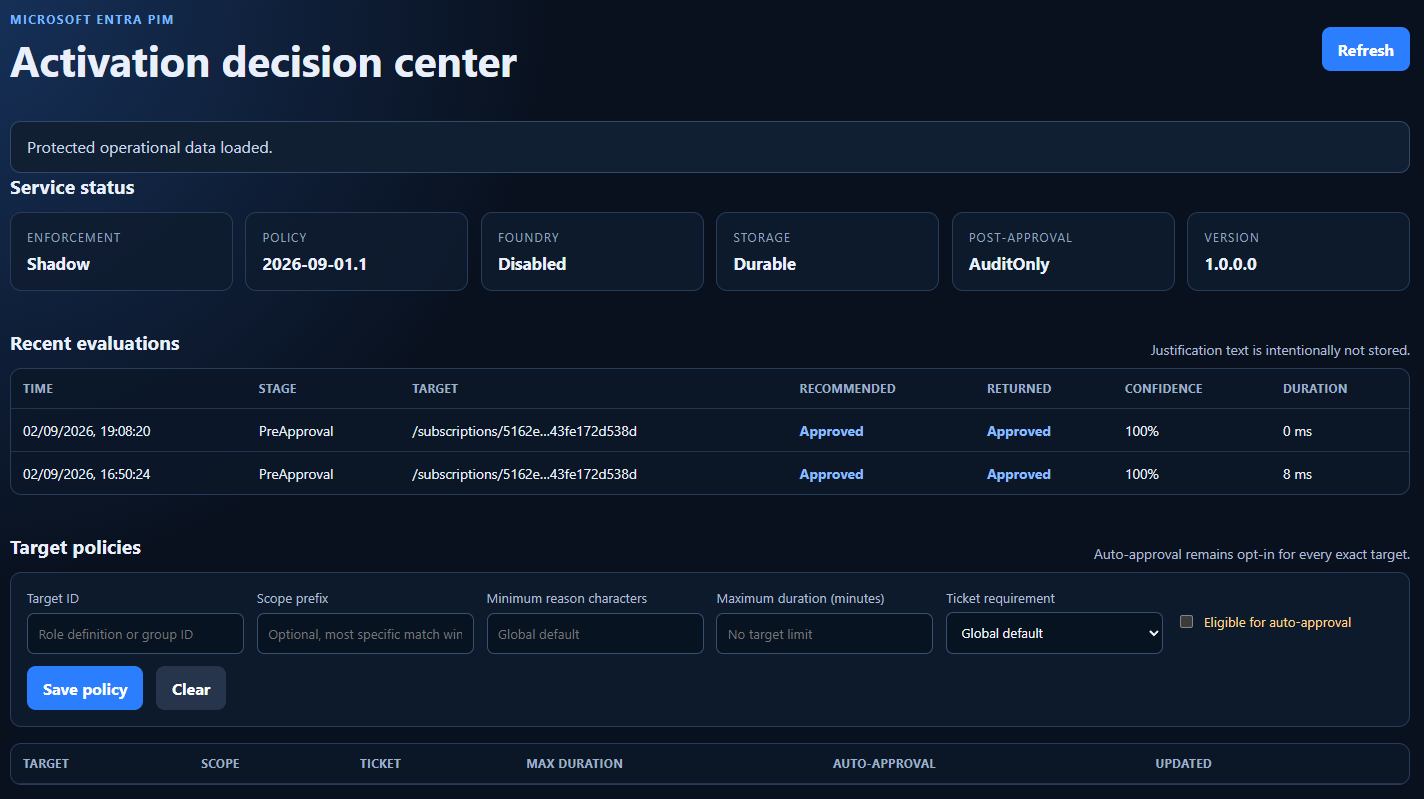
<p>The console is not part of the Microsoft feature and the API works without it. Still, running this thing blind felt like a bad idea, so I added a small operations console. It shows the current enforcement mode, policy version, API version, storage status, AI model status and post-approval mode. It also shows recent evaluations with the stage, target, recommended outcome, returned outcome, confidence and duration.</p>

<p>The difference between the recommended and returned outcome is especially useful in Shadow mode. I can see that the API wanted to deny a request while PIM still received <code class="language-plaintext highlighter-rouge">Approved</code>. This gives me real data before I let the new policy affect access.</p>

<p>The console also lets me create policies for an exact role or group. A policy can require a longer justification, limit activation duration, require a ticket and decide whether that exact target is even eligible for automatic approval. Automatic approval remains disabled unless I explicitly enable it for a target.</p>

<p><img src="/assets/img/posts/2026-09-07/pim-activation-center.png" alt="PIM activation configuration pre or post approval" /></p>

<p>The console is protected by Entra ID as well. And the page deliberately does not show or store the raw activation reason. It stores enough evidence to understand the outcome without creating another database full of operational details and incident information.</p>

<h2 id="things-i-learned-the-hard-way">Things I learned the hard way</h2>

<p>This is a preview feature, and yes, it shows in a few places.</p>

<h3 id="the-create-example-needed-an-id">The create example needed an ID</h3>

<p>The Microsoft Graph example did not include an <code class="language-plaintext highlighter-rouge">id</code> property when I tested it. My first POST returned:</p>

<div class="language-text highlighter-rouge"><div class="highlight"><pre class="highlight"><code>Id property needs to have a GUID value.
</code></pre></div></div>

<p>Adding this to the request fixed it:</p>

<div class="language-powershell highlighter-rouge"><div class="highlight"><pre class="highlight"><code><span class="n">id</span><span class="w"> </span><span class="o">=</span><span class="w"> </span><span class="p">[</span><span class="n">Guid</span><span class="p">]::</span><span class="n">NewGuid</span><span class="p">()</span><span class="o">.</span><span class="nf">ToString</span><span class="p">()</span><span class="w">
</span></code></pre></div></div>

<h3 id="the-application-id-uri-existed-in-only-one-place">The Application ID URI existed in only one place</h3>

<p>The app registration had the correct <code class="language-plaintext highlighter-rouge">identifierUris</code> value, but it had not been synchronized to <code class="language-plaintext highlighter-rouge">servicePrincipalNames</code> on the Enterprise application.</p>

<p>Creating the custom extension then failed with:</p>

<div class="language-text highlighter-rouge"><div class="highlight"><pre class="highlight"><code>The resourceId is not present in the service principal names for application id.
</code></pre></div></div>

<p>Checking both objects and reconciling the missing value fixed the problem.</p>

<h3 id="the-portal-knows-more-than-the-documentation">The portal knows more than the documentation</h3>

<p>The current Microsoft documentation explains the pre-approval extension, request payload and response contract quite well. The PIM portal also exposes a native post-approval custom extension setting, even though this is not explained in the same documentation yet.</p>

<p>The portal is also where you can see the difference between Audit mode and Enabled for the pre-approval call.</p>

<p>Preview means preview. Expect both the API and portal experience to change, and test this again before using it for important roles.</p>

<h2 id="do-we-need-an-ai-agent-for-this">Do we need an AI agent for this?</h2>

<p>Maybe not.</p>

<p>For my test use case, this is one stateless classification request with a strict response schema and a hard timeout. A direct call to a hosted model is simpler, faster and easier to audit. I do not need to give an agent tools, memory and its own workflow just to decide whether a paragraph is a good enough justification.</p>

<p>I would use normal code for rules that can be expressed normally, then use the model for understanding the written justification. The code remains responsible for the final outcome and enforcement mode.</p>

<p>I think the model should not decide whether it feels like calling another system. If ticket validation is required, the API should call that system explicitly and include the result as trusted context for the model or policy engine.</p>

<h2 id="final-thoughts">Final thoughts</h2>

<p>This is one interesting improvement, great to see Microsoft releasing new PIM features.</p>

<p>PIM is no longer limited to the same static activation rules for every organization. We can insert our own business logic directly into the documented pre-approval flow. That power also makes it easy to build something dangerous. An API outage can affect role activation. Weak token validation can expose a decision endpoint. Bad automatic approval logic can bypass humans. Logging every justification can create a new pile of sensitive data.</p>

<p>Build it small. Protect it properly. Start in audit mode. Measure what it would do. Then decide how much authority it should actually have.</p>]]></content><author><name>Stian Strysse Bjørge</name></author><category term="ENTRA" /><category term="PIM" /><category term="AZURE" /><category term="RBAC" /><category term="API" /><category term="CUSTOMEXTENSIONS" /><summary type="html"><![CDATA[I recently wrote about the things I would fix in Microsoft Entra Privileged Identity Management if Microsoft made me Product Manager for a day. While researching that post, one preview feature caught my attention: custom extensions for role activation - which is something I helped test in private preview earlier.]]></summary></entry><entry><title type="html">Microsoft PIM is great - but it has some shortcomings that need fixing</title><link href="https://learningbydoing.cloud/blog/pim-shortcomings/" rel="alternate" type="text/html" title="Microsoft PIM is great - but it has some shortcomings that need fixing" /><published>2026-08-26T00:00:00+00:00</published><updated>2026-08-26T00:00:00+00:00</updated><id>https://learningbydoing.cloud/blog/pim-shortcomings</id><content type="html" xml:base="https://learningbydoing.cloud/blog/pim-shortcomings/"><![CDATA[<p>Microsoft Entra Privileged Identity Management, or PIM, is a product I both really like and sometimes get really frustrated with. I’ve used PIM for many years, both as an administrator and when building IAM automation around it. The core idea is great: don’t give people privileged access all the time. Make the access eligible, let them activate it when needed, and remove it again when they’re done.</p>

<p>But PIM has also started to feel a bit… forgotten.</p>

<p>Some parts of the product have barely changed for years. Reporting Azure RBAC eligibility at scale is still painful. Important lifecycle operations available in the portal are missing from the public APIs. Getting read-only visibility into PIM often requires surprisingly powerful roles. And some of the portal experiences could definitely use some love.</p>

<p>So, if Microsoft made me Product Manager for PIM for a day, here’s what I’d put on the backlog.</p>

<ol>
  <li><a href="#pim-is-still-great">PIM is still great</a></li>
  <li><a href="#pim-enforces-least-privilege-better-than-it-practices-it">PIM enforces least privilege better than it practices it</a></li>
  <li><a href="#reporting-shouldnt-require-crawling-azure">Reporting shouldn’t require crawling Azure</a></li>
  <li><a href="#email-is-apparently-the-pim-dashboard">Email is apparently the PIM dashboard</a></li>
  <li><a href="#the-api-can-do-it-you-just-cant">The API can do it. You just can’t</a></li>
  <li><a href="#fine-put-a-copilot-in-it">Fine. Put a Copilot in it</a></li>
  <li><a href="#my-pim-backlog">My PIM backlog</a></li>
</ol>

<h2 id="pim-is-still-great">PIM is still great</h2>

<p>Before complaining, let’s give PIM some credit. Having my admin account running with only <code class="language-plaintext highlighter-rouge">Reader</code> access most of the day, and requiring elevation before I can actually change anything, is a great security and governance model.</p>

<p>I think this is becoming even more important. Today many of us have our favorite AI companion sitting directly in our IDE, terminal or browser, just one badly written prompt away from doing something we didn’t really intend. If my current permissions only allow reading resources, the potential blast radius is quite different from having <code class="language-plaintext highlighter-rouge">Contributor</code> activated all day.</p>

<p>PIM also has some really good features.</p>

<p>One of my favorites is the ability to scope down an Azure RBAC activation. If I’m eligible for <code class="language-plaintext highlighter-rouge">Contributor</code> at a Management Group containing ten subscriptions, I can activate the role for only the two subscriptions I’m actually going to work on. That’s proper just-enough-access.</p>

<p><a href="https://techcommunity.microsoft.com/blog/coreinfrastructureandsecurityblog/enhancing-security-with-entra-pim-and-conditional-access-policy-using-authentica/4368002">Conditional Access authentication context</a> is another great addition. Requiring a compliant device and phishing-resistant authentication before activating a highly privileged role makes a lot of sense. There is one important detail though: the authentication context protects the activation, not necessarily where the activated permissions can be used afterwards. Microsoft even documents that after activation, another session, device or location isn’t prevented from using the activated permissions.</p>

<p>So I tend to think of PIM primarily as an access lifecycle and governance control with very useful security benefits, rather than some magical security boundary around privileged sessions. It reduces when my identity is privileged. It doesn’t bind the privilege to the session where I activated it.</p>

<p>Still, PIM is great, which is exactly why I wish Microsoft would give it some more attention. There have of course been additional improvements over the last few years.</p>

<p><a href="https://learn.microsoft.com/en-us/entra/id-governance/privileged-identity-management/concept-pim-for-groups">PIM for Groups</a> became a major part of the product. <a href="https://learn.microsoft.com/en-us/entra/id-governance/privileged-identity-management/pim-how-to-change-default-settings#on-activation-require-microsoft-entra-conditional-access-authentication-context">Conditional Access authentication context</a> was added. <a href="https://learn.microsoft.com/en-us/entra/id-governance/privileged-identity-management/concept-pim-for-groups#privileged-identity-management-and-app-provisioning">Activating PIM group membership can trigger application provisioning</a> for JIT access to applications. <a href="https://learn.microsoft.com/en-us/entra/id-governance/privileged-identity-management/pim-resource-roles-activate-your-roles">Azure RBAC got better integration with PIM</a>, and <a href="https://learn.microsoft.com/en-us/entra/id-governance/entitlement-management-access-package-pim-reference">Entitlement Management can be combined with PIM for Groups</a>.</p>

<p>One <strong>preview</strong> feature that deserves a special mention is <a href="https://learn.microsoft.com/en-us/entra/id-governance/privileged-identity-management/privileged-identity-management-custom-extensions">custom extensions for PIM role activation</a>. PIM can call a secured REST API as part of the activation flow, allowing organizations to add their own business logic before or after approval. The extension can, for example, validate ticket numbers, check employment or compliance data, integrate with audit systems, or apply dynamic approval rules. Based on the response, PIM can continue the normal workflow, automatically approve the activation, or deny it.</p>

<p>Custom extensions work with PIM for Groups, Microsoft Entra roles, and Azure resources. This is exactly the kind of extensibility I want to see in PIM, although the feature is currently in preview.</p>

<p>These are good additions. But if you remove new UIs and integrations with other Entra services, the list of major changes to the core PIM experience over the last few years becomes surprisingly short. Meanwhile, some very old limitations are still there. Let’s look at those instead.</p>

<h2 id="pim-enforces-least-privilege-better-than-it-practices-it">PIM enforces least privilege better than it practices it</h2>

<p>One of the main reasons for using PIM is least privilege. That’s why I find it slightly ironic that administering and even viewing parts of PIM often doesn’t follow the same principle very well. Take Azure RBAC extension and renewal requests.</p>

<p>If I want to see pending requests across Azure resources, I need access such as <code class="language-plaintext highlighter-rouge">User Access Administrator</code>, <code class="language-plaintext highlighter-rouge">Role Based Access Control Administrator</code> or <code class="language-plaintext highlighter-rouge">Owner</code> at the relevant scope(s). But what if I only want to see them? Why shouldn’t a <code class="language-plaintext highlighter-rouge">Reader</code> for Azure RBAC, and <code class="language-plaintext highlighter-rouge">Global Reader</code> for Entra, or a dedicated PIM Reader role be able to see that a user has requested an extension of an existing eligible assignment?</p>

<p>This becomes especially important in larger organizations. Many organizations likely outsource Azure RBAC management to workload owners or development team leads:</p>

<blockquote>
  <p>Here’s your subscription. Here’s User Access Administrator. Manage your team’s access.</p>
</blockquote>

<p>The workload owner probably should decide whether Adele still needs <code class="language-plaintext highlighter-rouge">Contributor</code> on the non-production subscription. But does that really mean the workload owner also needs permission to grant arbitrary Azure RBAC roles to arbitrary identities? I don’t think so.</p>

<p>There are really three different responsibilities here:</p>

<ul>
  <li><strong>Observe:</strong> Who has access? Which requests are pending? Which assignments are about to expire?</li>
  <li><strong>Decide:</strong> Should Adele still have this access?</li>
  <li><strong>Execute:</strong> Actually change the Azure RBAC or PIM assignment.</li>
</ul>

<p>PIM currently ties these responsibilities too closely together. I’d like to see proper read-only PIM permissions, plus something like a scoped PIM Access Steward role. Let workload owners review and approve access for their resources without making them full RBAC administrators.</p>

<p>Use least privilege, even for the people managing least privilege.</p>

<h2 id="reporting-shouldnt-require-crawling-azure">Reporting shouldn’t require crawling Azure</h2>

<p>This one has annoyed me for years. Reporting on normal, standing Azure RBAC role assignments is actually quite nice. Azure Resource Graph contains role assignments, meaning I can use KQL to query assignments across a large Azure estate. Reporting on PIM eligible Azure RBAC assignments is another story.</p>

<p>For example, this query returns the key properties of standing Azure RBAC role assignments across the scopes available to Azure Resource Graph:</p>

<pre><code class="language-kql">authorizationresources
| where type =~ 'microsoft.authorization/roleassignments'
| extend roleDefinitionId = tostring(properties.roleDefinitionId),
         principalType = tostring(properties.principalType),
         principalId = tostring(properties.principalId),
         scope = tostring(properties.scope)
| project scope, principalId, principalType, roleDefinitionId
</code></pre>

<p>But there is no such thing as <code class="language-plaintext highlighter-rouge">'microsoft.authorization/roleeligibilityassignments'</code>. The ARM PIM API exposes <code class="language-plaintext highlighter-rouge">roleEligibilityScheduleInstances</code>, but the API is scope based:</p>

<div class="language-text highlighter-rouge"><div class="highlight"><pre class="highlight"><code>/{scope}/providers/Microsoft.Authorization/roleEligibilityScheduleInstances
</code></pre></div></div>

<p>The scope is a required part of the request. That’s perfectly fine if my question is:</p>

<blockquote>
  <p>Who is eligible for access on this subscription?</p>
</blockquote>

<p>It isn’t so great when the auditor asks:</p>

<blockquote>
  <p>Who is eligible for privileged access anywhere in Azure?</p>
</blockquote>

<p>In a large organization, access can be assigned at the tenant root Management Group, child Management Groups, subscriptions, Resource Groups and individual resources. Now we’re crawling the Azure hierarchy and collecting eligibility from different scopes just to build an inventory.</p>

<p>Azure already has a scalable inventory and query engine. It’s called Azure Resource Graph. Please index PIM eligible assignments in it.</p>

<p>There are of course other and often better ways to manage Azure RBAC lifecycle. Assigning a PIM-managed group to an Azure role is usually much easier to govern than creating individual eligible RBAC assignments. Entitlement Management can take this further by putting access packages, approvals, expiration and access reviews around the group or Azure role membership. I like these patterns and use them where they make sense, but they don’t remove the reporting problem.</p>

<p>In an organization with hundreds or thousands of subscriptions, different teams, different ways of working and different role requirements, there won’t always be one clean access model. Some access comes from groups. Some is direct on individual resources. Some is inherited from Management Groups. Some comes through access packages. Some teams have custom roles.</p>

<p>The auditor doesn’t really care. They just want to know:</p>

<blockquote>
  <p>Who can get privileged access to this thing?</p>
</blockquote>

<p>We should have a good answer.</p>

<h2 id="email-is-apparently-the-pim-dashboard">Email is apparently the PIM dashboard</h2>

<p>If you’ve worked with PIM for a while, you probably know that PIM really likes email. Role activated? Email. Assignment changed? Email. Something needs approval? Email.</p>

<p>This would be fine if PIM had an equally good central place for administrators to see everything requiring attention. It doesn’t.</p>

<p>And if you decide that you don’t want all those emails, notification configuration is tied to role settings. Managing different notification settings across many roles and Azure scopes quickly becomes another configuration exercise. There are some good community tools out there, yes, but this should really be built-in.</p>

<p>I would love a central PIM operations view:</p>

<ul>
  <li>12 pending requests</li>
  <li>8 assignments expiring this week</li>
  <li>3 requests waiting for approval for more than five days</li>
  <li>27 permanent privileged assignments</li>
</ul>

<p>Give me filters, useful columns and an API exposing the same information. Speaking of useful columns, the extension and renewal approval experience has recently become another small frustration.</p>

<p>The current role extension UI has fixed columns. I can’t make them wider and I can’t choose which columns I want to display. So I end up looking at values such as:</p>

<blockquote>
  <p>subscripti…</p>
</blockquote>

<p>Great. Thanks. What’s particularly frustrating is looking at the network requests in Developer Tools and seeing how much useful information is actually returned by the backend. The data is there; the UI just doesn’t show it.</p>

<p>There is another small UI detail that makes managing expiring assignments harder than it should be. In a user’s PIM roles UI, for active assignments, the <code class="language-plaintext highlighter-rouge">Renew</code> link is disabled until the assignment is close enough to expiration to be renewed, makes sense. For eligible assignments however, the <code class="language-plaintext highlighter-rouge">Renew</code> link is active all the time. Click it too early and PIM simply tells you that the assignment can’t be renewed yet.</p>

<p>So the portal already knows the renewal window. It just doesn’t use that information consistently in the UI. It’s likely a small bug.</p>

<p>Finding the assignments that actually are about to expire isn’t much better. There is no clear warning on the role, and the columns can’t be sorted to bring the assignments closest to expiration to the top. Which brings us back to the feature PIM seems to trust most for operational visibility: email.</p>

<h2 id="the-api-can-do-it-you-just-cant">The API can do it. You just can’t</h2>

<p>This is probably my biggest PIM frustration. I recently worked with Claude on a custom approval gate portal for Azure RBAC extension and renewal requests. The idea was simple: the people who know whether someone still needs access are often the workload or project owners. I wanted those owners to review PIM extension requests without giving every one of them <code class="language-plaintext highlighter-rouge">User Access Administrator</code> or <code class="language-plaintext highlighter-rouge">Owner</code> role assignments on their subscriptions.</p>

<p>The flow looked roughly like this:</p>

<blockquote>
  <p>PIM extension request → Custom approval portal → Workload owner approves or rejects → Backend executes the decision</p>
</blockquote>

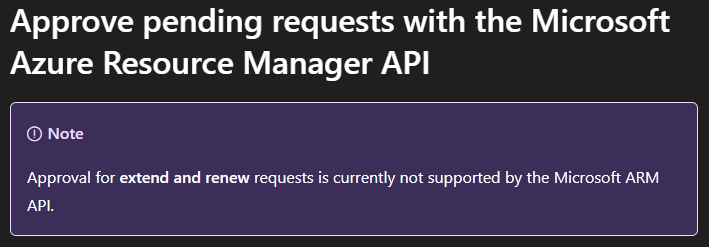
<p>The workload owner makes the decision, and a controlled workload identity executes it. Nice separation of duties. There was only one problem: <a href="https://learn.microsoft.com/en-us/entra/id-governance/privileged-identity-management/pim-resource-roles-approval-workflow#approve-pending-requests-with-the-microsoft-azure-resource-manager-api">the public PIM APIs don’t expose the complete extension and renewal approval lifecycle</a> I needed.</p>

<p><img src="/assets/img/posts/2026-08-26/no-extension-api.png" alt="Missing public API support for extensions" /></p>

<p>So I did what any responsible identity engineer does after spending too much time looking at Developer Tools in the browser. I found the API used by Microsoft’s own PIM portal. The internal <code class="language-plaintext highlighter-rouge">api.azrbac.azure.com</code> API allowed me to fetch the pending requests and approve or reject them programmatically. I authenticated using a Managed Identity with the required Azure RBAC permissions, and it worked great.</p>

<p>Yes, this was an undocumented and unsupported API. I knew that.</p>

<p>Then during the summer of 2026 something changed. Application authentication that previously worked against this internal API stopped working in my scenario, with the API now requiring a <strong>user token</strong>. I can’t really blame Microsoft for changing an internal API. It’s unsupported. The problem is that there is no supported API to migrate to. So my idea stranded there.</p>

<p>Using Microsoft’s PIM portal I can retrieve these requests and approve or reject them using click-ops (which I hate). The backend functionality exists, so please expose it. And while you’re at it, give workload identities a least-privileged read permission for PIM extension requests.</p>

<p>Even if Microsoft doesn’t want applications approving requests, I should at least be able to build automation saying:</p>

<blockquote>
  <p>There are seven extension requests waiting for approval.</p>
</blockquote>

<p>Today PIM is very good at emailing humans about this. I’d like to let machines help too.</p>

<h2 id="fine-put-a-copilot-in-it">Fine. Put a Copilot in it</h2>

<p>Maybe I’ve misunderstood the problem. It’s 2026. Perhaps PIM simply needs a Copilot. Microsoft has managed to put Copilot into approximately everything else, so surely we can find a licensing opportunity here too.</p>

<p>The annoying part is that I would actually use a PIM Copilot.</p>

<p>Imagine asking:</p>

<blockquote>
  <p>Show me everyone eligible for Owner or User Access Administrator on subscription X.</p>

  <p>I need to whitelist this IP address on Key Vault X. Find the least-privileged role I’m eligible for on that scope and activate it for one hour.</p>

  <p>Which privileged assignments haven’t been used for six months and could be removed?</p>
</blockquote>

<p>That would actually be useful. PIM already knows a lot about roles, eligibility, scopes and activation requirements. Add proper inventory, permission analysis and automation around it and there are some genuinely interesting possibilities.</p>

<p>There’s just one small problem. Before we give PIM a Copilot, we need to give machines proper access to PIM: complete public APIs, a tenant-wide inventory and read-only permissions. Then you can slap a Copilot license requirement on it. Deal?</p>

<h2 id="my-pim-backlog">My PIM backlog</h2>

<p>So here’s my PIM backlog:</p>

<ul>
  <li><strong>Complete public APIs.</strong> If the PIM portal UI can do it, there should be a supported way to automate it (e.g. for pending renewal requests).</li>
  <li><strong>PIM Reader role.</strong> Let people and workload identities observe PIM without giving them permissions to administer access (e.g. for pending renewal requests).</li>
  <li><strong>Delegated PIM governance.</strong> Let workload owners approve access without making them UAA, RBAC Administrator or Owner (e.g. for pending renewal requests).</li>
  <li><strong>Index PIM eligible Azure RBAC roles in Azure Resource Graph.</strong> Make tenant-wide Azure RBAC reporting easy with KQL.</li>
  <li><strong>A central operational dashboard.</strong> Show me more of what requires attention across PIM (expiring roles, pending renewals etc).</li>
  <li><strong>Better UI.</strong> Resizable columns and column selection aren’t exactly futuristic features.</li>
  <li><strong>Multi-role activation.</strong> PIM already lets me scope one activation down to selected resources. Let me activate several required roles in one workflow too.</li>
  <li><strong>And yes, PIM Copilot.</strong> But please fix the plumbing first.</li>
</ul>

<p>PIM doesn’t need to be reinvented. It needs to be finished.</p>]]></content><author><name>Stian Strysse Bjørge</name></author><category term="ENTRA" /><category term="PIM" /><category term="AZURE" /><category term="RBAC" /><category term="API" /><summary type="html"><![CDATA[Microsoft Entra Privileged Identity Management, or PIM, is a product I both really like and sometimes get really frustrated with. I’ve used PIM for many years, both as an administrator and when building IAM automation around it. The core idea is great: don’t give people privileged access all the time. Make the access eligible, let them activate it when needed, and remove it again when they’re done.]]></summary></entry><entry><title type="html">New feature in Entra ID Governance ELM - support for request on-behalf-of</title><link href="https://learningbydoing.cloud/blog/entra-elm-on-behalf-of-requests-preview/" rel="alternate" type="text/html" title="New feature in Entra ID Governance ELM - support for request on-behalf-of" /><published>2024-09-17T00:00:00+00:00</published><updated>2024-09-17T00:00:00+00:00</updated><id>https://learningbydoing.cloud/blog/entra-elm-on-behalf-of-requests-preview</id><content type="html" xml:base="https://learningbydoing.cloud/blog/entra-elm-on-behalf-of-requests-preview/"><![CDATA[<p>Think about it - if you have access packages governing access to Azure Virtual Desktop, Windows Cloud PC, Citrix, or other remote tools, and new hires need access from day one, managers would historically have to place a manual request to an IGA admin who would then add users to the correct access packages manually.</p>

<p>Well, not anymore! Say hello to the new ‘request access packages on-behalf-of other users’ feature now in public preview, available for customers with the <code class="language-plaintext highlighter-rouge">Microsoft Entra ID Governance</code> or <code class="language-plaintext highlighter-rouge">Microsoft Entra Suite</code> licenses.</p>

<p>The current preview allows IGA admins to enable the functionality per access package policy, specifically allowing managers to request packages on-behalf-of their direct reports. The default setting is not to allow on-behalf-of requests, which means it can be gradually rolled out on access packages where it makes sense to offer this capability. Once enabled, managers can visit the MyAccess portal, look up the correct access package, select it, and choose which user to request for. The request follows the normal approval configuration, but there’s also an option to bypass the approval process if the manager is also the approver of the request - which makes sense in those access packages where managers are specified as approvers.</p>

<p>It’s time to start paying more attention to access package requests to spot when the target user is not the same as the requestor.</p>

<p>The public preview currently only supports managers requesting on-behalf-of their direct reports, but I’m really hoping to see this expanded before general availability. Examples of other requestors that could benefit from requesting on-behalf-of other users include application or system owners, helpdesk staff, colleagues helping with onboarding of new team members, etc.</p>

<p>I have to say, Microsoft is really picking up the pace with their cloud IGA offering. Hope to see more cool and highly awaited features soon!</p>

<p>Check out the <a href="https://learn.microsoft.com/en-us/entra/id-governance/entitlement-management-request-behalf">official documentation</a> and start testing it in your environment today.</p>]]></content><author><name>Stian A. Strysse</name></author><category term="AZUREAD" /><category term="AZURE" /><category term="IDENTITY" /><category term="ENTRAID" /><category term="ENTRA" /><category term="ELM" /><category term="IDENTITYGOVERNANCE" /><category term="IGA" /><summary type="html"><![CDATA[Think about it - if you have access packages governing access to Azure Virtual Desktop, Windows Cloud PC, Citrix, or other remote tools, and new hires need access from day one, managers would historically have to place a manual request to an IGA admin who would then add users to the correct access packages manually. Well, not anymore! Say hello to the new ‘request access packages on-behalf-of other users’ feature now in public preview, available for customers with the Microsoft Entra ID Governance or Microsoft Entra Suite licenses. The current preview allows IGA admins to enable the functionality per access package policy, specifically allowing managers to request packages on-behalf-of their direct reports. The default setting is not to allow on-behalf-of requests, which means it can be gradually rolled out on access packages where it makes sense to offer this capability. Once enabled, managers can visit the MyAccess portal, look up the correct access package, select it, and choose which user to request for. The request follows the normal approval configuration, but there’s also an option to bypass the approval process if the manager is also the approver of the request - which makes sense in those access packages where managers are specified as approvers. It’s time to start paying more attention to access package requests to spot when the target user is not the same as the requestor. The public preview currently only supports managers requesting on-behalf-of their direct reports, but I’m really hoping to see this expanded before general availability. Examples of other requestors that could benefit from requesting on-behalf-of other users include application or system owners, helpdesk staff, colleagues helping with onboarding of new team members, etc. I have to say, Microsoft is really picking up the pace with their cloud IGA offering. Hope to see more cool and highly awaited features soon! Check out the official documentation and start testing it in your environment today.]]></summary></entry><entry><title type="html">What’s lurking in your Microsoft Graph app role assignments?</title><link href="https://learningbydoing.cloud/blog/audit-ms-graph-app-role-assignments/" rel="alternate" type="text/html" title="What’s lurking in your Microsoft Graph app role assignments?" /><published>2023-08-16T00:00:00+00:00</published><updated>2023-08-16T00:00:00+00:00</updated><id>https://learningbydoing.cloud/blog/audit-ms-graph-app-role-assignments</id><content type="html" xml:base="https://learningbydoing.cloud/blog/audit-ms-graph-app-role-assignments/"><![CDATA[<p>I’ve earlier blogged about <a href="https://learningbydoing.cloud/blog/building-a-comprehensive-report-on-azure-ad-admin-role-assignments/">Building a comprehensive report on admin role assignments in Powershell</a>, this time we’ll look at app role assignments instead.</p>

<p>Application permissions, often called app role assignments in Entra ID (former Azure AD), are permission sets that an app, service principal or managed identity can be assigned in another resource app, and that app’s identity can then access and utilize the resource app’s API without a signed-in user present.</p>

<p>Service principals by default have no access to enumerate other objects in Entra ID (former Azure AD). An example, if a service principal used in automated workflows requires read access to all user objects in Entra ID, it will need to be assigned the app role <code class="language-plaintext highlighter-rouge">User.Read.All</code> <a href="https://docs.microsoft.com/en-us/azure/active-directory/develop/v2-permissions-and-consent#permission-types">application permission</a> (app role) in Microsoft Graph, consented by an admin, to be able to query Graph for any or all users.</p>

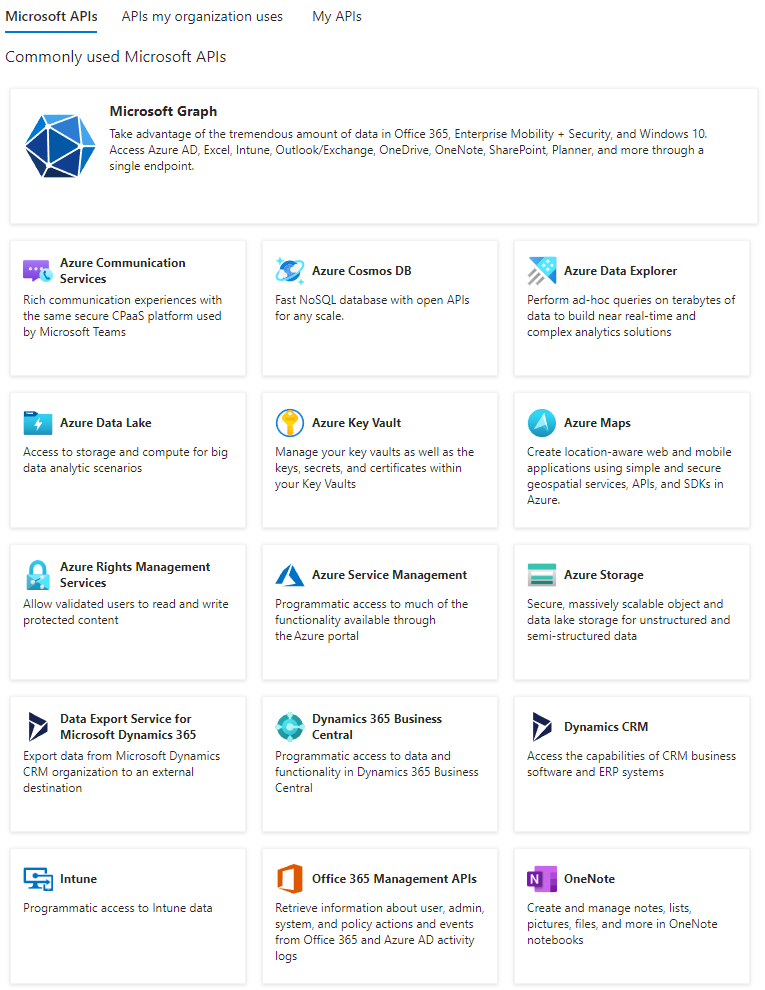
<p>The <a href="https://learningbydoing.cloud/blog/getting-started-with-microsoft-graph-part2/">Microsoft Graph API</a> is covering endpoints for most of Entra ID and Microsoft 365 services, and it has a wide range of app roles for providing specific API access. And let’s not forget the old and deprecated Azure AD Graph API which has not yet been fully been sunset. It’s critical for compliance and security hygiene of the tenant to audit and monitor app role assignments for these resources especially. Do note that there are a lot of other APIs with their own sets of app roles in Entra ID, some examples below, but for this blog post I will focus on Microsoft Graph and Azure AD Graph.</p>

<p><img src="/assets/img/posts/2023-08-16/entra-id-apis.png" alt="entra-id-apis" /></p>

<p>Some app roles can be abused for privilege escalation all the way up to <code class="language-plaintext highlighter-rouge">Global Admin</code>, as <a href="https://twitter.com/_wald0">Andy Robbins</a> (co-creator of BloodHound) points out in <a href="https://posts.specterops.io/azure-privilege-escalation-via-azure-api-permissions-abuse-74aee1006f48">this blog post</a>. A Global Admin can do whatever it wants in Entra ID, and it can also <a href="https://learn.microsoft.com/en-us/azure/role-based-access-control/elevate-access-global-admin#elevate-access-for-a-global-administrator">elevate its access for all Azure subscriptions in the tenant with the flip of a switch</a>. This just proves how critical it is to have full control on any high-privilege app roles.</p>

<p>With these things in mind, let’s look at how to extract all app role assignments for Microsoft Graph and Azure AD Graph, including other valuable information for each service principal, using Powershell and the <a href="https://devblogs.microsoft.com/microsoft365dev/upgrade-to-microsoft-graph-powershell-sdk-v2-now-generally-available/">Graph Powershell SDK v2</a> module.</p>

<ul>
  <li><a href="#identify-highly-privileged-app-roles">Identify highly privileged app roles</a></li>
  <li><a href="#required-scopes-in-graph-powershell-sdk">Required scopes in Graph Powershell SDK</a></li>
  <li><a href="#extracting-data">Extracting data</a>
    <ul>
      <li><a href="#app-roles-and-assignments">App roles and assignments</a></li>
      <li><a href="#app-roles-and-assignments">Owner organizations and sign-in activities</a></li>
    </ul>
  </li>
  <li><a href="#compiling-the-report">Compiling the report</a></li>
  <li><a href="#full-script-on-github">Full script on GitHub</a></li>
</ul>

<h2 id="identify-highly-privileged-app-roles">Identify highly privileged app roles</h2>

<p>I wish there was a list of all Microsoft Graph app roles with tiering information, identifying how privileged each app role is. Since there are none I’ve added some of the app roles that I know are highly privileged - they will be specifically flagged as Tier 0 in the report. There are many other privileged app roles, but let’s start with these as abusing them can lead to Global Admin access. You can easily add other roles and other tiers, depending on what you want to report on.</p>

<div class="language-powershell highlighter-rouge"><div class="highlight"><pre class="highlight"><code><span class="c"># The tier 0 app roles below are typically what can be abused to become Global Admin.</span><span class="w">
</span><span class="c"># NOTE: Organizations should do their own investigations and include any app roles to regard as sensitive, and which tier to assign them.</span><span class="w">
</span><span class="nv">$appRoleTiers</span><span class="w"> </span><span class="o">=</span><span class="w"> </span><span class="p">@{</span><span class="w">
    </span><span class="s1">'Application.ReadWrite.All'</span><span class="w">          </span><span class="o">=</span><span class="w"> </span><span class="s1">'Tier 0'</span><span class="w"> </span><span class="c"># SP can add credentials to other high-privileged apps, and then sign-in as the high-privileged app</span><span class="w">
    </span><span class="s1">'AppRoleAssignment.ReadWrite.All'</span><span class="w">    </span><span class="o">=</span><span class="w"> </span><span class="s1">'Tier 0'</span><span class="w"> </span><span class="c"># SP can add any app role assignments to any resource, including MS Graph</span><span class="w">
    </span><span class="s1">'Directory.ReadWrite.All'</span><span class="w">            </span><span class="o">=</span><span class="w"> </span><span class="s1">'Tier 0'</span><span class="w"> </span><span class="c"># SP can read and write all objects in the directory, including adding credentials to other high-privileged apps</span><span class="w">
    </span><span class="s1">'RoleManagement.ReadWrite.Directory'</span><span class="w"> </span><span class="o">=</span><span class="w"> </span><span class="s1">'Tier 0'</span><span class="w"> </span><span class="c"># SP can grant any role to any principal, including Global Admin</span><span class="w">
</span><span class="p">}</span><span class="w">
</span></code></pre></div></div>

<p><em>Update 2023-08-17 @ 11:00 (CEST): Removed ‘Application.ReadWrite.OwnedBy’ from the list as this permission isn’t Tier 0 at all: “Allows the app to create other applications, and fully manage those applications (read, update, update application secrets and delete), without a signed-in user. It cannot update any apps that it is not an owner of.”</em></p>

<h2 id="required-scopes-in-graph-powershell-sdk">Required scopes in Graph Powershell SDK</h2>

<p>When connecting to Microsoft Graph with the Graph Powershell SDK v2 module, the following delegated scopes are required:</p>

<ol>
  <li><code class="language-plaintext highlighter-rouge">Application.Read.All</code> (to enumerate service principals)</li>
  <li><code class="language-plaintext highlighter-rouge">AuditLog.Read.All</code> (to pull out service principal sign-in activity)</li>
  <li><code class="language-plaintext highlighter-rouge">CrossTenantInformation.ReadBasic.All</code> (to query app owner tenant information for 3.party apps)</li>
</ol>

<div class="language-powershell highlighter-rouge"><div class="highlight"><pre class="highlight"><code><span class="c"># Connect to Microsoft Graph</span><span class="w">
</span><span class="n">Connect-MgGraph</span><span class="w"> </span><span class="nt">-Scopes</span><span class="w"> </span><span class="s2">"Application.Read.All"</span><span class="p">,</span><span class="s2">"AuditLog.Read.All"</span><span class="p">,</span><span class="s2">"CrossTenantInformation.ReadBasic.All"</span><span class="w">
</span></code></pre></div></div>

<p>Other than that, no special privileges are necessary for the user account connecting to Microsoft Graph - only read-access is used.</p>

<h2 id="extracting-data">Extracting data</h2>

<p>Now let’s start extracting the data we need from Microsoft Graph to create the report.</p>

<h3 id="app-roles-and-assignments">App roles and assignments</h3>

<p>First we are querying for Microsoft Graph and Azure AD Graph’s service principal objects in the tenant - by filtering on their <a href="https://learn.microsoft.com/en-us/troubleshoot/azure/active-directory/verify-first-party-apps-sign-in">well-known Application IDs</a> (<code class="language-plaintext highlighter-rouge">00000003-0000-0000-c000-000000000000</code> and <code class="language-plaintext highlighter-rouge">00000002-0000-0000-c000-000000000000</code>). Once the service principals have been found, we are extracting all app roles and app role assignments, creating <a href="https://learn.microsoft.com/en-us/powershell/scripting/learn/deep-dives/everything-about-hashtable?view=powershell-7.3">hashtable</a> for quick lookups, and lastly joining the app role assignments for both service principals.</p>

<div class="language-powershell highlighter-rouge"><div class="highlight"><pre class="highlight"><code><span class="c"># Get Microsoft Graph SPN, appRoles, appRolesAssignedTo and generate hashtable for quick lookups</span><span class="w">
</span><span class="nv">$servicePrincipalMsGraph</span><span class="w"> </span><span class="o">=</span><span class="w"> </span><span class="n">Get-MgServicePrincipal</span><span class="w"> </span><span class="nt">-Filter</span><span class="w"> </span><span class="s2">"AppId eq '00000003-0000-0000-c000-000000000000'"</span><span class="w">
</span><span class="p">[</span><span class="n">array</span><span class="p">]</span><span class="w"> </span><span class="nv">$msGraphAppRoles</span><span class="w"> </span><span class="o">=</span><span class="w"> </span><span class="nv">$servicePrincipalMsGraph</span><span class="o">.</span><span class="nf">AppRoles</span><span class="w">
</span><span class="p">[</span><span class="n">array</span><span class="p">]</span><span class="w"> </span><span class="nv">$msGraphAppRolesAssignedTo</span><span class="w"> </span><span class="o">=</span><span class="w"> </span><span class="n">Get-MgServicePrincipalAppRoleAssignedTo</span><span class="w"> </span><span class="nt">-ServicePrincipalId</span><span class="w"> </span><span class="nv">$servicePrincipalMsGraph</span><span class="o">.</span><span class="nf">Id</span><span class="w"> </span><span class="nt">-All</span><span class="w">
</span><span class="nv">$msGraphAppRolesHashTableId</span><span class="w"> </span><span class="o">=</span><span class="w"> </span><span class="nv">$msGraphAppRoles</span><span class="w"> </span><span class="o">|</span><span class="w"> </span><span class="n">Group-Object</span><span class="w"> </span><span class="nt">-Property</span><span class="w"> </span><span class="nx">Id</span><span class="w"> </span><span class="nt">-AsHashTable</span><span class="w">

</span><span class="c"># Get Azure AD Graph SPN, appRoles, appRolesAssignedTo and generate hashtable for quick lookups</span><span class="w">
</span><span class="nv">$servicePrincipalAadGraph</span><span class="w"> </span><span class="o">=</span><span class="w"> </span><span class="n">Get-MgServicePrincipal</span><span class="w"> </span><span class="nt">-Filter</span><span class="w"> </span><span class="s2">"AppId eq '00000002-0000-0000-c000-000000000000'"</span><span class="w">
</span><span class="p">[</span><span class="n">array</span><span class="p">]</span><span class="w"> </span><span class="nv">$aadGraphAppRoles</span><span class="w"> </span><span class="o">=</span><span class="w"> </span><span class="nv">$servicePrincipalAadGraph</span><span class="o">.</span><span class="nf">AppRoles</span><span class="w">
</span><span class="p">[</span><span class="n">array</span><span class="p">]</span><span class="w"> </span><span class="nv">$aadGraphAppRolesAssignedTo</span><span class="w"> </span><span class="o">=</span><span class="w"> </span><span class="n">Get-MgServicePrincipalAppRoleAssignedTo</span><span class="w"> </span><span class="nt">-ServicePrincipalId</span><span class="w"> </span><span class="nv">$servicePrincipalAadGraph</span><span class="o">.</span><span class="nf">Id</span><span class="w"> </span><span class="nt">-All</span><span class="w">
</span><span class="nv">$aadGraphAppRolesHashTableId</span><span class="w"> </span><span class="o">=</span><span class="w"> </span><span class="nv">$aadGraphAppRoles</span><span class="w"> </span><span class="o">|</span><span class="w"> </span><span class="n">Group-Object</span><span class="w"> </span><span class="nt">-Property</span><span class="w"> </span><span class="nx">Id</span><span class="w"> </span><span class="nt">-AsHashTable</span><span class="w">

</span><span class="c"># Join appRolesAssignedTo entries for AAD / MS Graph</span><span class="w">
</span><span class="nv">$joinedAppRolesAssignedTo</span><span class="w"> </span><span class="o">=</span><span class="w"> </span><span class="p">@(</span><span class="w">
    </span><span class="nv">$msGraphAppRolesAssignedTo</span><span class="w">
    </span><span class="nv">$aadGraphAppRolesAssignedTo</span><span class="w">
</span><span class="p">)</span><span class="w">
</span></code></pre></div></div>

<p>We can now process each of the app role assignments in <code class="language-plaintext highlighter-rouge">$joinedAppRolesAssignedTo</code> to create a report, while enriching the data set even further.</p>

<div class="language-powershell highlighter-rouge"><div class="highlight"><pre class="highlight"><code><span class="c"># Process each appRolesAssignedTo for AAD / MS Graph</span><span class="w">
</span><span class="nv">$progressCounter</span><span class="w"> </span><span class="o">=</span><span class="w"> </span><span class="mi">0</span><span class="w">
</span><span class="nv">$cacheAppOwnerOrganizations</span><span class="w"> </span><span class="o">=</span><span class="w"> </span><span class="p">@()</span><span class="w">
</span><span class="nv">$cacheServicePrincipalObjects</span><span class="w"> </span><span class="o">=</span><span class="w"> </span><span class="p">@()</span><span class="w">
</span><span class="nv">$cacheServicePrincipalSigninActivities</span><span class="w"> </span><span class="o">=</span><span class="w"> </span><span class="p">@()</span><span class="w">
</span><span class="nv">$cacheServicePrincipalsWithoutSigninActivities</span><span class="w"> </span><span class="o">=</span><span class="w"> </span><span class="p">@()</span><span class="w">
</span><span class="p">[</span><span class="n">array</span><span class="p">]</span><span class="w"> </span><span class="nv">$msGraphAppRoleAssignedToReport</span><span class="w"> </span><span class="o">=</span><span class="w"> </span><span class="nv">$joinedAppRolesAssignedTo</span><span class="w"> </span><span class="o">|</span><span class="w"> </span><span class="n">ForEach-Object</span><span class="w"> </span><span class="p">{</span><span class="w">

    </span><span class="nv">$progressCounter</span><span class="o">++</span><span class="w">
    </span><span class="nv">$currentAppRoleAssignedTo</span><span class="w"> </span><span class="o">=</span><span class="w"> </span><span class="bp">$_</span><span class="w">
    </span><span class="n">Write-Host</span><span class="w"> </span><span class="s2">"Processing appRole # </span><span class="nv">$progressCounter</span><span class="s2"> of </span><span class="si">$(</span><span class="nv">$joinedAppRolesAssignedTo</span><span class="o">.</span><span class="nf">count</span><span class="si">)</span><span class="s2">"</span><span class="w">

    </span><span class="c"># Lookup appRole for MS Graph</span><span class="w">
    </span><span class="nv">$currentAppRole</span><span class="w"> </span><span class="o">=</span><span class="w"> </span><span class="nv">$msGraphAppRolesHashTableId</span><span class="p">[</span><span class="s2">"</span><span class="si">$(</span><span class="nv">$currentAppRoleAssignedTo</span><span class="o">.</span><span class="nf">AppRoleId</span><span class="si">)</span><span class="s2">"</span><span class="p">]</span><span class="w">
    </span><span class="kr">if</span><span class="p">(</span><span class="bp">$null</span><span class="w"> </span><span class="o">-eq</span><span class="w"> </span><span class="nv">$currentAppRole</span><span class="p">)</span><span class="w"> </span><span class="p">{</span><span class="w">
        </span><span class="c"># Lookup appRole for AAD Graph</span><span class="w">
        </span><span class="nv">$currentAppRole</span><span class="w"> </span><span class="o">=</span><span class="w"> </span><span class="nv">$aadGraphAppRolesHashTableId</span><span class="p">[</span><span class="s2">"</span><span class="si">$(</span><span class="nv">$currentAppRoleAssignedTo</span><span class="o">.</span><span class="nf">AppRoleId</span><span class="si">)</span><span class="s2">"</span><span class="p">]</span><span class="w">
    </span><span class="p">}</span><span class="w">
</span></code></pre></div></div>

<h3 id="service-principals-owner-organizations-and-sign-in-activities">Service principals, owner organizations and sign-in activities</h3>

<p>The app role assignments in <code class="language-plaintext highlighter-rouge">$joinedAppRolesAssignedTo</code> does not contain all the information we need about the assigned service principals. So we will query Graph for the service principal objects, the owner organizations for multi-tenant apps, and sign-in activities. To optimize the script we’re utilizing cache and only querying each object one time even tho it has multiple app role assignments.</p>

<div class="language-powershell highlighter-rouge"><div class="highlight"><pre class="highlight"><code><span class="w">    </span><span class="c"># Lookup servicePrincipal object - check cache</span><span class="w">
    </span><span class="nv">$currentServicePrincipalObject</span><span class="w"> </span><span class="o">=</span><span class="w"> </span><span class="bp">$null</span><span class="w">
    </span><span class="kr">if</span><span class="p">(</span><span class="nv">$cacheServicePrincipalObjects</span><span class="o">.</span><span class="nf">Id</span><span class="w"> </span><span class="o">-contains</span><span class="w"> </span><span class="nv">$currentAppRoleAssignedTo</span><span class="o">.</span><span class="nf">PrincipalId</span><span class="p">)</span><span class="w"> </span><span class="p">{</span><span class="w">
        </span><span class="nv">$currentServicePrincipalObject</span><span class="w"> </span><span class="o">=</span><span class="w"> </span><span class="nv">$cacheServicePrincipalObjects</span><span class="w"> </span><span class="o">|</span><span class="w"> </span><span class="n">Where-Object</span><span class="w"> </span><span class="p">{</span><span class="w"> </span><span class="bp">$_</span><span class="o">.</span><span class="nf">Id</span><span class="w"> </span><span class="o">-eq</span><span class="w"> </span><span class="nv">$currentAppRoleAssignedTo</span><span class="o">.</span><span class="nf">PrincipalId</span><span class="w"> </span><span class="p">}</span><span class="w">
    </span><span class="p">}</span><span class="w"> 
    
    </span><span class="kr">else</span><span class="w"> </span><span class="p">{</span><span class="w">
        </span><span class="c"># Retrieve servicePrincipalObject from MS Graph</span><span class="w">
        </span><span class="nv">$currentServicePrincipalObject</span><span class="w"> </span><span class="o">=</span><span class="w"> </span><span class="n">Get-MgServicePrincipal</span><span class="w"> </span><span class="nt">-ServicePrincipalId</span><span class="w"> </span><span class="nv">$currentAppRoleAssignedTo</span><span class="o">.</span><span class="nf">PrincipalId</span><span class="w">
        </span><span class="nv">$cacheServicePrincipalObjects</span><span class="w"> </span><span class="o">+=</span><span class="w"> </span><span class="nv">$currentServicePrincipalObject</span><span class="w">
        </span><span class="n">Write-Host</span><span class="w"> </span><span class="s2">"Added servicePrincipal object to cache: </span><span class="si">$(</span><span class="nv">$currentServicePrincipalObject</span><span class="o">.</span><span class="nf">displayName</span><span class="si">)</span><span class="s2">"</span><span class="w">
    </span><span class="p">}</span><span class="w">
</span></code></pre></div></div>

<p>Note that looking up the app owner organization (for multi-tenant apps) uses <code class="language-plaintext highlighter-rouge">Invoke-MgGraphRequest</code> with a URI since I haven’t found a cmdlet for this in Graph Powershell SDK yet.</p>

<div class="language-powershell highlighter-rouge"><div class="highlight"><pre class="highlight"><code><span class="w">    </span><span class="c"># Lookup app owner organization</span><span class="w">
    </span><span class="nv">$currentAppOwnerOrgObject</span><span class="w"> </span><span class="o">=</span><span class="w"> </span><span class="bp">$null</span><span class="w">
    </span><span class="kr">if</span><span class="p">(</span><span class="bp">$null</span><span class="w"> </span><span class="o">-ne</span><span class="w"> </span><span class="nv">$currentServicePrincipalObject</span><span class="o">.</span><span class="nf">AppOwnerOrganizationId</span><span class="p">)</span><span class="w"> </span><span class="p">{</span><span class="w">
        </span><span class="c"># Check if app owner organization is in cache</span><span class="w">
        </span><span class="kr">if</span><span class="p">(</span><span class="nv">$cacheAppOwnerOrganizations</span><span class="o">.</span><span class="nf">tenantId</span><span class="w"> </span><span class="o">-contains</span><span class="w"> </span><span class="nv">$currentServicePrincipalObject</span><span class="o">.</span><span class="nf">AppOwnerOrganizationId</span><span class="p">)</span><span class="w"> </span><span class="p">{</span><span class="w">
            </span><span class="nv">$currentAppOwnerOrgObject</span><span class="w"> </span><span class="o">=</span><span class="w"> </span><span class="nv">$cacheAppOwnerOrganizations</span><span class="w"> </span><span class="o">|</span><span class="w"> </span><span class="n">Where-Object</span><span class="w"> </span><span class="p">{</span><span class="w"> </span><span class="bp">$_</span><span class="o">.</span><span class="nf">tenantId</span><span class="w"> </span><span class="o">-eq</span><span class="w"> </span><span class="nv">$currentServicePrincipalObject</span><span class="o">.</span><span class="nf">AppOwnerOrganizationId</span><span class="w"> </span><span class="p">}</span><span class="w">
        </span><span class="p">}</span><span class="w"> 

        </span><span class="kr">else</span><span class="w"> </span><span class="p">{</span><span class="w">
            </span><span class="c"># Retrieve app owner organization from MS Graph</span><span class="w">
            </span><span class="nv">$currentAppOwnerOrgObject</span><span class="w"> </span><span class="o">=</span><span class="w"> </span><span class="n">Invoke-MgGraphRequest</span><span class="w"> </span><span class="nt">-Method</span><span class="w"> </span><span class="nx">GET</span><span class="w"> </span><span class="nt">-Uri</span><span class="w"> </span><span class="s2">"https://graph.microsoft.com/v1.0/tenantRelationships/findTenantInformationByTenantId(tenantId='</span><span class="si">$(</span><span class="nv">$currentServicePrincipalObject</span><span class="o">.</span><span class="nf">AppOwnerOrganizationId</span><span class="si">)</span><span class="s2">')"</span><span class="w">
            </span><span class="nv">$cacheAppOwnerOrganizations</span><span class="w"> </span><span class="o">+=</span><span class="w"> </span><span class="nv">$currentAppOwnerOrgObject</span><span class="w">
            </span><span class="n">Write-Host</span><span class="w"> </span><span class="s2">"Added app owner organization tenant to cache: </span><span class="si">$(</span><span class="nv">$currentAppOwnerOrgObject</span><span class="o">.</span><span class="nf">displayName</span><span class="si">)</span><span class="s2">"</span><span class="w">
        </span><span class="p">}</span><span class="w">
    </span><span class="p">}</span><span class="w">
</span></code></pre></div></div>

<p>Let’s pull the sign-in activities for the service principals. This gives us information about the most recent service principal sign-in and delegated (user) sign-in, which can help us identify stale apps. Note that this newly released reporting endpoint in Graph is still in beta, which is why we need to utilize the <code class="language-plaintext highlighter-rouge">Get-MgBetaReportServicePrincipalSignInActivity</code> cmdlet.</p>

<div class="language-powershell highlighter-rouge"><div class="highlight"><pre class="highlight"><code><span class="w">    </span><span class="c"># Lookup servicePrincipal sign-in activity if not already in no-signin-activity list</span><span class="w">
    </span><span class="nv">$currentSpSigninActivity</span><span class="w"> </span><span class="o">=</span><span class="w"> </span><span class="bp">$null</span><span class="w">
    </span><span class="kr">if</span><span class="p">(</span><span class="nv">$currentServicePrincipalObject</span><span class="o">.</span><span class="nf">AppId</span><span class="w"> </span><span class="nt">-notin</span><span class="w"> </span><span class="nv">$cacheServicePrincipalsWithoutSigninActivities</span><span class="p">)</span><span class="w"> </span><span class="p">{</span><span class="w">
        </span><span class="kr">if</span><span class="p">(</span><span class="nv">$cacheServicePrincipalSigninActivities</span><span class="o">.</span><span class="nf">AppId</span><span class="w"> </span><span class="o">-contains</span><span class="w"> </span><span class="nv">$currentServicePrincipalObject</span><span class="o">.</span><span class="nf">AppId</span><span class="p">)</span><span class="w"> </span><span class="p">{</span><span class="w">
            </span><span class="nv">$currentSpSigninActivity</span><span class="w"> </span><span class="o">=</span><span class="w"> </span><span class="nv">$cacheServicePrincipalSigninActivities</span><span class="w"> </span><span class="o">|</span><span class="w"> </span><span class="n">Where-Object</span><span class="w"> </span><span class="p">{</span><span class="w"> </span><span class="bp">$_</span><span class="o">.</span><span class="nf">AppId</span><span class="w"> </span><span class="o">-eq</span><span class="w"> </span><span class="nv">$currentServicePrincipalObject</span><span class="o">.</span><span class="nf">AppId</span><span class="w"> </span><span class="p">}</span><span class="w">
        </span><span class="p">}</span><span class="w"> 

        </span><span class="kr">else</span><span class="w"> </span><span class="p">{</span><span class="w">
            </span><span class="c"># Retrieve servicePrincipal sign-in activity from MS Graph</span><span class="w">
            </span><span class="nv">$currentSpSigninActivity</span><span class="w"> </span><span class="o">=</span><span class="w"> </span><span class="n">Get-MgBetaReportServicePrincipalSignInActivity</span><span class="w"> </span><span class="nt">-Filter</span><span class="w"> </span><span class="s2">"AppId eq '</span><span class="si">$(</span><span class="nv">$currentServicePrincipalObject</span><span class="o">.</span><span class="nf">AppId</span><span class="si">)</span><span class="s2">'"</span><span class="w">
            
            </span><span class="c"># If sign-in activity was found, add it to the cache - else add appId to no-signin-activity list</span><span class="w">
            </span><span class="kr">if</span><span class="p">(</span><span class="nv">$currentSpSigninActivity</span><span class="p">)</span><span class="w"> </span><span class="p">{</span><span class="w">
                </span><span class="nv">$cacheServicePrincipalSigninActivities</span><span class="w"> </span><span class="o">+=</span><span class="w"> </span><span class="nv">$currentSpSigninActivity</span><span class="w">
                </span><span class="n">Write-Host</span><span class="w"> </span><span class="s2">"Found servicePrincipal sign-in activity and added it to cache: </span><span class="si">$(</span><span class="nv">$currentServicePrincipalObject</span><span class="o">.</span><span class="nf">displayName</span><span class="si">)</span><span class="s2">"</span><span class="w">
            </span><span class="p">}</span><span class="w">

            </span><span class="kr">else</span><span class="w"> </span><span class="p">{</span><span class="w">
                </span><span class="nv">$cacheServicePrincipalsWithoutSigninActivities</span><span class="w"> </span><span class="o">+=</span><span class="w"> </span><span class="nv">$currentServicePrincipalObject</span><span class="o">.</span><span class="nf">AppId</span><span class="w">
                </span><span class="n">Write-Host</span><span class="w"> </span><span class="s2">"Did not find servicePrincipal sign-in activity: </span><span class="si">$(</span><span class="nv">$currentServicePrincipalObject</span><span class="o">.</span><span class="nf">displayName</span><span class="si">)</span><span class="s2">"</span><span class="w">
            </span><span class="p">}</span><span class="w">
        </span><span class="p">}</span><span class="w">
    </span><span class="p">}</span><span class="w">
</span></code></pre></div></div>

<h2 id="compiling-the-report">Compiling the report</h2>

<p>And finally we can generate a PSCustomObject with the data we need for the report.</p>

<div class="language-powershell highlighter-rouge"><div class="highlight"><pre class="highlight"><code><span class="w">    </span><span class="c"># Create reporting object</span><span class="w">
    </span><span class="p">[</span><span class="n">PSCustomObject</span><span class="p">]@{</span><span class="w">
        </span><span class="nx">ServicePrincipalDisplayName</span><span class="w"> </span><span class="o">=</span><span class="w"> </span><span class="nv">$currentServicePrincipalObject</span><span class="err">.</span><span class="nx">DisplayName</span><span class="w">
        </span><span class="nx">ServicePrincipalId</span><span class="w"> </span><span class="o">=</span><span class="w"> </span><span class="nv">$currentServicePrincipalObject</span><span class="err">.</span><span class="nx">Id</span><span class="w">
        </span><span class="nx">ServicePrincipalType</span><span class="w"> </span><span class="o">=</span><span class="w"> </span><span class="nv">$currentServicePrincipalObject</span><span class="err">.</span><span class="nx">ServicePrincipalType</span><span class="w">
        </span><span class="nx">ServicePrincipalEnabled</span><span class="w"> </span><span class="o">=</span><span class="w"> </span><span class="nv">$currentServicePrincipalObject</span><span class="err">.</span><span class="nx">AccountEnabled</span><span class="w">
        </span><span class="nx">AppId</span><span class="w"> </span><span class="o">=</span><span class="w"> </span><span class="nv">$currentServicePrincipalObject</span><span class="err">.</span><span class="nx">AppId</span><span class="w">
        </span><span class="nx">AppSignInAudience</span><span class="w"> </span><span class="o">=</span><span class="w"> </span><span class="nv">$currentServicePrincipalObject</span><span class="err">.</span><span class="nx">SignInAudience</span><span class="w">
        </span><span class="nx">AppOwnerOrganizationTenantId</span><span class="w"> </span><span class="o">=</span><span class="w"> </span><span class="nv">$currentServicePrincipalObject</span><span class="err">.</span><span class="nx">AppOwnerOrganizationId</span><span class="w">
        </span><span class="nx">AppOwnerOrganizationTenantName</span><span class="w"> </span><span class="o">=</span><span class="w"> </span><span class="nv">$currentAppOwnerOrgObject</span><span class="err">.</span><span class="nx">DisplayName</span><span class="w">
        </span><span class="nx">AppOwnerOrganizationTenantDomain</span><span class="w"> </span><span class="o">=</span><span class="w"> </span><span class="nv">$currentAppOwnerOrgObject</span><span class="err">.</span><span class="nx">DefaultDomainName</span><span class="w">
        </span><span class="nx">Resource</span><span class="w"> </span><span class="o">=</span><span class="w"> </span><span class="nv">$currentAppRoleAssignedTo</span><span class="err">.</span><span class="nx">ResourceDisplayName</span><span class="w">
        </span><span class="nx">AppRole</span><span class="w"> </span><span class="o">=</span><span class="w"> </span><span class="nv">$currentAppRole</span><span class="err">.</span><span class="nx">Value</span><span class="w">
        </span><span class="nx">AppRoleTier</span><span class="w"> </span><span class="o">=</span><span class="w"> </span><span class="nv">$appRoleTiers</span><span class="p">[</span><span class="s2">"</span><span class="si">$(</span><span class="nv">$currentAppRole</span><span class="o">.</span><span class="nf">Value</span><span class="si">)</span><span class="s2">"</span><span class="p">]</span><span class="w">
        </span><span class="nx">AppRoleAssignedDate</span><span class="w"> </span><span class="o">=</span><span class="w"> </span><span class="err">$(</span><span class="nx">if</span><span class="err">(</span><span class="nv">$currentAppRoleAssignedTo</span><span class="err">.</span><span class="nx">CreatedDateTime</span><span class="err">)</span><span class="w"> </span><span class="p">{(</span><span class="n">Get-Date</span><span class="w"> </span><span class="nv">$currentAppRoleAssignedTo</span><span class="o">.</span><span class="nf">CreatedDateTime</span><span class="w"> </span><span class="nt">-Format</span><span class="w"> </span><span class="s1">'yyyy-MM-dd'</span><span class="p">)}</span><span class="err">)</span><span class="w">
        </span><span class="nx">AppRoleName</span><span class="w"> </span><span class="o">=</span><span class="w"> </span><span class="nv">$currentAppRole</span><span class="err">.</span><span class="nx">DisplayName</span><span class="w">
        </span><span class="nx">AppRoleDescription</span><span class="w"> </span><span class="o">=</span><span class="w"> </span><span class="nv">$currentAppRole</span><span class="err">.</span><span class="nx">Description</span><span class="w">
        </span><span class="nx">LastSignInActivity</span><span class="w"> </span><span class="o">=</span><span class="w"> </span><span class="nv">$currentSpSigninActivity</span><span class="err">.</span><span class="nx">LastSignInActivity</span><span class="err">.</span><span class="nx">LastSignInDateTime</span><span class="w">
        </span><span class="nx">DelegatedClientSignInActivity</span><span class="w"> </span><span class="o">=</span><span class="w"> </span><span class="nv">$currentSpSigninActivity</span><span class="err">.</span><span class="nx">DelegatedClientSignInActivity</span><span class="err">.</span><span class="nx">LastSignInDateTime</span><span class="w">
        </span><span class="nx">DelegatedResourceSignInActivity</span><span class="w"> </span><span class="o">=</span><span class="w"> </span><span class="nv">$currentSpSigninActivity</span><span class="err">.</span><span class="nx">DelegatedResourceSignInActivity</span><span class="err">.</span><span class="nx">LastSignInDateTime</span><span class="w">
        </span><span class="nx">ApplicationAuthenticationClientSignInActivity</span><span class="w"> </span><span class="o">=</span><span class="w"> </span><span class="nv">$currentSpSigninActivity</span><span class="err">.</span><span class="nx">ApplicationAuthenticationClientSignInActivity</span><span class="err">.</span><span class="nx">LastSignInDateTime</span><span class="w">
        </span><span class="nx">ApplicationAuthenticationResourceSignInActivity</span><span class="w"> </span><span class="o">=</span><span class="w"> </span><span class="nv">$currentSpSigninActivity</span><span class="err">.</span><span class="nx">ApplicationAuthenticationResourceSignInActivity</span><span class="err">.</span><span class="nx">LastSignInDateTime</span><span class="w">
    </span><span class="p">}</span><span class="w">
</span><span class="p">}</span><span class="w">
</span></code></pre></div></div>

<p>This will generate a list of all the app role assignments for Microsoft Graph and Azure AD Graph, enriched with additional data for the assigned service principals and any configured tier. Here’s an example.</p>

<div class="language-text highlighter-rouge"><div class="highlight"><pre class="highlight"><code>ServicePrincipalDisplayName                     : az-sp-idw-reporter
ServicePrincipalId                              : 17805a37-7b8f-4319-b3d9-36fa7fd037fc
ServicePrincipalType                            : Application
ServicePrincipalEnabled                         : True
AppId                                           : cafd0954-9d88-4e33-b4ab-6e681ba2f4a4
AppSignInAudience                               : AzureADMyOrg
AppOwnerOrganizationTenantId                    : eeb4b582-c6fd-4cc0-b12f-b2604b111a4b
AppOwnerOrganizationTenantName                  : MyTenant
AppOwnerOrganizationTenantDomain                : mytenant.onmicrosoft.com
Resource                                        : Microsoft Graph
AppRole                                         : User.Read.All
AppRoleTier                                     : 
AppRoleAssignedDate                             : 2022-11-24
AppRoleName                                     : Read all users' full profiles
AppRoleDescription                              : Allows the app to read user profiles without a signed in user.
LastSignInActivity                              : 14.08.2023 21:08:25
DelegatedClientSignInActivity                   : 
DelegatedResourceSignInActivity                 : 
ApplicationAuthenticationClientSignInActivity   : 14.08.2023 21:08:25
ApplicationAuthenticationResourceSignInActivity : 
</code></pre></div></div>

<h2 id="full-script-on-github">Full script on GitHub</h2>

<p>I like to explain how the Powershell scripts I publish works, and this blog post does just that. I have also published <a href="https://github.com/stianstrysse/powershell-scripts/blob/main/EntraID-audit-msgraph-approleassignments.ps1">the full Powershell script on GitHub</a> so you don’t have to copy/paste from this page, feel free to check it out.</p>

<p>Thanks for reading!</p>

<p>Be sure to provide any feedback on <a href="https://x.com/stianstrysse/status/1691794041661211106">X (former Twitter)</a> or <a href="https://www.linkedin.com/posts/stianstrysse_whats-lurking-in-your-microsoft-graph-app-activity-7097559044852187137-tave">LinkedIn</a>.</p>]]></content><author><name>Stian A. Strysse</name></author><category term="AZUREAD" /><category term="AZURE" /><category term="IDENTITY" /><category term="ENTRAID" /><category term="ENTRA" /><category term="PRIVILEGEDACCESS" /><category term="MICROSOFTGRAPH" /><category term="APPROLE" /><category term="SCOPES" /><summary type="html"><![CDATA[I’ve earlier blogged about Building a comprehensive report on admin role assignments in Powershell, this time we’ll look at app role assignments instead.]]></summary></entry><entry><title type="html">Defend against MFA phishing of Azure AD user identities</title><link href="https://learningbydoing.cloud/blog/defend-against-mfa-phishing-azuread/" rel="alternate" type="text/html" title="Defend against MFA phishing of Azure AD user identities" /><published>2023-04-23T00:00:00+00:00</published><updated>2023-04-23T00:00:00+00:00</updated><id>https://learningbydoing.cloud/blog/defend-against-mfa-phishing-azuread</id><content type="html" xml:base="https://learningbydoing.cloud/blog/defend-against-mfa-phishing-azuread/"><![CDATA[<p>Continuing on from the <a href="https://learningbydoing.cloud/blog/securing-user-identities-in-azure-ad-beyond-mfa/">Securing user identities in Azure AD beyond MFA</a> blog post, but this time looking at how to prevent MFA phishing attacks.</p>

<p>Phishing of user account credentials has been part of the cyber threat landscape for ages. This also goes for MFA phishing, or rather phishing attacks where a threat actor gets away with a valid access token, primary refresh token and session cookies for an Azure AD user account.</p>

<p>Now, how is it even possible to fall victim to a phishing attack when the account is protected by MFA?</p>

<h2 id="burn-the-password">Burn the password</h2>

<p>Passwords only are bad. Passwords can be intercepted, phished, leaked, guessed, or shared. Single-factor authentication simply is not enough.</p>

<h2 id="any-mfa-method-is-better-than-none">Any MFA method is better than none</h2>

<p>Some MFA methods are weak and some are strong. But no MFA is always worse than a weak MFA method. Say all you want about false security - I’d go for the weaker MFA method any day of the week if the only option was to have no MFA.</p>

<p>According to Microsoft, a whooping 99% of compromised user accounts were not protected by MFA.</p>

<h2 id="weak-mfa-methods">Weak MFA methods</h2>

<p>Phone-call and SMS, <a href="https://techcommunity.microsoft.com/t5/microsoft-entra-azure-ad-blog/it-s-time-to-hang-up-on-phone-transports-for-authentication/ba-p/1751752">the weakest form of MFA</a>. This might differ from country to country, but mobile subscriptions can be vulnerable to SIM swapping by attackers which fraudulently takes control of a user’s mobile subscription by persuading their mobile carrier to transfer the phone number to a SIM card in the attacker’s possession. Another possible attack vector is simply put SMS interception - where an attacker catches the SMS contents which is not encrypted.</p>

<h2 id="strong-mfa-methods">Strong MFA methods</h2>

<p><a href="https://learn.microsoft.com/en-us/azure/active-directory/authentication/how-to-mfa-registration-campaign">Nudge users</a> to move away from weak MFA methods and over to Microsoft’s Authenticator app which has has several great security and usability features:</p>

<ul>
  <li><a href="https://learn.microsoft.com/en-us/azure/active-directory/authentication/how-to-mfa-number-match">Number matching</a></li>
  <li><a href="https://learn.microsoft.com/en-us/azure/active-directory/authentication/how-to-mfa-additional-context">Additional context</a></li>
  <li><a href="https://learn.microsoft.com/en-us/azure/active-directory/authentication/howto-authentication-passwordless-phone">Passwordless sign-in</a></li>
  <li><a href="https://learn.microsoft.com/en-us/azure/active-directory/conditional-access/location-condition">GPS location</a></li>
  <li>Protect app with pin or biometrics</li>
  <li>Onboard Azure AD accounts directly in the app with <a href="https://learn.microsoft.com/en-us/azure/active-directory/authentication/howto-authentication-temporary-access-pass">Temporary Access Pass</a></li>
  <li>It’s free and supports iOS and Android</li>
</ul>

<p>Other strong methods are OATH verification code apps like Google Authenticator, and <a href="https://learn.microsoft.com/en-us/azure/active-directory/authentication/concept-authentication-oath-tokens">hardware tokens with OTP</a>. Unfortunately, these are all vulnerable to MFA phishing, including the Microsoft Authenticator app.</p>

<h2 id="evilginx-attack-framework">Evilginx attack framework</h2>

<p>Evilginx is an open-source framework utilized to conduct  phishing attacks using man-in-the-middle technics to catch credentials, tokens and cookies. Simply explained, an attacker can set up a phishing site looking like a normal Azure AD sign-in page, then lure users to click a link to the site by using e-mail or other means.</p>

<p>If the user actually do sign-in, the phishing website will look and act like the normal sign-in process. But behind the curtains it will proxy the credentials from the attacker’s webserver directly to Azure AD, triggering MFA prompt which the user might approve, and if they do approve - the access token, primary refresh token and session cookies are issued to the attacker’s server instead of the phished user’s device.</p>

<h2 id="phishing-resistant-mfa-methods">Phishing-resistant MFA methods</h2>

<p>This phishing attack works on all types of MFA methods currently supported by Azure AD, except for those methods we call phishing-resistant; Windows Hello for Business, FIDO2 security keys and Certificate-based Authentication (CBA). The reason is that these three authentication methods are securely coupled to Azure AD on a physical device, and cannot be intercepted by an attacker’s webserver as the user have no way of providing these credentials to services that are not Azure AD.</p>

<p>If the user had phishing-resistant MFA when signing in to the phishing site, the attack would stop dead in its tracks.</p>

<h2 id="obvious-solution">Obvious solution?</h2>

<p>Assign FIDO2 security keys to all users and we’re good to go! Well, unfortunately it might not be that easy after all as adoption takes more effort than for other MFA methods. The keys have a cost, it’s a physical device and requires some form of management and distribution, and Azure AD demands some other valid MFA method when registering a FIDO2 security key on a user’s account. Also, having fallback methods in the case a FIDO2 key is lost might be something to think about.</p>

<p>Windows Hello for Business is a no-brainer, and now it’s even easier to implement. WHfB signs the user in with PIN or biometrics, without a password on the user’s enrolled Windows device, and it’s always regarded as MFA by Azure AD. Say goodbye to MFA prompts and password reset calls.</p>

<h2 id="conditional-access-policies">Conditional Access policies</h2>

<p>Another way of protecting users from MFA phishing without phishing-resistant MFA methods, is by using Conditional Access policies. Conditional Access can require hybrid-joined or compliant device for users signing in, effectively blocking users from signing in from unmanaged devices - like an attacker’s phishing website.</p>

<p>If an organization is able to, I would strongly advise to require hybrid-joined or compliant device with CA - as it helps prevent phishing attacks, and also prevents users from connecting to company resources from devices that have an unknown security posture. Windows, MacOS, Linux, iOS and Android are all supported by Intune enrollment. Remember - attackers have gained initial entry to organizations by pivoting from users’ home devices utilized to accessing company resources in several publicly known security breaches.</p>

<h2 id="secure-device-enrollment-process">Secure device enrollment process</h2>

<p>Even though Conditional Access policy requires hybrid-joined or compliant device for users, organizations are potentially <a href="https://learn.microsoft.com/en-us/azure/active-directory/standards/memo-22-09-multi-factor-authentication#protection-from-external-phishing">vulnerable to fraudulent device registration</a> during MFA phishing attacks if users are allowed to enroll devices into Intune. Supporting self-enrollment is of course a great user experience, but it comes with a risk. Allowing an attacker to get a compliant device in Azure AD is definitely very bad.</p>

<p>How about this - only allow Intune enrollment of devices for new hires, so they can get their Windows device installed via Autopilot and their mobile devices enrolled. Remove the access after onboarding has been completed.</p>

<p>To allow enrollment of e.g. new mobile devices in Intune for existing users, set up an access package granting access to this - with or without approval, and with expiration of a few hours.</p>

<p><code class="language-plaintext highlighter-rouge">Least-privilege</code> and <code class="language-plaintext highlighter-rouge">just-in-time</code> principals like this can really save the day when (not if) a user in the organization falls victim to a phishing attack.</p>

<p>That’s all for now, thanks for reading!</p>

<p>Be sure to provide any feedback on <a href="https://twitter.com/stianstrysse/status/1650199681580822529">Twitter</a>, <a href="https://www.linkedin.com/posts/stianstrysse_defend-against-mfa-phishing-of-azure-ad-user-activity-7055963524124016640-TEZL">LinkedIn</a> or <a href="https://infosec.exchange/@stians/110249486902476311">Mastadon</a>.</p>]]></content><author><name>Stian A. Strysse</name></author><category term="AZUREAD" /><category term="AZURE" /><category term="IDENTITY" /><category term="JIT" /><category term="JEA" /><category term="ZEROTRUST" /><category term="LEASTPRIVILEGE" /><category term="MFA" /><category term="PHISHING" /><category term="CONDITIONALACCESS" /><summary type="html"><![CDATA[Continuing on from the Securing user identities in Azure AD beyond MFA blog post, but this time looking at how to prevent MFA phishing attacks.]]></summary></entry><entry><title type="html">Follow ‘just-enough-access’ principle by scoping resources during role elevation in Azure PIM</title><link href="https://learningbydoing.cloud/blog/follow-jea-principle-by-scoping-resources-during-role-elevation-in-azure-pim/" rel="alternate" type="text/html" title="Follow ‘just-enough-access’ principle by scoping resources during role elevation in Azure PIM" /><published>2023-04-04T00:00:00+00:00</published><updated>2023-04-04T00:00:00+00:00</updated><id>https://learningbydoing.cloud/blog/follow-jea-principle-by-scoping-resources-during-role-elevation-in-azure-pim</id><content type="html" xml:base="https://learningbydoing.cloud/blog/follow-jea-principle-by-scoping-resources-during-role-elevation-in-azure-pim/"><![CDATA[<p>Privileged Identity Management (PIM) in Azure is a service that helps organizations to manage, govern and monitor access to resources in Azure and Azure AD. It helps with reducing risk and exposure by adhering to the principle of <code class="language-plaintext highlighter-rouge">least-privilege</code> - by providing capabilities for granting privileged access roles to the required resources for the correct individuals at the right time.</p>

<p>One of the principles in <code class="language-plaintext highlighter-rouge">zero-trust</code> strategy is specifically <code class="language-plaintext highlighter-rouge">least-privilege</code>, which comprises of <code class="language-plaintext highlighter-rouge">just-in-time</code> and <code class="language-plaintext highlighter-rouge">just-enough-access</code> plus other strategies.</p>

<p><img src="/assets/img/posts/2023-04-04/zerotrustprinciples.png" alt="Zero trust principles - by Microsoft (https://learn.microsoft.com/en-us/microsoftteams/shared-device-security-for-microsoft-teams)" /></p>

<ul>
  <li><a href="#just-in-time-jit">Just-in-time (JIT)</a></li>
  <li><a href="#just-enough-access-jea">Just-enough-access (JEA)</a></li>
  <li><a href="#pim-to-the-rescue">PIM to the rescue</a></li>
  <li><a href="#activate-eligible-role-for-specific-scope-in-pim">Activate eligible role for specific scope in PIM</a></li>
  <li><a href="#activate-eligible-role-from-a-resources-access-control-iam-blade">Activate eligible role from a resource’s ‘Access control (IAM)’ blade</a></li>
</ul>

<h2 id="just-in-time-jit">Just-in-time (JIT)</h2>

<p>One of the key features of PIM is <code class="language-plaintext highlighter-rouge">just-in-time</code> (JIT) access, which allows users to gain temporary access to a privileged role or resource for a limited amount of time. JIT access minimizes the exposure of sensitive resources and reduces the attack surface by limiting the time window during which a user can access a privileged role or resource.</p>

<p>An example of JIT is requiring developers to elevate into the <code class="language-plaintext highlighter-rouge">Key Vault Secrets Officer</code> role when they need to work with secrets, expiring that access within <code class="language-plaintext highlighter-rouge">X</code> hours - instead of having standing and active access at persistently.</p>

<h2 id="just-enough-access-jea">Just-enough-access (JEA)</h2>

<p>JEA, <code class="language-plaintext highlighter-rouge">just-enough-access</code>, simply put means having the lowest administrative privileges possible, and access only to resources that are strictly necessary to complete a task. Good for security, but at the same time it’s lowering operational risk as there’s less chance for accidental or intentional  changes to be applied to the wrong resources.</p>

<p>Azure AD supports JEA in certain scenarios with the concept of <a href="https://learn.microsoft.com/en-us/azure/active-directory/roles/administrative-units">Administrative Units</a>. Azure RBAC also supports JEA, as granular and specific roles can be granted all the way down to a single resource in Azure. The challenge is to not give too broad permissions, especially ones that are not necessary 99% of the time. Granting <code class="language-plaintext highlighter-rouge">Contributor</code> role on the tenant root management group is far from JEA, the blast radius is potentially extreme, but may still be required in certain circumstances.</p>

<h2 id="pim-to-the-rescue">PIM to the rescue</h2>

<p>PIM can help out with JEA - while an eligible Azure RBAC role has been granted high up in the hierarchy, the role holder can choose which descendant scope to activate it for. If we’re so “lucky” to have eligible <code class="language-plaintext highlighter-rouge">Contributor</code> role on the tenant root management group, effectively granting contributor permissions on all descendent objects once activated, it doesn’t mean we have to activate the role with the full scope on every occasion.</p>

<p>Alternatively we can select a specific descendent management group, subscription or resource group we want to activate the contributor role for as scope in PIM. Which means we can choose our <code class="language-plaintext highlighter-rouge">Contributor</code> role on the tenant root management group, but effectively scope it down to a specific descendant resource group. By doing so we’re adhering to the <code class="language-plaintext highlighter-rouge">least-privilege</code> and <code class="language-plaintext highlighter-rouge">just-enough-access</code> principles by only elevating for what we actually need then and there.</p>

<p>Yes, we might have to “PIM ourselves” a few times more than only once a day, but really - that’s the only drawback. Have to get ourselves a few cups of coffee during the day anyways. While the big advantage is smaller blast radius should something disastrous happen. Think about that for a second.</p>

<h2 id="activate-eligible-role-for-specific-scope-in-pim">Activate eligible role for specific scope in PIM</h2>

<p>Start by accessing the PIM portal at <a href="https://aka.ms/pim">https://aka.ms/pim</a>:</p>

<ol>
  <li>Select the <code class="language-plaintext highlighter-rouge">Azure resources</code> blade, click <code class="language-plaintext highlighter-rouge">Activate</code> on the role we want to elevate into.</li>
  <li>Choose duration, type a reason and go to the <code class="language-plaintext highlighter-rouge">Scope</code> blade.</li>
  <li>In the <code class="language-plaintext highlighter-rouge">Scope</code> blade, click <code class="language-plaintext highlighter-rouge">Select scope</code>, choose <code class="language-plaintext highlighter-rouge">Management group</code>, <code class="language-plaintext highlighter-rouge">Subscription</code> or <code class="language-plaintext highlighter-rouge">Resource group</code>.</li>
  <li>Search for and select the correct resource to scope the role elevation for, then click <code class="language-plaintext highlighter-rouge">Activate</code>.</li>
</ol>

<p>We’ve now elevated our <code class="language-plaintext highlighter-rouge">Contributor</code> role only for the <code class="language-plaintext highlighter-rouge">p-plt-idm</code> resource group, instead of for the whole tenant root management group.</p>

<p><img src="/assets/img/posts/2023-04-04/pim-scope-elevation.png" alt="PIM - elevate into role on scope" /></p>

<p>We can also do this programatically, but that’ll be saved for another blog post.</p>

<h2 id="activate-eligible-role-from-a-resources-access-control-iam-blade">Activate eligible role from a resource’s ‘Access control (IAM)’ blade</h2>

<p>This feature is brand new, released in March 2023 according to <a href="https://learn.microsoft.com/en-us/azure/active-directory/privileged-identity-management/pim-resource-roles-activate-your-roles">Microsoft’s documentation</a>.</p>

<blockquote>
  <p>As of March 2023, you may now activate your assignments and view your access directly from blades outside of PIM in the Azure portal. Read more <a href="https://learn.microsoft.com/en-us/azure/active-directory/privileged-identity-management/pim-resource-roles-activate-your-roles#activate-with-azure-portal">here</a>. Privileged Identity Management role activation has been integrated into the Billing and Access Control (AD) extensions within the Azure portal. Shortcuts to Subscriptions (billing) and Access Control (AD) allow you to activate PIM roles directly from these blades.</p>
</blockquote>

<ol>
  <li>Go to the <code class="language-plaintext highlighter-rouge">Access control (IAM)</code> blade of a resource.</li>
  <li>Click <code class="language-plaintext highlighter-rouge">View my access</code> and go to the <code class="language-plaintext highlighter-rouge">Eligible assignments</code> tab.</li>
  <li>Select the role we want to elevate into, then click <code class="language-plaintext highlighter-rouge">Activate role</code>.</li>
  <li>Choose duration, type a reason and go to the <code class="language-plaintext highlighter-rouge">Scope</code> blade.</li>
  <li>In the <code class="language-plaintext highlighter-rouge">Scope</code> blade, click <code class="language-plaintext highlighter-rouge">Select scope</code>, choose the correct resource to scope the role elevation for and then click <code class="language-plaintext highlighter-rouge">Activate</code>.</li>
</ol>

<p><img src="/assets/img/posts/2023-04-04/accessblade-scope-elevation.png" alt="Access blade - elevate into role on scope" /></p>

<blockquote>
  <p>Note: This specific functionality seems buggy as of April 4, and I have not been successfull at selecting a descendant resource as scope yet. Microsoft will likely fix this very soon.</p>
</blockquote>

<p>This makes it so much easier to elevate into a role for the scope of a resource we’re currently working on, and we don’t even have to visit the PIM portal. Nice!</p>

<p>That’s it for now, thanks for reading!</p>

<p>Be sure to provide any feedback on <a href="https://twitter.com/stianstrysse/status/1643326509036306436">Twitter</a>, <a href="https://www.linkedin.com/posts/stianstrysse_follow-just-enough-access-principle-by-activity-7049089987815911425-Zbsp">LinkedIn</a> or <a href="https://infosec.exchange/@stians/110142099127414506">Mastadon</a>.</p>]]></content><author><name>Stian A. Strysse</name></author><category term="AZUREAD" /><category term="AZURE" /><category term="IDENTITY" /><category term="JIT" /><category term="JEA" /><category term="ZEROTRUST" /><category term="LEASTPRIVILEGE" /><summary type="html"><![CDATA[Privileged Identity Management (PIM) in Azure is a service that helps organizations to manage, govern and monitor access to resources in Azure and Azure AD. It helps with reducing risk and exposure by adhering to the principle of least-privilege - by providing capabilities for granting privileged access roles to the required resources for the correct individuals at the right time.]]></summary></entry><entry><title type="html">Securing user identities in Azure AD beyond MFA</title><link href="https://learningbydoing.cloud/blog/securing-user-identities-in-azure-ad-beyond-mfa/" rel="alternate" type="text/html" title="Securing user identities in Azure AD beyond MFA" /><published>2023-03-27T00:00:00+00:00</published><updated>2023-03-27T00:00:00+00:00</updated><id>https://learningbydoing.cloud/blog/securing-user-identities-in-azure-ad-beyond-mfa</id><content type="html" xml:base="https://learningbydoing.cloud/blog/securing-user-identities-in-azure-ad-beyond-mfa/"><![CDATA[<p>No pretty screenshots this time, but I’ll try to keep it short and to the point.</p>

<ul>
  <li><a href="#the-basics">The basics</a></li>
  <li><a href="#securing-the-mfa-registration-process">Securing the MFA registration process</a></li>
  <li><a href="#no-network-exceptions">No network exceptions</a></li>
  <li><a href="#block-risky-identities">Block risky identities</a></li>
  <li><a href="#block-unknown-devices">Block unknown devices</a></li>
  <li><a href="#tweak-sign-in-frequency-and-browser-session-persistence">Tweak sign-in frequency and browser session persistence</a></li>
  <li><a href="#final-thoughts">Final thoughts</a></li>
</ul>

<h2 id="the-basics">The basics</h2>

<p>First - if an organization’s MFA coverage for admin and user identities is below 100%, that’s where to start. All identities used by individuals with a pulse must be secured using MFA - no exceptions. Only requiring passwords in Azure AD really isn’t enough and will eventually cause a disaster.</p>

<h2 id="securing-the-mfa-registration-process">Securing the MFA registration process</h2>

<p>An essential step is to secure the MFA registration process. Users by default have the ability to register MFA methods upon sign-in when triggering MFA requirement - if no current MFA method exists yet for the account. An attacker could potentially sign-in with compromised credentials and enroll MFA right in the Authenticator app - which would definitely be bad.</p>

<p>To prevent this, <a href="https://learn.microsoft.com/en-us/azure/active-directory/conditional-access/howto-conditional-access-policy-registration">use Conditional Access policy to secure the MFA registration process</a> by either requiring known/compliant device, or another MFA method like <a href="https://learn.microsoft.com/en-us/azure/active-directory/authentication/howto-authentication-temporary-access-pass">Temporary Access Pass</a>.</p>

<h2 id="no-network-exceptions">No network exceptions</h2>

<p>As we keep focusing on Azure AD, require MFA always and from anywhere. Stop excluding MFA from known and “trusted” office networks. Seriously, the internal networks can’t be trusted anymore, it’s 2023 and we need to assume breach, never trust and always explicitly verify! If an attacker already is on the inside, excluding MFA from that network is just helping them potentially compromise the organization’s cloud resources too.</p>

<p>From Azure AD’s perspective, all networks should be treated as the rest of the Internet. Full zero trust.</p>

<h2 id="block-risky-identities">Block risky identities</h2>

<p>Protect Azure AD user accounts further with Identity Protection signals and Conditional Access policies. Block <code class="language-plaintext highlighter-rouge">high-risk</code> sign-ins and users - especially if a SOC is present and can act on such events to investigate and quickly remediate both for the sake of security and user productivity.</p>

<p><code class="language-plaintext highlighter-rouge">Medium-risk</code> sign-ins could <a href="https://techcommunity.microsoft.com/t5/microsoft-entra-azure-ad-blog/new-require-reauthentication-for-intune-enrollment-or-risk/ba-p/3299049">trigger full re-authentication with MFA</a>, and <code class="language-plaintext highlighter-rouge">medium-risk</code> users could trigger full re-authentication with secure password-change through <a href="https://learn.microsoft.com/en-us/azure/active-directory/authentication/tutorial-enable-sspr">self-service password reset</a>. This would assist users in helping themselves to get out of a potentially bad situation.</p>

<h2 id="block-unknown-devices">Block unknown devices</h2>

<p>Going further it’s important to bring in device status. Which device is the user logging in from, is it known to Azure AD either as an <code class="language-plaintext highlighter-rouge">Azure AD-joined</code> or <code class="language-plaintext highlighter-rouge">registered</code> device, or as a <code class="language-plaintext highlighter-rouge">hybrid-joined</code> device for those organizations with AD domain-joined computers. In case of Azure AD-joined or registered device - is it in compliance with the implemented security policies in Intune?</p>

<p>Using Conditional Access policies to block sign-ins from <code class="language-plaintext highlighter-rouge">unknown</code> or <code class="language-plaintext highlighter-rouge">non-compliant</code> devices might be the protection mechanism fending off an actual ongoing phishing attack at the very last minute. As long as users are allowed to utilize phishable MFA methods like SMS, phone call, OTP and even Microsoft Authenticator - they are at risk to be lured into giving up both their account credentials and MFA challenge on a phishing site running <a href="https://janbakker.tech/how-to-set-up-evilginx-to-phish-office-365-credentials/">Evilginx2</a> (as showcased by <a href="https://twitter.com/janbakker_">@janbakker_</a>) or similar tool.</p>

<p>With this Conditional Access policy in place the attacker would be stopped dead in its tracks when signing in with the phished credentials, as the <code class="language-plaintext highlighter-rouge">known device</code> requirement can’t be satisfied.</p>

<h2 id="tweak-sign-in-frequency-and-browser-session-persistence">Tweak sign-in frequency and browser session persistence</h2>

<p>Deviation from the default sign-in frequency for standard users, which is a rolling window of 90 days, is likely not a good strategy for managed devices in the organization. It may impact user productivity, and will likely annoy users more than securing them.</p>

<p>However, in certain scenarios for specific <code class="language-plaintext highlighter-rouge">personas</code> it makes sense to both configure sign-in frequency to a day or less - and to disallow persistent browser session in one go:</p>

<ul>
  <li>Highly privileged user accounts.</li>
  <li>Users accessing apps from unmanaged devices.</li>
</ul>

<p>Make sure to understand how these features work by looking at <a href="https://learn.microsoft.com/en-us/azure/active-directory/conditional-access/howto-conditional-access-session-lifetime">Microsoft’s documentation</a>.</p>

<h2 id="implement-phishing-resistant-mfa">Implement phishing-resistant MFA</h2>

<p>Lastly, look into transitioning over to phishing-resistant MFA methods. High-value targets like privileged users and VIPs should be required to use FIDO2 security keys, but it’s even more important to require FIDO2 for any user excluded in the <code class="language-plaintext highlighter-rouge">known device</code> Conditional Access policy - as they are much more susceptible at being successfully compromised in a phishing attack.</p>

<h2 id="final-thoughts">Final thoughts</h2>

<p>There are of course many other measures to consider and features to implement for protecting user identities. Some important things comes to mind, especially within endpoint management, like <a href="https://learn.microsoft.com/en-us/windows-server/identity/ad-ds/plan/security-best-practices/implementing-least-privilege-administrative-models#on-workstations">prevent giving users local admin privileges</a> by default on their computers and instead look into <a href="https://techcommunity.microsoft.com/t5/microsoft-intune-blog/enable-windows-standard-users-with-endpoint-privilege-management/ba-p/3755710">Endpoint Privilege Management</a>, make sure to use all the goodies in <a href="https://learn.microsoft.com/en-us/microsoft-365/security/defender-endpoint/microsoft-defender-endpoint">Windows like Defender for Endpoint</a> and <a href="https://learn.microsoft.com/en-us/windows/security/identity-protection/credential-guard/credential-guard">Credential Guard</a>, look into issuing privileged and <a href="https://learn.microsoft.com/en-us/security/privileged-access-workstations/privileged-access-devices">secure access workstation</a> for high-impact users, and more.</p>

<p>While we’re talking about Conditional Access policies, I highly recommend looking into <a href="https://learn.microsoft.com/en-us/azure/architecture/guide/security/conditional-access-zero-trust">Microsoft’s articles on Conditional Access for zero trust</a> - and also <a href="https://github.com/microsoft/ConditionalAccessforZeroTrustResources">this GitHub repo</a> by <a href="https://twitter.com/claus_jespersen">@claus_jespersen</a>.</p>

<p>That’s it for now, thanks for reading - and keep on securing those identities!</p>

<p>Be sure to provide any feedback on <a href="https://twitter.com/stianstrysse/status/1640426366603542545">Twitter</a>, <a href="https://www.linkedin.com/posts/stianstrysse_securing-user-identities-in-azure-ad-beyond-activity-7046191571314032641-EZ8T">LinkedIn</a> or <a href="https://infosec.exchange/@stians/110096763996667030">Mastadon</a>.</p>]]></content><author><name>Stian A. Strysse</name></author><category term="AZUREAD" /><category term="AZURE" /><category term="IDENTITY" /><category term="MFA" /><category term="ZEROTRUST" /><category term="FIDO2" /><summary type="html"><![CDATA[No pretty screenshots this time, but I’ll try to keep it short and to the point.]]></summary></entry><entry><title type="html">Building a comprehensive report on Azure AD admin role assignments in Powershell</title><link href="https://learningbydoing.cloud/blog/building-a-comprehensive-report-on-azure-ad-admin-role-assignments/" rel="alternate" type="text/html" title="Building a comprehensive report on Azure AD admin role assignments in Powershell" /><published>2022-09-18T00:00:00+00:00</published><updated>2022-09-18T00:00:00+00:00</updated><id>https://learningbydoing.cloud/blog/building-a-comprehensive-report-on-azure-ad-admin-role-assignments</id><content type="html" xml:base="https://learningbydoing.cloud/blog/building-a-comprehensive-report-on-azure-ad-admin-role-assignments/"><![CDATA[<p>Unassigning inactive roles, verifying that all role holders have registered MFA and are active users, auditing service principals, role-assignable groups and guests with roles, move users from active to eligible roles in PIM (<a href="https://docs.microsoft.com/en-us/azure/active-directory/privileged-identity-management/">Privileged Identity Management</a>), and making sure that no synchronized users have privileged roles are just a few ideas for why you should be reporting on this topic.</p>

<p>In this blogpost I will showcase how to gather data from various sources and compile it all into an actionable status report. Since different tenants have different needs and ways of working, I’m providing examples so that you can write your own custom-tailored script.</p>

<p>The report will list the following records:</p>

<ol>
  <li>Users with eligible or active Azure AD admin roles - including details on last role activation date, role assignment and expiration dates, MFA status and last sign-in date, admin owner account status etc.</li>
  <li>Service Principals / Applications and Managed Identities with active Azure AD admin roles - including details on last authentication date, tenant ownership, etc.</li>
  <li>Role-assignable groups with eligible or active Azure AD admin roles</li>
</ol>

<p class="box-note"><strong>Note</strong>: Role-assignable groups granted one or more Azure AD admin roles will be listed in the report but users with active or eligible membership to such groups will currently not be listed.</p>

<p>See the <a href="#report-examples">Report examples</a> chapter for details.</p>

<ul>
  <li><a href="#prerequisites">Prerequisites</a></li>
  <li><a href="#connecting-to-graph-and-log-analytics">Connecting to Graph and Log Analytics</a></li>
  <li><a href="#extracting-data">Extracting data</a>
    <ul>
      <li><a href="#mfa-registration-details">MFA registration details</a></li>
      <li><a href="#role-assignments">Role assignments</a></li>
      <li><a href="#principal-last-sign-in-date">Principal last sign-in date</a></li>
      <li><a href="#eligible-role-last-activation-date">Eligible role last activation date</a></li>
      <li><a href="#default-mfa-method-and-capability">Default MFA method and capability</a></li>
      <li><a href="#admin-account-owner">Admin account owner</a></li>
      <li><a href="#service-principal-owner-organization">Service Principal owner organization</a></li>
    </ul>
  </li>
  <li><a href="#compiling-the-report">Compiling the report</a>
    <ul>
      <li><a href="#report-examples">Report examples</a></li>
      <li><a href="#example-script">Example script</a></li>
    </ul>
  </li>
</ul>

<h2 id="prerequisites">Prerequisites</h2>

<p>These Powershell modules are required:</p>

<ul>
  <li><a href="https://docs.microsoft.com/en-us/powershell/microsoftgraph/installation?view=graph-powershell-1.0">Graph Powershell SDK</a></li>
  <li><a href="https://docs.microsoft.com/en-us/powershell/azure/install-az-ps?view=azps-8.2.0">Azure Powershell</a></li>
</ul>

<p>Other prerequisites:</p>

<ul>
  <li>Global Reader role (or other AAD roles granting enough read-access)</li>
  <li>Admin consent to any required non-consented Graph scopes (read-only) in Graph Powershell SDK.</li>
  <li>Reader-role on the Log Analytics workspace where the Azure AD <code class="language-plaintext highlighter-rouge">Sign-in</code> and <code class="language-plaintext highlighter-rouge">Audit</code> logs are exported.</li>
</ul>

<h2 id="connecting-to-graph-and-log-analytics">Connecting to Graph and Log Analytics</h2>

<p>Connect to Graph with the Graph Powershell SDK using the required read-only scopes, and select the <code class="language-plaintext highlighter-rouge">beta</code> endpoint as required by some of the cmdlets:</p>

<div class="language-powershell highlighter-rouge"><div class="highlight"><pre class="highlight"><code><span class="n">Connect-MgGraph</span><span class="w"> </span><span class="nt">-Scopes</span><span class="w"> </span><span class="nx">RoleEligibilitySchedule.Read.Directory</span><span class="p">,</span><span class="w"> </span><span class="nx">RoleAssignmentSchedule.Read.Directory</span><span class="p">,</span><span class="w"> </span><span class="nx">CrossTenantInformation.ReadBasic.All</span><span class="p">,</span><span class="w"> </span><span class="nx">AuditLog.Read.All</span><span class="p">,</span><span class="w"> </span><span class="nx">User.Read.All</span><span class="w">
</span><span class="n">Select-MgProfile</span><span class="w"> </span><span class="nt">-Name</span><span class="w"> </span><span class="nx">Beta</span><span class="w">
</span></code></pre></div></div>

<p>Then connect to Azure with the Azure Powershell module, for running KQL queries on the Log Analytics workspace data. Read my <a href="https://learningbydoing.cloud/blog/query-log-analytics-with-kql-from-powershell/">Query Azure AD logs with KQL from Powershell</a> blogpost for more information on running KQL queries in Powershell. Update the various parameters according to your environment.</p>

<div class="language-powershell highlighter-rouge"><div class="highlight"><pre class="highlight"><code><span class="n">Connect-AzAccount</span><span class="w">
</span><span class="nx">Set-AzContext</span><span class="w"> </span><span class="nt">-Subscription</span><span class="w"> </span><span class="s2">"my-subscription"</span><span class="w">
</span><span class="nv">$workspaceName</span><span class="w"> </span><span class="o">=</span><span class="w"> </span><span class="s2">"p-aadlogs-loganalyticsworkspace"</span><span class="w">
</span><span class="nv">$workspaceRG</span><span class="w"> </span><span class="o">=</span><span class="w"> </span><span class="s2">"p-aadlogs-loganalytics"</span><span class="w">
</span><span class="nv">$workspaceID</span><span class="w"> </span><span class="o">=</span><span class="w"> </span><span class="p">(</span><span class="n">Get-AzOperationalInsightsWorkspace</span><span class="w"> </span><span class="nt">-Name</span><span class="w"> </span><span class="nv">$workspaceName</span><span class="w"> </span><span class="nt">-ResourceGroupName</span><span class="w"> </span><span class="nv">$workspaceRG</span><span class="p">)</span><span class="o">.</span><span class="nf">CustomerID</span><span class="w">
</span></code></pre></div></div>

<h2 id="extracting-data">Extracting data</h2>

<p>We need to extract data from various sources using Microsoft Graph and KQL queries in Log Analytics.</p>

<h3 id="mfa-registration-details">MFA registration details</h3>

<p>To report on MFA registration details for Azure AD admin role holders it is likely most efficient to extract all registration details and create a <a href="https://docs.microsoft.com/en-us/powershell/scripting/learn/deep-dives/everything-about-hashtable?view=powershell-7.2#group-object--ashashtable">hashtable</a> for quick lookup, depending on the number of users in the tenant.</p>

<div class="language-powershell highlighter-rouge"><div class="highlight"><pre class="highlight"><code><span class="c"># Get MFA registration details</span><span class="w">
</span><span class="c"># Graph API: https://graph.microsoft.com/beta/reports/authenticationMethods/userRegistrationDetails</span><span class="w">
</span><span class="n">Write-Host</span><span class="w"> </span><span class="nt">-ForegroundColor</span><span class="w"> </span><span class="nx">Yellow</span><span class="w"> </span><span class="s2">"Fetching MFA registration details report"</span><span class="w">
</span><span class="nv">$mfaRegistrationDetails</span><span class="w"> </span><span class="o">=</span><span class="w"> </span><span class="n">Get-MgReportAuthenticationMethodUserRegistrationDetail</span><span class="w"> </span><span class="nt">-All</span><span class="p">:</span><span class="bp">$true</span><span class="w">
</span><span class="nv">$mfaRegistrationDetailsHashmap</span><span class="w"> </span><span class="o">=</span><span class="w"> </span><span class="nv">$mfaRegistrationDetails</span><span class="w"> </span><span class="o">|</span><span class="w"> </span><span class="n">Group-Object</span><span class="w"> </span><span class="nt">-Property</span><span class="w"> </span><span class="nx">Id</span><span class="w"> </span><span class="nt">-AsHashTable</span><span class="w">
</span><span class="n">Write-Host</span><span class="w"> </span><span class="nt">-ForegroundColor</span><span class="w"> </span><span class="nx">Yellow</span><span class="w"> </span><span class="s2">"Found </span><span class="si">$(</span><span class="nv">$mfaRegistrationDetails</span><span class="o">.</span><span class="nf">count</span><span class="si">)</span><span class="s2"> MFA registration detail records"</span><span class="w">
</span></code></pre></div></div>

<h3 id="role-assignments">Role assignments</h3>

<p>Assigned roles are active role assignments. This query will also return eligible role assignments which are currently activated through PIM, so we’ll filter those out as they will just be duplicates in the report as they are also listed as eligible roles.</p>

<div class="language-powershell highlighter-rouge"><div class="highlight"><pre class="highlight"><code><span class="c"># Get assigned role assignments</span><span class="w">
</span><span class="n">Write-Host</span><span class="w"> </span><span class="nt">-ForegroundColor</span><span class="w"> </span><span class="nx">Yellow</span><span class="w"> </span><span class="s2">"Fetching assigned role assignments, might take a minute..."</span><span class="w">
</span><span class="nv">$assignedRoleAssignments</span><span class="w"> </span><span class="o">=</span><span class="w"> </span><span class="n">Get-MgRoleManagementDirectoryRoleAssignmentScheduleInstance</span><span class="w"> </span><span class="nt">-ExpandProperty</span><span class="w"> </span><span class="s2">"*"</span><span class="w"> </span><span class="nt">-All</span><span class="p">:</span><span class="bp">$true</span><span class="w">
</span><span class="nv">$activatedRoleAssignments</span><span class="w"> </span><span class="o">=</span><span class="w"> </span><span class="nv">$assignedRoleAssignments</span><span class="w"> </span><span class="o">|</span><span class="w"> </span><span class="n">Where-Object</span><span class="w"> </span><span class="p">{</span><span class="w"> </span><span class="bp">$_</span><span class="o">.</span><span class="nf">AssignmentType</span><span class="w"> </span><span class="o">-eq</span><span class="w"> </span><span class="s1">'Activated'</span><span class="w"> </span><span class="p">}</span><span class="w">
</span><span class="nv">$filteredAssignedRoleAssignments</span><span class="w"> </span><span class="o">=</span><span class="w"> </span><span class="nv">$assignedRoleAssignments</span><span class="w"> </span><span class="o">|</span><span class="w"> </span><span class="n">Where-Object</span><span class="w"> </span><span class="p">{</span><span class="w"> </span><span class="bp">$_</span><span class="o">.</span><span class="nf">AssignmentType</span><span class="w"> </span><span class="o">-eq</span><span class="w"> </span><span class="s1">'Assigned'</span><span class="w"> </span><span class="p">}</span><span class="w">
</span><span class="n">Write-Host</span><span class="w"> </span><span class="nt">-ForegroundColor</span><span class="w"> </span><span class="nx">Yellow</span><span class="w"> </span><span class="s2">"Found </span><span class="si">$(</span><span class="nv">$filteredAssignedRoleAssignments</span><span class="o">.</span><span class="nf">count</span><span class="si">)</span><span class="s2"> assigned role assignments"</span><span class="w">
</span></code></pre></div></div>

<p>Eligible roles are role assignments requiring activation in PIM.</p>

<div class="language-powershell highlighter-rouge"><div class="highlight"><pre class="highlight"><code><span class="c"># Get eligible role assignments</span><span class="w">
</span><span class="n">Write-Host</span><span class="w"> </span><span class="nt">-ForegroundColor</span><span class="w"> </span><span class="nx">Yellow</span><span class="w"> </span><span class="s2">"Fetching eligible role assignments, might take a minute..."</span><span class="w">
</span><span class="nv">$eligibleRoleAssignments</span><span class="w"> </span><span class="o">=</span><span class="w"> </span><span class="n">Get-MgRoleManagementDirectoryRoleEligibilitySchedule</span><span class="w"> </span><span class="nt">-ExpandProperty</span><span class="w"> </span><span class="s2">"*"</span><span class="w"> </span><span class="nt">-All</span><span class="p">:</span><span class="bp">$true</span><span class="w">
</span><span class="n">Write-Host</span><span class="w"> </span><span class="nt">-ForegroundColor</span><span class="w"> </span><span class="nx">Yellow</span><span class="w"> </span><span class="s2">"Found </span><span class="si">$(</span><span class="nv">$eligibleRoleAssignments</span><span class="o">.</span><span class="nf">count</span><span class="si">)</span><span class="s2"> eligible PIM role assignments, whereof </span><span class="si">$(</span><span class="nv">$activatedRoleAssignments</span><span class="o">.</span><span class="nf">count</span><span class="si">)</span><span class="s2"> are activated"</span><span class="w">
</span></code></pre></div></div>

<p>Then we combine the two assignment types into one array. Use the <code class="language-plaintext highlighter-rouge">Select-Object</code> cmdlet to pick out a few records while developing and testing the script.</p>

<div class="language-powershell highlighter-rouge"><div class="highlight"><pre class="highlight"><code><span class="c"># Combine assignments</span><span class="w">
</span><span class="nv">$allRoleAssignments</span><span class="w"> </span><span class="o">=</span><span class="w"> </span><span class="p">@(</span><span class="w">
    </span><span class="nv">$eligibleRoleAssignments</span><span class="w"> </span><span class="c">#| Select-Object -First 10</span><span class="w">
    </span><span class="nv">$filteredAssignedRoleAssignments</span><span class="w"> </span><span class="c">#| Select-Object -First 10</span><span class="w">
</span><span class="p">)</span><span class="w">
</span></code></pre></div></div>

<p>Now we have all the assignment objects we need in the <code class="language-plaintext highlighter-rouge">$allRoleAssignments</code> array, and will process each of those objects in a <code class="language-plaintext highlighter-rouge">foreach</code> loop to fetch other necessary data. In the following examples I’ve populated the <code class="language-plaintext highlighter-rouge">$roleObject</code> variable with one object from the <code class="language-plaintext highlighter-rouge">$allRoleAssignments</code> array.</p>

<p>Since the <code class="language-plaintext highlighter-rouge">$allRoleAssignments</code> array may contain both users and Service Principals with active or eligible role assignments, the <code class="language-plaintext highlighter-rouge">$roleObject.Principal.AdditionalProperties.'@odata.type</code> property will tell which principal type the current object is - either <code class="language-plaintext highlighter-rouge">'#microsoft.graph.user</code> or <code class="language-plaintext highlighter-rouge">#microsoft.graph.servicePrincipal</code>. And for Service Principals we can differentiate on types in the <code class="language-plaintext highlighter-rouge">$roleObject.Principal.AdditionalProperties.servicePrincipalType</code> property - which is either <code class="language-plaintext highlighter-rouge">Application</code> or <code class="language-plaintext highlighter-rouge">ManagedIdentity</code>.</p>

<h3 id="principal-last-sign-in-date">Principal last sign-in date</h3>

<p>The quickest way to get an Azure AD user’s last sign-in date is to query Graph for the user and selecting <code class="language-plaintext highlighter-rouge">signInActivity</code>.</p>

<div class="language-powershell highlighter-rouge"><div class="highlight"><pre class="highlight"><code><span class="nv">$principalLastSignIn</span><span class="w"> </span><span class="o">=</span><span class="w"> </span><span class="bp">$null</span><span class="w">
</span><span class="nv">$principalSignInActivity</span><span class="w"> </span><span class="o">=</span><span class="w"> </span><span class="n">Invoke-MgGraphRequest</span><span class="w"> </span><span class="nt">-Method</span><span class="w"> </span><span class="nx">GET</span><span class="w"> </span><span class="nt">-Uri</span><span class="w"> </span><span class="s2">"https://graph.microsoft.com/beta/users/</span><span class="si">$(</span><span class="nv">$roleObject</span><span class="o">.</span><span class="nf">Principal</span><span class="o">.</span><span class="nf">Id</span><span class="si">)</span><span class="s2">?</span><span class="se">`$</span><span class="s2">select=id,userPrincipalName,userType,signInActivity"</span><span class="w">
</span><span class="kr">if</span><span class="p">(</span><span class="nv">$principalSignInActivity</span><span class="p">)</span><span class="w"> </span><span class="p">{</span><span class="w">
    </span><span class="kr">if</span><span class="p">(</span><span class="nv">$principalSignInActivity</span><span class="o">.</span><span class="nf">signInActivity</span><span class="o">.</span><span class="nf">lastSignInDateTime</span><span class="w"> </span><span class="o">-gt</span><span class="w"> </span><span class="nv">$principalSignInActivity</span><span class="o">.</span><span class="nf">signInActivity</span><span class="o">.</span><span class="nf">lastNonInteractiveSignInDateTime</span><span class="p">)</span><span class="w"> </span><span class="p">{</span><span class="w">
        </span><span class="nv">$principalLastSignIn</span><span class="w"> </span><span class="o">=</span><span class="w"> </span><span class="nv">$principalSignInActivity</span><span class="o">.</span><span class="nf">signInActivity</span><span class="o">.</span><span class="nf">lastSignInDateTime</span><span class="w">
    </span><span class="p">}</span><span class="w"> </span><span class="kr">else</span><span class="w"> </span><span class="p">{</span><span class="w"> </span><span class="nv">$principalLastSignIn</span><span class="w"> </span><span class="o">=</span><span class="w"> </span><span class="nv">$principalSignInActivity</span><span class="o">.</span><span class="nf">signInActivity</span><span class="o">.</span><span class="nf">lastNonInteractiveSignInDateTime</span><span class="w"> </span><span class="p">}</span><span class="w">
</span><span class="p">}</span><span class="w">
</span></code></pre></div></div>

<p>For Service Principals we need to query the Azure AD logs in Log Analytics with KQL to fetch the date when the Service Principal last signed in.</p>

<p>KQL query for Service Principal of type <code class="language-plaintext highlighter-rouge">Application</code>:</p>

<div class="language-powershell highlighter-rouge"><div class="highlight"><pre class="highlight"><code><span class="c"># KQL query for SP last sign-in</span><span class="w">
</span><span class="nv">$principalLastSignIn</span><span class="w"> </span><span class="o">=</span><span class="w"> </span><span class="bp">$null</span><span class="w">
</span><span class="nv">$query</span><span class="w"> </span><span class="o">=</span><span class="w"> </span><span class="s2">"AADServicePrincipalSignInLogs
| where ResultType == '0'
| where TimeGenerated &gt; ago(90d)
| where AppId == '</span><span class="si">$(</span><span class="nv">$roleObject</span><span class="o">.</span><span class="nf">Principal</span><span class="o">.</span><span class="nf">AdditionalProperties</span><span class="o">.</span><span class="nf">appId</span><span class="si">)</span><span class="s2">'
| sort by TimeGenerated desc
| limit 1"</span><span class="w">

</span><span class="nv">$kqlQuery</span><span class="w"> </span><span class="o">=</span><span class="w"> </span><span class="n">Invoke-AzOperationalInsightsQuery</span><span class="w"> </span><span class="nt">-WorkspaceId</span><span class="w"> </span><span class="nv">$WorkspaceID</span><span class="w"> </span><span class="nt">-Query</span><span class="w"> </span><span class="nv">$query</span><span class="w">
</span><span class="nv">$principalLastSignIn</span><span class="w"> </span><span class="o">=</span><span class="w"> </span><span class="nv">$kqlQuery</span><span class="o">.</span><span class="nf">Results</span><span class="o">.</span><span class="nf">TimeGenerated</span><span class="w">
</span></code></pre></div></div>

<p>KQL query for Service Principals of type <code class="language-plaintext highlighter-rouge">ManagedIdentity</code>:</p>

<div class="language-powershell highlighter-rouge"><div class="highlight"><pre class="highlight"><code><span class="c"># KQL query for MSI last sign-in</span><span class="w">
</span><span class="nv">$principalLastSignIn</span><span class="w"> </span><span class="o">=</span><span class="w"> </span><span class="bp">$null</span><span class="w">
</span><span class="nv">$query</span><span class="w"> </span><span class="o">=</span><span class="w"> </span><span class="s2">"AADManagedIdentitySignInLogs
| where ResultType == '0'
| where TimeGenerated &gt; ago(90d)
| where AppId == '</span><span class="si">$(</span><span class="nv">$roleObject</span><span class="o">.</span><span class="nf">Principal</span><span class="o">.</span><span class="nf">AdditionalProperties</span><span class="o">.</span><span class="nf">appId</span><span class="si">)</span><span class="s2">'
| sort by TimeGenerated desc
| limit 1"</span><span class="w">

</span><span class="nv">$kqlQuery</span><span class="w"> </span><span class="o">=</span><span class="w"> </span><span class="n">Invoke-AzOperationalInsightsQuery</span><span class="w"> </span><span class="nt">-WorkspaceId</span><span class="w"> </span><span class="nv">$WorkspaceID</span><span class="w"> </span><span class="nt">-Query</span><span class="w"> </span><span class="nv">$query</span><span class="w">
</span><span class="nv">$principalLastSignIn</span><span class="w"> </span><span class="o">=</span><span class="w"> </span><span class="nv">$kqlQuery</span><span class="o">.</span><span class="nf">Results</span><span class="o">.</span><span class="nf">TimeGenerated</span><span class="w">
</span></code></pre></div></div>

<h3 id="eligible-role-last-activation-date">Eligible role last activation date</h3>

<p>We also need to fetch the latest date of eligible role activations for users. If <code class="language-plaintext highlighter-rouge">$roleObject.AssignmentType</code> equals <code class="language-plaintext highlighter-rouge">null</code> and the principal is a user, the following KQL query can help out:</p>

<div class="language-powershell highlighter-rouge"><div class="highlight"><pre class="highlight"><code><span class="c"># KQL query for last PIM role activation</span><span class="w">
</span><span class="nv">$eligibleRoleLastActivated</span><span class="w"> </span><span class="o">=</span><span class="w"> </span><span class="bp">$null</span><span class="w">
</span><span class="nv">$query</span><span class="w"> </span><span class="o">=</span><span class="w"> </span><span class="s2">"AuditLogs
| where TimeGenerated &gt; ago(90d)
| where OperationName == 'Add member to role completed (PIM activation)'
| where Result == 'success'
| where InitiatedBy.user.id == '</span><span class="si">$(</span><span class="nv">$roleObject</span><span class="o">.</span><span class="nf">Principal</span><span class="o">.</span><span class="nf">Id</span><span class="si">)</span><span class="s2">'
| where TargetResources[0].id == '</span><span class="si">$(</span><span class="nv">$roleObject</span><span class="o">.</span><span class="nf">RoleDefinition</span><span class="o">.</span><span class="nf">Id</span><span class="si">)</span><span class="s2">'
| sort by TimeGenerated desc
| limit 1"</span><span class="w">

</span><span class="nv">$kqlQuery</span><span class="w"> </span><span class="o">=</span><span class="w"> </span><span class="n">Invoke-AzOperationalInsightsQuery</span><span class="w"> </span><span class="nt">-WorkspaceId</span><span class="w"> </span><span class="nv">$WorkspaceID</span><span class="w"> </span><span class="nt">-Query</span><span class="w"> </span><span class="nv">$query</span><span class="w">
</span><span class="nv">$eligibleRoleLastActivated</span><span class="w"> </span><span class="o">=</span><span class="w"> </span><span class="nv">$kqlQuery</span><span class="o">.</span><span class="nf">Results</span><span class="o">.</span><span class="nf">TimeGenerated</span><span class="w">
</span></code></pre></div></div>

<h3 id="default-mfa-method-and-capability">Default MFA method and capability</h3>

<p>Users with administrative roles and no registered MFA method can be a security risk, depending on tenant configuration and conditional access policies. It’s best to avoid it - while also report on the default type of MFA methods active role assignees have. We already have the <code class="language-plaintext highlighter-rouge">$mfaRegistrationDetailsHashmap</code> hashtable and can query it for each processed role where the principal is a user.</p>

<div class="language-powershell highlighter-rouge"><div class="highlight"><pre class="highlight"><code><span class="c"># Fetch default MFA method and cabability</span><span class="w">
</span><span class="nv">$mfaCapable</span><span class="w"> </span><span class="o">=</span><span class="w"> </span><span class="bp">$false</span><span class="w">
</span><span class="nv">$mfaDefaultMethod</span><span class="w"> </span><span class="o">=</span><span class="w"> </span><span class="bp">$null</span><span class="w">
</span><span class="kr">if</span><span class="p">(</span><span class="nv">$mfaRegistrationDetailsHashmap</span><span class="o">.</span><span class="nf">ContainsKey</span><span class="p">(</span><span class="s2">"</span><span class="si">$(</span><span class="nv">$roleObject</span><span class="o">.</span><span class="nf">Principal</span><span class="o">.</span><span class="nf">Id</span><span class="si">)</span><span class="s2">"</span><span class="p">))</span><span class="w"> </span><span class="p">{</span><span class="w">
    </span><span class="nv">$mfaCapable</span><span class="w"> </span><span class="o">=</span><span class="w"> </span><span class="nv">$mfaRegistrationDetailsHashmap</span><span class="p">[</span><span class="s2">"</span><span class="si">$(</span><span class="nv">$roleObject</span><span class="o">.</span><span class="nf">Principal</span><span class="o">.</span><span class="nf">Id</span><span class="si">)</span><span class="s2">"</span><span class="p">]</span><span class="o">.</span><span class="nf">IsMfaCapable</span><span class="w">
    </span><span class="nv">$mfaDefaultMethod</span><span class="w"> </span><span class="o">=</span><span class="w"> </span><span class="nv">$mfaRegistrationDetailsHashmap</span><span class="p">[</span><span class="s2">"</span><span class="si">$(</span><span class="nv">$roleObject</span><span class="o">.</span><span class="nf">Principal</span><span class="o">.</span><span class="nf">Id</span><span class="si">)</span><span class="s2">"</span><span class="p">]</span><span class="o">.</span><span class="nf">AdditionalProperties</span><span class="o">.</span><span class="nf">defaultMfaMethod</span><span class="w">
</span><span class="p">}</span><span class="w">
</span></code></pre></div></div>

<h3 id="admin-account-owner">Admin account owner</h3>

<p>If you’re following <a href="https://docs.microsoft.com/en-us/azure/active-directory/roles/security-planning">Microsoft best-practises</a> and separating normal user accounts from administrative roles, you should be having a separate admin account for each user who requires privileged roles and access.</p>

<p>When having separate admin accounts it’s also important to check account status of the admin account owners if possible - to make sure that all admin accounts of terminated employees have been disabled and/or deleted. This query will depend on how you identify admin account owners in your tenant, the following example extracts the owner’s accountName from the UPN and queries Graph for any user with that <code class="language-plaintext highlighter-rouge">onPremisesSamAccountName</code> + <code class="language-plaintext highlighter-rouge">employeeId</code>.</p>

<div class="language-powershell highlighter-rouge"><div class="highlight"><pre class="highlight"><code><span class="c"># Fetch admin account owner</span><span class="w">
</span><span class="nv">$adminAccountOwner</span><span class="w"> </span><span class="o">=</span><span class="w"> </span><span class="bp">$null</span><span class="w">
</span><span class="kr">if</span><span class="p">(</span><span class="nv">$roleObject</span><span class="o">.</span><span class="nf">Principal</span><span class="o">.</span><span class="nf">AdditionalProperties</span><span class="o">.</span><span class="nf">userPrincipalName</span><span class="w"> </span><span class="o">-like</span><span class="w"> </span><span class="s1">'admin-*@&lt;tenant&gt;.onmicrosoft.com'</span><span class="p">)</span><span class="w"> </span><span class="p">{</span><span class="w">
    </span><span class="nv">$adminAccountOwnerAccountName</span><span class="w"> </span><span class="o">=</span><span class="w"> </span><span class="nv">$roleObject</span><span class="o">.</span><span class="nf">Principal</span><span class="o">.</span><span class="nf">AdditionalProperties</span><span class="o">.</span><span class="nf">userPrincipalName</span><span class="w"> </span><span class="o">-replace</span><span class="w"> </span><span class="s2">"@&lt;tenant&gt;.onmicrosoft.com"</span><span class="p">,</span><span class="s2">""</span><span class="w"> </span><span class="o">-replace</span><span class="w"> </span><span class="s2">"admin-"</span><span class="p">,</span><span class="s2">""</span><span class="w">
    </span><span class="nv">$adminAccountOwner</span><span class="w"> </span><span class="o">=</span><span class="w"> </span><span class="n">Get-MgUser</span><span class="w"> </span><span class="nt">-Filter</span><span class="w"> </span><span class="s2">"onPremisesSamAccountName eq '</span><span class="si">$(</span><span class="nv">$adminAccountOwnerAccountName</span><span class="si">)</span><span class="s2">' and employeeId eq '</span><span class="si">$(</span><span class="nv">$roleObject</span><span class="o">.</span><span class="nf">Principal</span><span class="o">.</span><span class="nf">AdditionalProperties</span><span class="o">.</span><span class="nf">employeeId</span><span class="si">)</span><span class="s2">'"</span><span class="w"> </span><span class="nt">-ConsistencyLevel</span><span class="w"> </span><span class="s2">"eventual"</span><span class="w"> </span><span class="nt">-CountVariable</span><span class="w"> </span><span class="nx">counter</span><span class="w"> </span><span class="nt">-Select</span><span class="w"> </span><span class="s2">"id,userPrincipalName,displayName,onPremisesSamAccountName,employeeId,companyName,department,accountEnabled,signInActivity"</span><span class="w">
</span><span class="p">}</span><span class="w">
</span></code></pre></div></div>

<h3 id="service-principal-owner-organization">Service Principal owner organization</h3>

<p>Service Principals of multi-tenant app registrations can be owned by other Azure AD tenants and consented to in your tenant. It’s important to know about these and understand why they have privileged roles.</p>

<p>If <code class="language-plaintext highlighter-rouge">$roleObject.Principal.AdditionalProperties.appOwnerOrganizationId</code> is not <code class="language-plaintext highlighter-rouge">null</code>, query Graph for the tenant properties of the owner organization.</p>

<div class="language-powershell highlighter-rouge"><div class="highlight"><pre class="highlight"><code><span class="nv">$spOwnerOrg</span><span class="w"> </span><span class="o">=</span><span class="w"> </span><span class="bp">$null</span><span class="w">
</span><span class="nv">$spOwnerOrg</span><span class="w"> </span><span class="o">=</span><span class="w"> </span><span class="n">Invoke-MgGraphRequest</span><span class="w"> </span><span class="nt">-Method</span><span class="w"> </span><span class="nx">GET</span><span class="w"> </span><span class="nt">-Uri</span><span class="w"> </span><span class="s2">"https://graph.microsoft.com/beta/tenantRelationships/findTenantInformationByTenantId(tenantId='</span><span class="si">$(</span><span class="nv">$roleObject</span><span class="o">.</span><span class="nf">Principal</span><span class="o">.</span><span class="nf">AdditionalProperties</span><span class="o">.</span><span class="nf">appOwnerOrganizationId</span><span class="si">)</span><span class="s2">')"</span><span class="w">
</span></code></pre></div></div>

<p><code class="language-plaintext highlighter-rouge">$spOwnerOrg.displayName</code> will contain the tenant organization name, and <code class="language-plaintext highlighter-rouge">$spOwnerOrg.defaultDomainName</code> the tenant’s default domain’, which can provide a better clue of what the Service Principal is used for and by whom.</p>

<p class="box-warning"><strong>Note</strong>: Know 100% what you’re doing before removing any privileged roles from Service Principals, especially from Microsoft-owned apps which likely have the roles for a very good reason.</p>

<p>That’s about it, we now have the data necessary to compile an actionable status report on all active and eligible Azure AD role assignments.</p>

<h2 id="compiling-the-report">Compiling the report</h2>

<p>We can now construct a <code class="language-plaintext highlighter-rouge">PSCustomObject</code> per role assignment with the collected data.</p>

<div class="language-powershell highlighter-rouge"><div class="highlight"><pre class="highlight"><code><span class="p">[</span><span class="n">PSCustomObject</span><span class="p">]@{</span><span class="w">
    </span><span class="s1">'PIM-role last activated'</span><span class="w"> </span><span class="o">=</span><span class="w"> </span><span class="nv">$eligibleRoleLastActivated</span><span class="w">
    </span><span class="s1">'Principal Type'</span><span class="w"> </span><span class="o">=</span><span class="w"> </span><span class="nx">switch</span><span class="w"> </span><span class="err">(</span><span class="nv">$roleObject</span><span class="err">.</span><span class="nx">Principal</span><span class="err">.</span><span class="nx">AdditionalProperties</span><span class="err">.</span><span class="s1">'@odata.type'</span><span class="err">)</span><span class="w"> </span><span class="p">{</span><span class="w">
        </span><span class="s1">'#microsoft.graph.user'</span><span class="w"> </span><span class="p">{</span><span class="w"> </span><span class="s2">"User"</span><span class="w"> </span><span class="p">}</span><span class="w">
        </span><span class="s1">'#microsoft.graph.servicePrincipal'</span><span class="w"> </span><span class="p">{</span><span class="w"> </span><span class="nv">$roleObject</span><span class="o">.</span><span class="nf">Principal</span><span class="o">.</span><span class="nf">AdditionalProperties</span><span class="o">.</span><span class="nf">servicePrincipalType</span><span class="w"> </span><span class="p">}</span><span class="w">
        </span><span class="s1">'#microsoft.graph.group'</span><span class="w"> </span><span class="p">{</span><span class="w"> </span><span class="s2">"RoleAssignableGroup"</span><span class="w"> </span><span class="p">}</span><span class="w">
    </span><span class="p">}</span><span class="w">
    </span><span class="s1">'Principal User Type'</span><span class="w"> </span><span class="o">=</span><span class="w"> </span><span class="nv">$principalSignInActivity</span><span class="err">.</span><span class="nx">userType</span><span class="w">
    </span><span class="s1">'Principal Created'</span><span class="w"> </span><span class="o">=</span><span class="w"> </span><span class="nv">$roleObject</span><span class="err">.</span><span class="nx">Principal</span><span class="err">.</span><span class="nx">AdditionalProperties</span><span class="err">.</span><span class="nx">createdDateTime</span><span class="w">
    </span><span class="s1">'Principal AD Synced'</span><span class="w"> </span><span class="o">=</span><span class="w"> </span><span class="nv">$roleObject</span><span class="err">.</span><span class="nx">Principal</span><span class="err">.</span><span class="nx">AdditionalProperties</span><span class="err">.</span><span class="nx">onPremisesSyncEnabled</span><span class="w"> </span><span class="err">-</span><span class="nx">eq</span><span class="w"> </span><span class="bp">$true</span><span class="w">
    </span><span class="s1">'Principal Enabled'</span><span class="w"> </span><span class="o">=</span><span class="w"> </span><span class="nv">$roleObject</span><span class="err">.</span><span class="nx">Principal</span><span class="err">.</span><span class="nx">AdditionalProperties</span><span class="err">.</span><span class="nx">accountEnabled</span><span class="w">
    </span><span class="s1">'Principal Last SignIn'</span><span class="w"> </span><span class="o">=</span><span class="w"> </span><span class="nv">$principalLastSignIn</span><span class="w">
    </span><span class="s1">'Principal DisplayName'</span><span class="w"> </span><span class="o">=</span><span class="w"> </span><span class="nv">$roleObject</span><span class="err">.</span><span class="nx">Principal</span><span class="err">.</span><span class="nx">AdditionalProperties</span><span class="err">.</span><span class="nx">displayName</span><span class="w">
    </span><span class="s1">'Principal UPN / AppId'</span><span class="w"> </span><span class="o">=</span><span class="w"> </span><span class="nx">switch</span><span class="w"> </span><span class="err">(</span><span class="nv">$roleObject</span><span class="err">.</span><span class="nx">Principal</span><span class="err">.</span><span class="nx">AdditionalProperties</span><span class="err">.</span><span class="s1">'@odata.type'</span><span class="err">)</span><span class="w"> </span><span class="p">{</span><span class="w">
        </span><span class="s1">'#microsoft.graph.user'</span><span class="w"> </span><span class="p">{</span><span class="w"> </span><span class="nv">$roleObject</span><span class="o">.</span><span class="nf">Principal</span><span class="o">.</span><span class="nf">AdditionalProperties</span><span class="o">.</span><span class="nf">userPrincipalName</span><span class="w"> </span><span class="p">}</span><span class="w">
        </span><span class="s1">'#microsoft.graph.servicePrincipal'</span><span class="w"> </span><span class="p">{</span><span class="w"> </span><span class="nv">$roleObject</span><span class="o">.</span><span class="nf">Principal</span><span class="o">.</span><span class="nf">AdditionalProperties</span><span class="o">.</span><span class="nf">appId</span><span class="w"> </span><span class="p">}</span><span class="w">
        </span><span class="s1">'#microsoft.graph.group'</span><span class="w"> </span><span class="p">{</span><span class="w"> </span><span class="s2">""</span><span class="w"> </span><span class="p">}</span><span class="w">
    </span><span class="p">}</span><span class="w">
    </span><span class="s1">'Principal Object ID'</span><span class="w"> </span><span class="o">=</span><span class="w"> </span><span class="nv">$roleObject</span><span class="err">.</span><span class="nx">Principal</span><span class="err">.</span><span class="nx">Id</span><span class="w">
    </span><span class="s1">'Principal Owner'</span><span class="w"> </span><span class="o">=</span><span class="w"> </span><span class="nv">$spOwnerOrg</span><span class="err">.</span><span class="nx">displayName</span><span class="w"> </span><span class="err">+</span><span class="w"> </span><span class="s2">" (</span><span class="si">$(</span><span class="nv">$spOwnerOrg</span><span class="o">.</span><span class="nf">defaultDomainName</span><span class="si">)</span><span class="s2">)"</span><span class="w">
    </span><span class="s1">'MFA Capable'</span><span class="w"> </span><span class="o">=</span><span class="w"> </span><span class="nv">$mfaCapable</span><span class="w">
    </span><span class="s1">'MFA Default Method'</span><span class="w"> </span><span class="o">=</span><span class="w"> </span><span class="nv">$mfaDefaultMethod</span><span class="w">
    </span><span class="s1">'Member Type'</span><span class="w"> </span><span class="o">=</span><span class="w"> </span><span class="nv">$roleObject</span><span class="err">.</span><span class="nx">MemberType</span><span class="w">
    </span><span class="s1">'Assignment Type'</span><span class="w"> </span><span class="o">=</span><span class="w"> </span><span class="nx">if</span><span class="err">(</span><span class="nv">$roleObject</span><span class="err">.</span><span class="nx">AssignmentType</span><span class="err">)</span><span class="w"> </span><span class="p">{</span><span class="w"> </span><span class="nv">$roleObject</span><span class="o">.</span><span class="nf">AssignmentType</span><span class="w"> </span><span class="p">}</span><span class="w"> </span><span class="nx">else</span><span class="w"> </span><span class="p">{</span><span class="w"> </span><span class="s2">"Eligible"</span><span class="w"> </span><span class="p">}</span><span class="w">
    </span><span class="s1">'Directory Scope'</span><span class="w"> </span><span class="o">=</span><span class="w"> </span><span class="nv">$roleObject</span><span class="err">.</span><span class="nx">DirectoryScopeId</span><span class="w">
    </span><span class="s1">'Assigned Role'</span><span class="w"> </span><span class="o">=</span><span class="w"> </span><span class="nv">$roleObject</span><span class="err">.</span><span class="nx">roleDefinition</span><span class="err">.</span><span class="nx">DisplayName</span><span class="w">
    </span><span class="s1">'Assignment Start Date'</span><span class="w"> </span><span class="o">=</span><span class="w"> </span><span class="nx">if</span><span class="err">(</span><span class="nv">$roleObject</span><span class="err">.</span><span class="nx">StartDateTime</span><span class="err">)</span><span class="w"> </span><span class="p">{</span><span class="w"> </span><span class="nv">$roleObject</span><span class="o">.</span><span class="nf">StartDateTime</span><span class="w"> </span><span class="p">}</span><span class="w"> </span><span class="nx">elseif</span><span class="w"> </span><span class="err">(</span><span class="nv">$roleObject</span><span class="err">.</span><span class="nx">scheduleInfo</span><span class="err">.</span><span class="nx">startDateTime</span><span class="err">)</span><span class="w"> </span><span class="p">{</span><span class="w"> </span><span class="nv">$roleObject</span><span class="o">.</span><span class="nf">scheduleInfo</span><span class="o">.</span><span class="nf">startDateTime</span><span class="w"> </span><span class="p">}</span><span class="w">
    </span><span class="s1">'Assignment End Date'</span><span class="w"> </span><span class="o">=</span><span class="w"> </span><span class="nx">if</span><span class="err">(</span><span class="nv">$roleObject</span><span class="err">.</span><span class="nx">EndDateTime</span><span class="err">)</span><span class="w"> </span><span class="p">{</span><span class="w"> </span><span class="nv">$roleObject</span><span class="o">.</span><span class="nf">EndDateTime</span><span class="w"> </span><span class="p">}</span><span class="w"> </span><span class="nx">elseif</span><span class="w"> </span><span class="err">(</span><span class="nv">$roleObject</span><span class="err">.</span><span class="nx">scheduleInfo</span><span class="err">.</span><span class="nx">expiration</span><span class="err">.</span><span class="nx">endDateTime</span><span class="err">)</span><span class="w"> </span><span class="p">{</span><span class="w"> </span><span class="nv">$roleObject</span><span class="o">.</span><span class="nf">scheduleInfo</span><span class="o">.</span><span class="nf">expiration</span><span class="o">.</span><span class="nf">endDateTime</span><span class="w"> </span><span class="p">}</span><span class="w">
    </span><span class="s1">'Has End Date'</span><span class="w"> </span><span class="o">=</span><span class="w"> </span><span class="nv">$roleObject</span><span class="err">.</span><span class="nx">EndDateTime</span><span class="w"> </span><span class="err">-</span><span class="nx">or</span><span class="w"> </span><span class="nv">$roleObject</span><span class="err">.</span><span class="nx">scheduleInfo</span><span class="err">.</span><span class="nx">expiration</span><span class="err">.</span><span class="nx">endDateTime</span><span class="w">
    </span><span class="s1">'Custom Role'</span><span class="w"> </span><span class="o">=</span><span class="w"> </span><span class="err">-</span><span class="nx">not</span><span class="w"> </span><span class="nv">$roleObject</span><span class="err">.</span><span class="nx">RoleDefinition</span><span class="err">.</span><span class="nx">IsBuiltIn</span><span class="w">
    </span><span class="s1">'Role Template'</span><span class="w"> </span><span class="o">=</span><span class="w"> </span><span class="nv">$roleObject</span><span class="err">.</span><span class="nx">RoleDefinition</span><span class="err">.</span><span class="nx">TemplateId</span><span class="w">
    </span><span class="s1">'AdminOwner Company'</span><span class="w"> </span><span class="o">=</span><span class="w"> </span><span class="nv">$adminAccountOwner</span><span class="err">.</span><span class="nx">CompanyName</span><span class="w">
    </span><span class="s1">'AdminOwner Department'</span><span class="w"> </span><span class="o">=</span><span class="w"> </span><span class="nv">$adminAccountOwner</span><span class="err">.</span><span class="nx">Department</span><span class="w">
    </span><span class="s1">'AdminOwner Name'</span><span class="w"> </span><span class="o">=</span><span class="w"> </span><span class="nv">$adminAccountOwner</span><span class="err">.</span><span class="nx">DisplayName</span><span class="w">
    </span><span class="s1">'AdminOwner UPN'</span><span class="w"> </span><span class="o">=</span><span class="w"> </span><span class="nv">$adminAccountOwner</span><span class="err">.</span><span class="nx">UserPrincipalName</span><span class="w">
    </span><span class="s1">'AdminOwner AccountName'</span><span class="w"> </span><span class="o">=</span><span class="w"> </span><span class="nv">$adminAccountOwner</span><span class="err">.</span><span class="nx">OnPremisesSamAccountName</span><span class="w">
    </span><span class="s1">'AdminOwner EmployeeId'</span><span class="w"> </span><span class="o">=</span><span class="w"> </span><span class="nv">$adminAccountOwner</span><span class="err">.</span><span class="nx">EmployeeId</span><span class="w">
    </span><span class="s1">'AdminOwner Enabled'</span><span class="w"> </span><span class="o">=</span><span class="w"> </span><span class="nv">$adminAccountOwner</span><span class="err">.</span><span class="nx">AccountEnabled</span><span class="w">
    </span><span class="s1">'AdminOwner LastSignIn'</span><span class="w"> </span><span class="o">=</span><span class="w"> </span><span class="nx">if</span><span class="err">(</span><span class="nv">$adminAccountOwner</span><span class="err">.</span><span class="nx">SignInActivity</span><span class="err">)</span><span class="w"> </span><span class="p">{</span><span class="w">
        </span><span class="kr">if</span><span class="p">(</span><span class="nv">$adminAccountOwner</span><span class="o">.</span><span class="nf">SignInActivity</span><span class="o">.</span><span class="nf">lastSignInDateTime</span><span class="w"> </span><span class="o">-gt</span><span class="w"> </span><span class="nv">$adminAccountOwner</span><span class="o">.</span><span class="nf">SignInActivity</span><span class="o">.</span><span class="nf">lastNonInteractiveSignInDateTime</span><span class="p">)</span><span class="w"> </span><span class="p">{</span><span class="w">
            </span><span class="nv">$adminAccountOwner</span><span class="o">.</span><span class="nf">SignInActivity</span><span class="o">.</span><span class="nf">lastSignInDateTime</span><span class="w">
        </span><span class="p">}</span><span class="w"> </span><span class="kr">else</span><span class="w"> </span><span class="p">{</span><span class="w"> </span><span class="nv">$adminAccountOwner</span><span class="o">.</span><span class="nf">SignInActivity</span><span class="o">.</span><span class="nf">lastNonInteractiveSignInDateTime</span><span class="w"> </span><span class="p">}</span><span class="w">
    </span><span class="p">}</span><span class="w">
</span><span class="p">}</span><span class="w">
</span></code></pre></div></div>

<h3 id="report-examples">Report examples</h3>

<p>User with eligible role assignment:</p>

<div class="language-text highlighter-rouge"><div class="highlight"><pre class="highlight"><code>PIM-role last activated    : 2022-08-24T09:24:20.549Z
Principal Type             : User
Principal User Type        : Member
Principal Created          : 2022-05-11T10:19:28Z
Principal AD Synced        : False
Principal Enabled          : True
Principal Last SignIn      : 18.09.2022 10:49:55
Principal DisplayName      : Adele Vance
Principal UPN / AppId      : AdeleV@tenant.onmicrosoft.com
Principal Object ID        : 806fd75c-2147-40d7-9366-1e3e73d5677b
MFA Capable                : True
MFA Default Method         : microsoftAuthenticatorPush
Member Type                : Direct
Assignment Type            : Eligible
Directory Scope            : /administrativeUnits/bbf65f2a-df92-4e28-8991-555360fa6c98
Assigned Role              : User Administrator
Assignment Start Date      : 23.08.2022 14:07:23
Assignment End Date        : 23.08.2023 14:07:07
Has End Date               : True
Custom Role                : False
Role Template              : fe930be7-5e62-47db-91af-98c3a49a38b1
</code></pre></div></div>

<p>User with active role assignment and owner account details:</p>

<div class="language-text highlighter-rouge"><div class="highlight"><pre class="highlight"><code>Principal Type             : User
Principal User Type        : Member
Principal Created          : 2022-06-14T19:27:21Z
Principal AD Synced        : False
Principal Enabled          : False
Principal Last SignIn      : 17.09.2022 09:37:23
Principal DisplayName      : AdeleV (Admin)
Principal UPN / AppId      : admin-adelev@tenant.onmicrosoft.com
Principal Object ID        : 416e9dc4-9c8d-44ce-8938-1fd9b92334a4
MFA Capable                : True
MFA Default Method         : microsoftAuthenticatorPush
Member Type                : Direct
Assignment Type            : Assigned
Directory Scope            : /
Assigned Role              : Group Creator
Assignment Start Date      : 24.08.2022 09:19:28
Assignment End Date        : 20.02.2023 09:19:13
Has End Date               : True
Custom Role                : True
Role Template              : 8ae1d011-0ae3-4cdf-b6c2-d6fb5cae8254
AdminOwner Company         : Some Company Ltd
AdminOwner Department      : IT
AdminOwner Name            : Adele Vance
AdminOwner UPN             : AdeleV@tenant.onmicrosoft.com
AdminOwner EmployeeId      : 123456
AdminOwner Enabled         : True
AdminOwner LastSignIn      : 18.09.2022 10:49:55
</code></pre></div></div>

<p>Service Principal with role assignment:</p>

<div class="language-text highlighter-rouge"><div class="highlight"><pre class="highlight"><code>Principal Type             : Application
Principal Created          : 2022-05-19T11:57:00Z
Principal AD Synced        : False
Principal Enabled          : True
Principal Last SignIn      : 
Principal DisplayName      : Microsoft.Azure.SyncFabric
Principal UPN / AppId      : 00000014-0000-0000-c000-000000000000
Principal Object ID        : 80faa33c-6cbd-42e5-bb62-4bbd0370351c
Principal Owner            : Microsoft Services (sharepoint.com)
Member Type                : Direct
Assignment Type            : Assigned
Directory Scope            : /
Assigned Role              : Directory Readers
Assignment Start Date      : 
Assignment End Date        : 
Has End Date               : False
Custom Role                : False
Role Template              : 88d8e3e3-8f55-4a1e-953a-9b9898b8876b
</code></pre></div></div>

<p>Managed Identity with role assignment:</p>

<div class="language-text highlighter-rouge"><div class="highlight"><pre class="highlight"><code>Principal Type             : ManagedIdentity
Principal Created          : 2022-06-14T00:03:31Z
Principal AD Synced        : False
Principal Enabled          : True
Principal Last SignIn      : 2022-08-23T11:55:41.73434Z
Principal DisplayName      : test-azrole-grant
Principal UPN / AppId      : 74d64966-c87a-4a4c-a372-fe446b9087ec
Principal Object ID        : e84f76b5-753a-4035-8d1e-c0de1d0686f7
Member Type                : Direct
Assignment Type            : Assigned
Directory Scope            : /
Assigned Role              : Directory Readers
Assignment Start Date      : 19.08.2022 11:09:05
Assignment End Date        : 15.02.2023 11:08:51
Has End Date               : True
Custom Role                : False
Role Template              : 88d8e3e3-8f55-4a1e-953a-9b9898b8876b
</code></pre></div></div>

<p>Role-assignable group with role assignment:</p>

<div class="language-text highlighter-rouge"><div class="highlight"><pre class="highlight"><code>Principal Type             : RoleAssignableGroup
Principal Created          : 2022-08-22T14:08:36Z
Principal AD Synced        : False
Principal DisplayName      : AAD-role PIM: Group Creator
Principal Object ID        : 6a2640b6-df72-4333-a15a-a1dc2056cf77
Member Type                : Direct
Assignment Type            : Assigned
Directory Scope            : /
Assigned Role              : Group Creator
Assignment Start Date      : 
Assignment End Date        : 
Has End Date               : False
Custom Role                : True
Role Template              : 8ae1d011-0ae3-4cdf-b6c2-d6fb5cae8254
</code></pre></div></div>

<h3 id="example-script">Example script</h3>

<p>In case you need more tips on creating a reporting powershell script for this report, take a look at the example script I’ve published on <a href="https://github.com/stianstrysse/powershell-scripts/blob/main/AzureAD-AdminRoles-ReportScript.ps1">GitHub</a>.</p>

<p>Thanks for reading!</p>

<p>Be sure to provide any feedback on <a href="https://twitter.com/stianstrysse/status/1571572424516448256">Twitter</a> or <a href="https://www.linkedin.com/posts/stianstrysse_building-a-comprehensive-report-on-azure-activity-6977338056408219649-KTgg">LinkedIn</a>.</p>]]></content><author><name>Stian A. Strysse</name></author><category term="AZUREAD" /><category term="AZURE" /><category term="IDENTITY" /><category term="GOVERNANCE" /><category term="GRAPH" /><category term="KQL" /><category term="POWERSHELL" /><category term="MICROSOFTGRAPH" /><category term="ADMINISTRATIVEROLES" /><category term="AUDIT" /><summary type="html"><![CDATA[Unassigning inactive roles, verifying that all role holders have registered MFA and are active users, auditing service principals, role-assignable groups and guests with roles, move users from active to eligible roles in PIM (Privileged Identity Management), and making sure that no synchronized users have privileged roles are just a few ideas for why you should be reporting on this topic.]]></summary></entry><entry><title type="html">Query Azure AD logs with KQL from Powershell</title><link href="https://learningbydoing.cloud/blog/query-log-analytics-with-kql-from-powershell/" rel="alternate" type="text/html" title="Query Azure AD logs with KQL from Powershell" /><published>2022-08-29T00:00:00+00:00</published><updated>2022-08-29T00:00:00+00:00</updated><id>https://learningbydoing.cloud/blog/query-log-analytics-with-kql-from-powershell</id><content type="html" xml:base="https://learningbydoing.cloud/blog/query-log-analytics-with-kql-from-powershell/"><![CDATA[<p>KQL, short for <code class="language-plaintext highlighter-rouge">Kusto Query Language</code>, is really great for quering data sets like <code class="language-plaintext highlighter-rouge">Sign-in Logs</code> and <code class="language-plaintext highlighter-rouge">Audit Logs</code> in Azure AD. KQL is what Microsoft Sentinel uses under the hood for discovering threats, detections and anomalies in larger data sets. But you can also use it to retrieve simpler log entries like:</p>

<ul>
  <li>Who deleted a specific user.</li>
  <li>How often is a user elevating into an Azure AD administrative role in PIM.</li>
  <li>When was a user added to or removed from a specific Azure AD security group.</li>
</ul>

<p>Since logs in Azure AD are usually <a href="https://docs.microsoft.com/en-us/azure/active-directory/reports-monitoring/reference-reports-data-retention">deleted after 7-30 days</a> depending on tenant licensing, it’s important to export these logs to a Log Analytics workspace for safekeeping. If the logs aren’t exported, there is no way to retrieve them back once they are deleted. You never know when you need to figure out when something happened and who or what actually did it, so having the logs available is key both for security and compliance.</p>

<p>To learn more about KQL I highly recommend <a href="https://github.com/reprise99/Sentinel-Queries#introduction">KQL for Microsoft Sentinel</a> by Matt Zorich (<a href="https://twitter.com/reprise_99">@reprise_99</a>), and <a href="https://github.com/rod-trent/MustLearnKQL">Must Learn KQL</a> by Rod Trent (<a href="https://twitter.com/rodtrent">@rodtrent</a>).</p>

<p>So, let’s get set up for running KQL queries in Powershell.</p>

<ul>
  <li><a href="#verify-azure-ad-diagnostic-settings-for-log-export">Verify Azure AD diagnostic settings for log export</a></li>
  <li><a href="#query-log-analytics-from-the-azure-ad-portal">Query log analytics from the Azure AD portal</a></li>
  <li><a href="#query-log-analytics-from-powershell">Query log analytics from Powershell</a></li>
</ul>

<h2 id="verify-azure-ad-diagnostic-settings-for-log-export">Verify Azure AD diagnostic settings for log export</h2>

<p>Check if the Azure AD tenant is already exporting logs by visiting the <a href="https://aad.portal.azure.com/#view/Microsoft_AAD_IAM/ActiveDirectoryMenuBlade/~/DiagnosticSettings">Diagnostic settings</a> blade in the Azure AD portal, any attached Log Analytics workspace will be displayed.</p>

<p>If the Azure AD tenant isn’t currently exporting logs to a Log Analytics workspace, see Microsoft’s documentation on how to get started:</p>

<ul>
  <li><a href="https://docs.microsoft.com/en-us/azure/azure-monitor/logs/quick-create-workspace?tabs=azure-portal">Create a Log Analytics workspace</a></li>
  <li><a href="https://docs.microsoft.com/en-us/azure/active-directory/reports-monitoring/howto-integrate-activity-logs-with-log-analytics">Integrate Azure AD logs with Azure Monitor logs</a></li>
</ul>

<h2 id="query-log-analytics-from-the-azure-ad-portal">Query log analytics from the Azure AD portal</h2>

<p>Go to the <a href="https://aad.portal.azure.com/#view/Microsoft_AAD_IAM/ActiveDirectoryMenuBlade/~/Logs">Log Analytics</a> blade within the Azure AD portal, you will need  <code class="language-plaintext highlighter-rouge">Reader</code> role on the Log Analytics workspace to query the data.</p>

<p>In the query box, input the following KQL and click <code class="language-plaintext highlighter-rouge">Run</code>:</p>

<pre><code class="language-kql">SigninLogs
| where ResultType == 0
| where TimeGenerated &gt; ago(1d)
| where AppDisplayName has "Azure Portal"
</code></pre>

<p>The results should show all successfull Azure portal sign-ins logged the last 24 hours. Not the most interesting query, but the point is just to show that it works.</p>

<p><img src="/assets/img/posts/2022-08-29/aad-portal-log-analytics.png" alt="AAD Portal Log Analytics" /></p>

<p>Using the <code class="language-plaintext highlighter-rouge">Log Analytics</code> blade within the Azure AD portal grants quick and easy access to log data, and allows you to play around with queries. But also note that with exported Azure AD log data available in a Log Anayltics workspace, the <a href="https://aad.portal.azure.com/#view/Microsoft_AAD_IAM/ActiveDirectoryMenuBlade/~/Workbooks">built-in workbooks</a> in the Azure AD portal will also light up. These are great for checking things like legacy authentication sign-ins, access package activities, conditional access gaps, provisioning analysis and more. Be sure to give them a run!</p>

<h2 id="query-log-analytics-from-powershell">Query log analytics from Powershell</h2>

<p>I’ve started using KQL queries in Powershell automation, especially for auditing and reporting scripts. An example is to discover when a specific user last activated their Azure AD administrative role in PIM - which isn’t easily available data without the exported Azure AD logs.</p>

<p>To run KQL queries on Azure AD logs in the Log Analytics workspace, make sure <a href="https://docs.microsoft.com/en-us/powershell/azure/install-az-ps?">Azure Powershell module</a> is installed. Then it’s just a matter of scripting the rest.</p>

<p>Add the correct <code class="language-plaintext highlighter-rouge">subscription</code>, <code class="language-plaintext highlighter-rouge">log analytics workspace name</code> and <code class="language-plaintext highlighter-rouge">workspace resource group</code> to connect with Powershell:</p>

<div class="language-powershell highlighter-rouge"><div class="highlight"><pre class="highlight"><code><span class="c"># Connect to Azure for Log Analytics</span><span class="w">
</span><span class="n">Connect-AzAccount</span><span class="w">
</span><span class="nx">Set-AzContext</span><span class="w"> </span><span class="nt">-Subscription</span><span class="w"> </span><span class="s2">"my-sub"</span><span class="w">
</span><span class="nv">$workspaceName</span><span class="w"> </span><span class="o">=</span><span class="w"> </span><span class="s2">"vl-loganalytics-workspace"</span><span class="w">
</span><span class="nv">$workspaceRG</span><span class="w"> </span><span class="o">=</span><span class="w"> </span><span class="s2">"vl-loganalytics"</span><span class="w">
</span><span class="nv">$WorkspaceID</span><span class="w"> </span><span class="o">=</span><span class="w"> </span><span class="p">(</span><span class="n">Get-AzOperationalInsightsWorkspace</span><span class="w"> </span><span class="nt">-Name</span><span class="w"> </span><span class="nv">$workspaceName</span><span class="w"> </span><span class="nt">-ResourceGroupName</span><span class="w"> </span><span class="nv">$workspaceRG</span><span class="p">)</span><span class="o">.</span><span class="nf">CustomerID</span><span class="w">
</span></code></pre></div></div>

<p>After a successful connection, it’s time to run a KQL query. The following query will return the latest Azure AD audit log record for when a specific user objectId last activated their eligible <code class="language-plaintext highlighter-rouge">Global Reader</code> role in PIM, which is the role definition id <code class="language-plaintext highlighter-rouge">f2ef992c-3afb-46b9-b7cf-a126ee74c451</code>. All Azure AD administrative roles with IDs are listed on <a href="https://docs.microsoft.com/en-us/azure/active-directory/roles/permissions-reference">Microsoft docs</a>. The <code class="language-plaintext highlighter-rouge">TimeGenerated</code> property can be set to the number of days you want to check for backwards in time.</p>

<div class="language-powershell highlighter-rouge"><div class="highlight"><pre class="highlight"><code><span class="c"># Query user's last PIM role activation for 'Global Reader' (role definition id: f2ef992c-3afb-46b9-b7cf-a126ee74c451)</span><span class="w">
</span><span class="nv">$query</span><span class="w"> </span><span class="o">=</span><span class="w"> </span><span class="s2">"AuditLogs
| where TimeGenerated &gt; ago(90d)
| where OperationName == 'Add member to role completed (PIM activation)'
| where Result == 'success'
| where InitiatedBy.user.id == '8b51737b-f961-41b0-ade7-6e59c77d6e62'
| where TargetResources[0].id == 'f2ef992c-3afb-46b9-b7cf-a126ee74c451'
| sort by TimeGenerated desc
| limit 1"</span><span class="w">

</span><span class="nv">$kqlQuery</span><span class="w"> </span><span class="o">=</span><span class="w"> </span><span class="n">Invoke-AzOperationalInsightsQuery</span><span class="w"> </span><span class="nt">-WorkspaceId</span><span class="w"> </span><span class="nv">$WorkspaceID</span><span class="w"> </span><span class="nt">-Query</span><span class="w"> </span><span class="nv">$query</span><span class="w">
</span><span class="nv">$kqlQuery</span><span class="o">.</span><span class="nf">Results</span><span class="o">.</span><span class="nf">TimeGenerated</span><span class="w">
</span></code></pre></div></div>

<p>The output will either be <code class="language-plaintext highlighter-rouge">null</code> if a record wasn’t found, or the <code class="language-plaintext highlighter-rouge">dateTime</code> of the user’s latest <code class="language-plaintext highlighter-rouge">Global Reader</code> role activation. <code class="language-plaintext highlighter-rouge">$kqlQuery.Results</code> will contain the full log entry.</p>

<p>The idea behind this KQL query is to report on users with eligible Azure AD administrative roles never being activated in PIM. Why have an eligible role if it’s not being used, right? Anyways, this was just to get you started with KQL for extracting Azure AD log data. Dive into the links I posted at the start of the blogpost to learn more, thanks for reading!</p>

<p>Be sure to provide any feedback on <a href="https://twitter.com/stianstrysse/status/1564331521716150279">Twitter</a> or <a href="https://www.linkedin.com/posts/stianstrysse_query-azure-ad-logs-with-kql-from-powershell-activity-6970097540348149760-q-zg">LinkedIn</a>.</p>]]></content><author><name>Stian A. Strysse</name></author><category term="AZUREAD" /><category term="AZURE" /><category term="KQL" /><category term="LOGANALYTICS" /><category term="POWERSHELL" /><summary type="html"><![CDATA[KQL, short for Kusto Query Language, is really great for quering data sets like Sign-in Logs and Audit Logs in Azure AD. KQL is what Microsoft Sentinel uses under the hood for discovering threats, detections and anomalies in larger data sets. But you can also use it to retrieve simpler log entries like:]]></summary></entry><entry><title type="html">Granting workload identities least-privilege mailbox access via Microsoft Graph</title><link href="https://learningbydoing.cloud/blog/granting-workload-identities-least-priv-mailbox-access-via-graph/" rel="alternate" type="text/html" title="Granting workload identities least-privilege mailbox access via Microsoft Graph" /><published>2022-04-11T00:00:00+00:00</published><updated>2022-04-11T00:00:00+00:00</updated><id>https://learningbydoing.cloud/blog/granting-workload-identities-least-priv-mailbox-access-via-graph</id><content type="html" xml:base="https://learningbydoing.cloud/blog/granting-workload-identities-least-priv-mailbox-access-via-graph/"><![CDATA[<p>Forget about POP3, IMAP, Exchange Web Services (EWS) and other legacy protocols for accessing mailbox resources programmatically. These protocols are being <a href="https://techcommunity.microsoft.com/t5/exchange-team-blog/basic-authentication-and-exchange-online-september-2021-update/ba-p/2772210">deprecated by Microsoft</a>, and rightly so. See my <a href="https://learningbydoing.cloud/blog/block-legacy-auth-using-azure-ad-ca/">blog post on blocking legacy authentication</a> for more details.</p>

<p>The modern way of connecting programmatically is via Microsoft Graph. By assigning Graph permission scopes to workload identities, you can grant access like send email, read and/or write email, calendar, contacts etc. However, assigning these permission scopes means that the workload identity receives permissions to <strong>all</strong> mailbox resources in the organization, which is far from least-privilege.</p>

<p>To circumvent this and scope permissions down to one or a few specific mailboxes, set up an <strong>application access policy</strong> in Exchange Online. The supported <a href="https://graphpermissions.merill.net/index.html">Graph permission scopes</a> for this policy is:</p>

<ul>
  <li><code class="language-plaintext highlighter-rouge">Mail.Read</code></li>
  <li><code class="language-plaintext highlighter-rouge">Mail.ReadBasic</code></li>
  <li><code class="language-plaintext highlighter-rouge">Mail.ReadBasic.All</code></li>
  <li><code class="language-plaintext highlighter-rouge">Mail.ReadWrite</code></li>
  <li><code class="language-plaintext highlighter-rouge">Mail.Send</code></li>
  <li><code class="language-plaintext highlighter-rouge">MailboxSettings.Read</code></li>
  <li><code class="language-plaintext highlighter-rouge">MailboxSettings.ReadWrite</code></li>
  <li><code class="language-plaintext highlighter-rouge">Calendars.Read</code></li>
  <li><code class="language-plaintext highlighter-rouge">Calendars.ReadWrite</code></li>
  <li><code class="language-plaintext highlighter-rouge">Contacts.Read</code></li>
  <li><code class="language-plaintext highlighter-rouge">Contacts.ReadWrite</code></li>
</ul>

<p>Let’s look at how to set this up.</p>

<ul>
  <li><a href="#the-scenario">The scenario</a></li>
  <li><a href="#create-a-logic-app-and-grant-graph-application-scope">Create a Logic App and grant Graph application scope</a></li>
  <li><a href="#create-a-shared-mailbox-and-a-mail-enabled-security-group">Create a shared mailbox and a mail-enabled security group</a></li>
  <li><a href="#create-the-application-access-policy-in-exchange-online">Create the application access policy in Exchange Online</a></li>
  <li><a href="#configure-the-logic-app-to-send-mail">Configure the Logic App to send mail</a></li>
</ul>

<h2 id="the-scenario">The scenario</h2>

<p>To showcase this policy, we will create a scheduled Logic App which will send mail via Microsoft Graph. The Logic App authenticates to Graph using a managed identity. The policy will allow the Logic App to send mail from a specific shared mailbox, but not from other mailboxes in the organization.</p>

<p>We will need the following resources:</p>

<ul>
  <li>A shared mailbox which the Logic App will send mail from.</li>
  <li>A mail-enabled security group. This group will contain mailbox objects that the policy will scope down access to.</li>
  <li>A Logic App with a system assigned managed identity.</li>
</ul>

<h2 id="create-a-logic-app-and-grant-graph-application-scope">Create a Logic App and grant Graph application scope</h2>

<p>Create a <a href="https://docs.microsoft.com/en-us/azure/logic-apps/quickstart-create-first-logic-app-workflow">consumption-based Logic App</a> with a HTTP or recurrence trigger, enable <code class="language-plaintext highlighter-rouge">system assigned</code> managed identity from the Identity blade. Make a note of the <code class="language-plaintext highlighter-rouge">Object (principal) ID</code> as we will need it for later.</p>

<p><img src="/assets/img/posts/2022-04-11/msi-objectid.png" alt="MSI Object ID" /></p>

<p>Once the managed identity has been created, we need to grant it the <code class="language-plaintext highlighter-rouge">Send.Mail</code> application scope in Microsoft Graph in order to allow it to send mail via Graph. This can be completed using the <a href="https://docs.microsoft.com/en-us/graph/powershell/get-started">Microsoft Graph Powershell SDK</a>, or by using the <a href="https://docs.microsoft.com/en-us/powershell/module/azuread/?view=azureadps-2.0">AzureAD Powershell module</a>.</p>

<p class="box-note"><strong>Note</strong>: As already mentioned, granting <code class="language-plaintext highlighter-rouge">Send.Mail</code> application scope to a workload identity allows it to send mail as anyone in the organization, which is why it is important to scope down the access with an Exchange Online policy. This is also true for any other mailbox application scope permissions in Graph.</p>

<p>In the script below, make sure to add the correct <code class="language-plaintext highlighter-rouge">Object (principal) ID</code> as noted down earlier for the managed identity.</p>

<p>Granting <code class="language-plaintext highlighter-rouge">Mail.Send</code> application scope with <strong>Microsoft Graph Powershell SDK</strong>:</p>

<div class="language-powershell highlighter-rouge"><div class="highlight"><pre class="highlight"><code><span class="c"># Add the correct 'Object (principal) ID' for the Managed Identity</span><span class="w">
</span><span class="nv">$servicePrincipalObjectId</span><span class="w">  </span><span class="o">=</span><span class="w"> </span><span class="s2">"15ca046b-ee0f-426e-858e-949b5f826596"</span><span class="w">

</span><span class="c"># Add the correct Graph scope to grant</span><span class="w">
</span><span class="nv">$graphScope</span><span class="w"> </span><span class="o">=</span><span class="w"> </span><span class="s2">"Mail.Send"</span><span class="w">

</span><span class="n">Connect-MgGraph</span><span class="w"> </span><span class="nt">-Scope</span><span class="w"> </span><span class="nx">AppRoleAssignment.ReadWrite.All</span><span class="w">
</span><span class="nv">$graph</span><span class="w"> </span><span class="o">=</span><span class="w"> </span><span class="n">Get-MgServicePrincipal</span><span class="w"> </span><span class="nt">-Filter</span><span class="w"> </span><span class="s2">"AppId eq '00000003-0000-0000-c000-000000000000'"</span><span class="w">
</span><span class="nv">$graphAppRole</span><span class="w"> </span><span class="o">=</span><span class="w"> </span><span class="nv">$graph</span><span class="o">.</span><span class="nf">AppRoles</span><span class="w"> </span><span class="o">|</span><span class="w"> </span><span class="nf">?</span><span class="w"> </span><span class="nx">Value</span><span class="w"> </span><span class="o">-eq</span><span class="w"> </span><span class="nv">$graphScope</span><span class="w">

</span><span class="nv">$appRoleAssignment</span><span class="w"> </span><span class="o">=</span><span class="w"> </span><span class="p">@{</span><span class="w">
    </span><span class="s2">"principalId"</span><span class="w"> </span><span class="o">=</span><span class="w"> </span><span class="nv">$servicePrincipalObjectId</span><span class="w">
    </span><span class="s2">"resourceId"</span><span class="w">  </span><span class="o">=</span><span class="w"> </span><span class="nv">$graph</span><span class="err">.</span><span class="nx">Id</span><span class="w">
    </span><span class="s2">"appRoleId"</span><span class="w">   </span><span class="o">=</span><span class="w"> </span><span class="nv">$graphAppRole</span><span class="err">.</span><span class="nx">Id</span><span class="w">
</span><span class="p">}</span><span class="w">

</span><span class="n">New-MgServicePrincipalAppRoleAssignment</span><span class="w"> </span><span class="nt">-ServicePrincipalId</span><span class="w"> </span><span class="nv">$servicePrincipalObjectId</span><span class="w"> </span><span class="nt">-BodyParameter</span><span class="w"> </span><span class="nv">$appRoleAssignment</span><span class="w"> </span><span class="o">|</span><span class="w"> </span><span class="n">Format-List</span><span class="w"> 
</span></code></pre></div></div>

<p>If you want to use the <strong>AzureAD Powershell Module</strong> instead:</p>

<div class="language-powershell highlighter-rouge"><div class="highlight"><pre class="highlight"><code><span class="c"># Add the correct 'Object (principal) ID' for the Managed Identity</span><span class="w">
</span><span class="nv">$servicePrincipalObjectId</span><span class="w">  </span><span class="o">=</span><span class="w"> </span><span class="s2">"15ca046b-ee0f-426e-858e-949b5f826596"</span><span class="w">

</span><span class="c"># Add the correct Graph scope to grant</span><span class="w">
</span><span class="nv">$graphScope</span><span class="w"> </span><span class="o">=</span><span class="w"> </span><span class="s2">"Mail.Send"</span><span class="w">

</span><span class="n">Connect-AzureAD</span><span class="w">
</span><span class="nv">$graph</span><span class="w"> </span><span class="o">=</span><span class="w"> </span><span class="n">Get-AzureADServicePrincipal</span><span class="w"> </span><span class="nt">-Filter</span><span class="w"> </span><span class="s2">"AppId eq '00000003-0000-0000-c000-000000000000'"</span><span class="w"> 
</span><span class="nv">$graphAppRole</span><span class="w"> </span><span class="o">=</span><span class="w"> </span><span class="nv">$graph</span><span class="o">.</span><span class="nf">AppRoles</span><span class="w"> </span><span class="o">|</span><span class="w"> </span><span class="nf">?</span><span class="w"> </span><span class="nx">Value</span><span class="w"> </span><span class="o">-eq</span><span class="w"> </span><span class="nv">$graphScope</span><span class="w">
</span><span class="n">New-AzureADServiceAppRoleAssignment</span><span class="w"> </span><span class="nt">-Id</span><span class="w"> </span><span class="nv">$graphAppRole</span><span class="o">.</span><span class="nf">Id</span><span class="w"> </span><span class="nt">-PrincipalId</span><span class="w"> </span><span class="nv">$servicePrincipalObjectId</span><span class="w"> </span><span class="nt">-ResourceId</span><span class="w"> </span><span class="nv">$graph</span><span class="o">.</span><span class="nf">ObjectId</span><span class="w"> </span><span class="nt">-ObjectID</span><span class="w"> </span><span class="nv">$servicePrincipalObjectId</span><span class="w"> 

</span></code></pre></div></div>

<h2 id="create-a-shared-mailbox-and-a-mail-enabled-security-group">Create a shared mailbox and a mail-enabled security group</h2>

<p>Using <a href="https://docs.microsoft.com/en-us/azure/cloud-shell/overview">Azure Cloud Shell</a>, it’s easy and quick to connect to Azure and Exchange Online with Powershell. The following Powershell code will create a shared mailbox, a mail-enabled security group, and add the shared mailbox as a member in the mail-enabled security group. The group is required when creating the Exchange Online policy later.</p>

<p>Edit the configuration in the script to set correct names and email addresses for the objects.</p>

<div class="language-powershell highlighter-rouge"><div class="highlight"><pre class="highlight"><code><span class="c"># Mailbox and group configuration</span><span class="w">
</span><span class="nv">$sharedMailboxName</span><span class="w"> </span><span class="o">=</span><span class="w"> </span><span class="s2">"Logic App Notifications"</span><span class="w">
</span><span class="nv">$sharedMailboxEmail</span><span class="w"> </span><span class="o">=</span><span class="w"> </span><span class="s2">"la-notifications@tenant.onmicrosoft.com"</span><span class="w">
</span><span class="nv">$mailSecurityGroupName</span><span class="w"> </span><span class="o">=</span><span class="w"> </span><span class="s2">"DL Graph Scope Group WL Mailsender LogicApp"</span><span class="w">
</span><span class="nv">$mailSecurityGroupEmail</span><span class="w"> </span><span class="o">=</span><span class="w"> </span><span class="s2">"dl-graphscopegroup-wl-mailsender-la@tenant.onmicrosoft.com"</span><span class="w">

</span><span class="c"># Connect to EXO</span><span class="w">
</span><span class="n">Connect-ExchangeOnline</span><span class="w">

</span><span class="c"># Create shared mailbox</span><span class="w">
</span><span class="nv">$sharedMailboxObject</span><span class="w"> </span><span class="o">=</span><span class="w"> </span><span class="n">New-Mailbox</span><span class="w"> </span><span class="nt">-Shared</span><span class="w"> </span><span class="nt">-Name</span><span class="w"> </span><span class="nv">$sharedMailboxName</span><span class="w"> </span><span class="nt">-DisplayName</span><span class="w"> </span><span class="nv">$sharedMailboxName</span><span class="w"> </span><span class="nt">-Alias</span><span class="w"> </span><span class="p">(</span><span class="nv">$sharedMailboxName</span><span class="o">.</span><span class="nf">Replace</span><span class="p">(</span><span class="s1">' '</span><span class="p">,</span><span class="s1">''</span><span class="p">))</span><span class="w"> </span><span class="nt">-PrimarySmtpAddress</span><span class="w"> </span><span class="nv">$sharedMailboxEmail</span><span class="w">

</span><span class="c"># Create mail-enabled security group</span><span class="w">
</span><span class="nv">$mailSecurityGroupObject</span><span class="w"> </span><span class="o">=</span><span class="w"> </span><span class="n">New-DistributionGroup</span><span class="w"> </span><span class="nt">-Name</span><span class="w"> </span><span class="nv">$mailSecurityGroupName</span><span class="w"> </span><span class="nt">-Alias</span><span class="w"> </span><span class="p">(</span><span class="nv">$mailSecurityGroupName</span><span class="o">.</span><span class="nf">Replace</span><span class="p">(</span><span class="s1">' '</span><span class="p">,</span><span class="s1">''</span><span class="p">))</span><span class="w"> </span><span class="nt">-Type</span><span class="w"> </span><span class="n">Security</span><span class="w"> </span><span class="nt">-PrimarySmtpAddress</span><span class="w"> </span><span class="nv">$mailSecurityGroupEmail</span><span class="w">

</span><span class="c"># Add the shared mailbox as member of the group</span><span class="w">
</span><span class="n">Add-DistributionGroupMember</span><span class="w"> </span><span class="nt">-Identity</span><span class="w"> </span><span class="nv">$mailSecurityGroupObject</span><span class="o">.</span><span class="nf">Identity</span><span class="w"> </span><span class="nt">-Member</span><span class="w"> </span><span class="nv">$sharedMailboxObject</span><span class="o">.</span><span class="nf">Identity</span><span class="w">

</span><span class="c"># Output to console</span><span class="w">
</span><span class="nv">$sharedMailboxObject</span><span class="w"> </span><span class="o">|</span><span class="w"> </span><span class="n">Select-Object</span><span class="w"> </span><span class="nt">-Property</span><span class="w"> </span><span class="nx">ExternalDirectoryObjectId</span><span class="w">
</span><span class="nv">$mailSecurityGroupObject</span><span class="w"> </span><span class="o">|</span><span class="w"> </span><span class="n">Select-Object</span><span class="w"> </span><span class="nt">-Property</span><span class="w"> </span><span class="nx">PrimarySmtpAddress</span><span class="w"> 
</span></code></pre></div></div>

<p>Make a note of the <code class="language-plaintext highlighter-rouge">ExternalDirectoryObjectId</code> of the shared mailbox, and the <code class="language-plaintext highlighter-rouge">PrimarySmtpAddress</code> for the mail-enabled security group as we need those values for later. <code class="language-plaintext highlighter-rouge">ExternalDirectoryObjectId</code> of the shared mailbox is needed in the Logic App when sending mail via Graph, and <code class="language-plaintext highlighter-rouge">PrimarySmtpAddress</code> for the mail-enabled security group is needed when creating the policy in Exchange Online.</p>

<h2 id="create-the-application-access-policy-in-exchange-online">Create the application access policy in Exchange Online</h2>

<p>The following Powershell code will create a new <strong>application access policy</strong> in Exchange Online. The policy will be scoped to the mail-enabled security group created earlier, and targeted to the Logic App’s managed identity.</p>

<p class="box-note"><strong>Note</strong>: It is the actual <code class="language-plaintext highlighter-rouge">app id</code> of the service principal, and not the <code class="language-plaintext highlighter-rouge">object (Principal) id</code> which must be targeted for the policy to work. This is why the Powershell code looks up the service principal object.</p>

<p>In the script below, make sure to add the correct <code class="language-plaintext highlighter-rouge">Object (principal) ID</code> as noted down earlier for the managed identity. It requires an Exchange Online Powershell session, use Azure Cloud Shell for easy access.</p>

<div class="language-powershell highlighter-rouge"><div class="highlight"><pre class="highlight"><code><span class="c"># Policy configuration</span><span class="w">
</span><span class="nv">$servicePrincipalObjectId</span><span class="w"> </span><span class="o">=</span><span class="w"> </span><span class="s2">"15ca046b-ee0f-426e-858e-949b5f826596"</span><span class="w">
</span><span class="nv">$mailSecurityGroupAddress</span><span class="w"> </span><span class="o">=</span><span class="w">  </span><span class="s2">"dl-graphscopegroup-wl-mailsender-la@tenant.onmicrosoft.com"</span><span class="w">
</span><span class="nv">$policyDescription</span><span class="w"> </span><span class="o">=</span><span class="w"> </span><span class="s2">"Restrict this app's permissions to members of distribution group </span><span class="si">$(</span><span class="nv">$mailSecurityGroupAddress</span><span class="si">)</span><span class="s2">"</span><span class="w">

</span><span class="c"># Fetch Service Principal object</span><span class="w">
</span><span class="nv">$servicePrincipalObject</span><span class="w"> </span><span class="o">=</span><span class="w"> </span><span class="n">Get-AzADServicePrincipal</span><span class="w"> </span><span class="nt">-ObjectId</span><span class="w"> </span><span class="nv">$servicePrincipalObjectId</span><span class="w">
</span><span class="n">New-ApplicationAccessPolicy</span><span class="w"> </span><span class="nt">-AppId</span><span class="w"> </span><span class="nv">$servicePrincipalObject</span><span class="o">.</span><span class="nf">AppId</span><span class="w"> </span><span class="nt">-PolicyScopeGroupId</span><span class="w"> </span><span class="nv">$mailSecurityGroupAddress</span><span class="w"> </span><span class="nt">-AccessRight</span><span class="w"> </span><span class="nx">RestrictAccess</span><span class="w"> </span><span class="nt">-Description</span><span class="w"> </span><span class="nv">$policyDescription</span><span class="w">
</span></code></pre></div></div>

<p>Everything is now set up in Exchange Online. According to <a href="https://docs.microsoft.com/en-us/graph/auth-limit-mailbox-access">this article on Microsoft Docs</a> it can take more than one hour for the policy to become effective. While waiting you can run the following Powershell code to test the policy to see that it should work according to plan, <code class="language-plaintext highlighter-rouge">AppId</code> is the managed identity’s app id, and <code class="language-plaintext highlighter-rouge">Identity</code> is the mail address for a mailbox which is in the scoped mail-enabled security group created earlier.</p>

<div class="language-powershell highlighter-rouge"><div class="highlight"><pre class="highlight"><code><span class="n">Test-ApplicationAccessPolicy</span><span class="w"> </span><span class="nt">-Identity</span><span class="w"> </span><span class="s2">"la-notifications@tenant.onmicrosoft.com"</span><span class="w"> </span><span class="nt">-AppId</span><span class="w"> </span><span class="nv">$servicePrincipalObject</span><span class="o">.</span><span class="nf">AppId</span><span class="w"> 
</span></code></pre></div></div>

<p>In the output, <code class="language-plaintext highlighter-rouge">AccessCheckResult</code> should be <code class="language-plaintext highlighter-rouge">Granted</code>.</p>

<p>If you now change <code class="language-plaintext highlighter-rouge">Identity</code> to a mailbox which is not in the scoped mail-enabled security group, the output for <code class="language-plaintext highlighter-rouge">AccessCheckResult</code> should be <code class="language-plaintext highlighter-rouge">Denied</code>. As expected, the policy only grants access to the managed identity for the shared mailbox already in the scoped mail-enabled security group, and not for some other mailbox in the organization.</p>

<h2 id="configure-the-logic-app-to-send-mail">Configure the Logic App to send mail</h2>

<p>After you have waited a few hours for the Exchange Online policy to start working, go to the Logic App designer and create a new action workflow step:</p>

<ul>
  <li>Operation: <code class="language-plaintext highlighter-rouge">HTTP</code></li>
  <li>Method: <code class="language-plaintext highlighter-rouge">POST</code></li>
  <li>URI: <code class="language-plaintext highlighter-rouge">https://graph.microsoft.com/v1.0/users/&lt;shared mailbox object id&gt;/sendMail</code></li>
  <li>Add new parameter: <code class="language-plaintext highlighter-rouge">Authentication</code></li>
  <li>Authentication type: <code class="language-plaintext highlighter-rouge">Managed identity</code></li>
  <li>Managed identity: <code class="language-plaintext highlighter-rouge">System-assigned managed identity</code></li>
  <li>Audience: <code class="language-plaintext highlighter-rouge">https://graph.microsoft.com</code></li>
</ul>

<p>Set the correct shared mailbox <code class="language-plaintext highlighter-rouge">ObjectId</code>, as noted down earlier, in the <code class="language-plaintext highlighter-rouge">URI</code> address. This is the mailbox that mail via Graph will be sent from.</p>

<p>Then add the following contents to <code class="language-plaintext highlighter-rouge">Body</code>, make sure to set the correct recipient address etc:</p>

<div class="language-json highlighter-rouge"><div class="highlight"><pre class="highlight"><code><span class="p">{</span><span class="w">
  </span><span class="nl">"message"</span><span class="p">:</span><span class="w"> </span><span class="p">{</span><span class="w">
    </span><span class="nl">"subject"</span><span class="p">:</span><span class="w"> </span><span class="s2">"Graph test mail"</span><span class="p">,</span><span class="w">
    </span><span class="nl">"body"</span><span class="p">:</span><span class="w"> </span><span class="p">{</span><span class="w">
      </span><span class="nl">"contentType"</span><span class="p">:</span><span class="w"> </span><span class="s2">"Text"</span><span class="p">,</span><span class="w">
      </span><span class="nl">"content"</span><span class="p">:</span><span class="w"> </span><span class="s2">"Does this work?"</span><span class="w">
    </span><span class="p">},</span><span class="w">
    </span><span class="nl">"toRecipients"</span><span class="p">:</span><span class="w"> </span><span class="p">[</span><span class="w">
      </span><span class="p">{</span><span class="w">
        </span><span class="nl">"emailAddress"</span><span class="p">:</span><span class="w"> </span><span class="p">{</span><span class="w">
          </span><span class="nl">"address"</span><span class="p">:</span><span class="w"> </span><span class="s2">"admin@tenant.onmicrosoft.com"</span><span class="w">
        </span><span class="p">}</span><span class="w">
      </span><span class="p">}</span><span class="w">
    </span><span class="p">]</span><span class="w">
  </span><span class="p">},</span><span class="w">
  </span><span class="nl">"saveToSentItems"</span><span class="p">:</span><span class="w"> </span><span class="s2">"false"</span><span class="w">
</span><span class="p">}</span><span class="w">
</span></code></pre></div></div>

<p>It should look like this:</p>

<p><img src="/assets/img/posts/2022-04-11/la-http-action.png" alt="Logic App HTTP action" /></p>

<p>Save the Logic App and run it. The expected result from the HTTP action workflow step should be <code class="language-plaintext highlighter-rouge">status code 202 Accepted</code>. This means that the operation was allowed and the mail should be received in the mailbox of the user it was sent to.</p>

<p>Now, by changing the <code class="language-plaintext highlighter-rouge">ObjectID</code> in the <code class="language-plaintext highlighter-rouge">URI</code> to an id for a mailbox user which is not a member of the mail-enabled security group scoped in the Exchange Online policy, saving and running the Logic App again, the expected result from the HTTP action workflow step should be <code class="language-plaintext highlighter-rouge">status code 403 Forbidden</code>.</p>

<div class="language-json highlighter-rouge"><div class="highlight"><pre class="highlight"><code><span class="p">{</span><span class="w">
  </span><span class="nl">"error"</span><span class="p">:</span><span class="w"> </span><span class="p">{</span><span class="w">
    </span><span class="nl">"code"</span><span class="p">:</span><span class="w"> </span><span class="s2">"ErrorAccessDenied"</span><span class="p">,</span><span class="w">
    </span><span class="nl">"message"</span><span class="p">:</span><span class="w"> </span><span class="s2">"Access to OData is disabled."</span><span class="w">
  </span><span class="p">}</span><span class="w">
</span><span class="p">}</span><span class="w">
</span></code></pre></div></div>

<p>This means the Exchange Online policy works, as it only allows the managed identity to send mail via Graph as a mailbox which is a member of the scoped mail-enabled security group.</p>

<p>Now you know how to scope Graph mailbox permissions for workload identities down to specific mailboxes, thanks for reading!</p>

<p>Be sure to provide any feedback on <a href="https://twitter.com/stianstrysse/status/1513490814776885249">Twitter</a> or <a href="https://www.linkedin.com/posts/stianstrysse_granting-workload-identities-least-privilege-activity-6919256803994124288-HxZF">LinkedIn</a>.</p>]]></content><author><name>Stian A. Strysse</name></author><category term="AZUREAD" /><category term="AZURE" /><category term="IDENTITY" /><category term="GOVERNANCE" /><category term="MSI" /><category term="MANAGEDIDENTITY" /><category term="GRAPH" /><category term="MICROSOFTGRAPH" /><category term="LEASTPRIVILEGE" /><summary type="html"><![CDATA[Forget about POP3, IMAP, Exchange Web Services (EWS) and other legacy protocols for accessing mailbox resources programmatically. These protocols are being deprecated by Microsoft, and rightly so. See my blog post on blocking legacy authentication for more details.]]></summary></entry></feed>