
Microsoft PIM is great - but it has some shortcomings that need fixing
If Microsoft made me Product Manager of PIM for a day, here's what I'd put on the backlog.
 Written by Stian Strysse Bjørge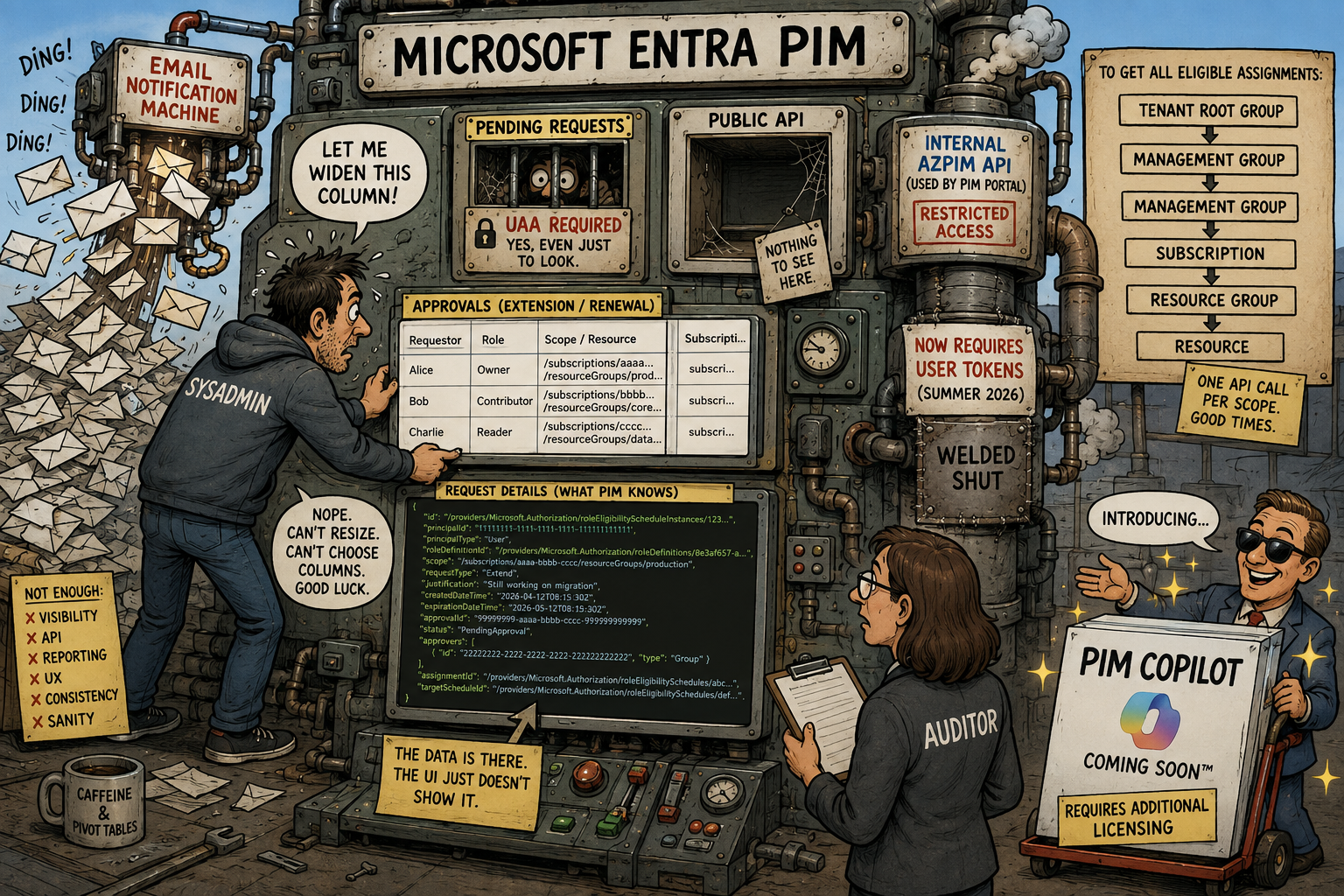
Microsoft Entra Privileged Identity Management, or PIM, is a product I both really like and sometimes get really frustrated with. I’ve used PIM for many years, both as an administrator and when building IAM automation around it. The core idea is great: don’t give people privileged access all the time. Make the access eligible, let them activate it when needed, and remove it again when they’re done.
But PIM has also started to feel a bit… forgotten.
Some parts of the product have barely changed for years. Reporting Azure RBAC eligibility at scale is still painful. Important lifecycle operations available in the portal are missing from the public APIs. Getting read-only visibility into PIM often requires surprisingly powerful roles. And some of the portal experiences could definitely use some love.
So, if Microsoft made me Product Manager for PIM for a day, here’s what I’d put on the backlog.
- PIM is still great
- PIM enforces least privilege better than it practices it
- Reporting shouldn’t require crawling Azure
- Email is apparently the PIM dashboard
- The API can do it. You just can’t
- Fine. Put a Copilot in it
- My PIM backlog
PIM is still great
Before complaining, let’s give PIM some credit. Having my admin account running with only Reader access most of the day, and requiring elevation before I can actually change anything, is a great security and governance model.
I think this is becoming even more important. Today many of us have our favorite AI companion sitting directly in our IDE, terminal or browser, just one badly written prompt away from doing something we didn’t really intend. If my current permissions only allow reading resources, the potential blast radius is quite different from having Contributor activated all day.
PIM also has some really good features.
One of my favorites is the ability to scope down an Azure RBAC activation. If I’m eligible for Contributor at a Management Group containing ten subscriptions, I can activate the role for only the two subscriptions I’m actually going to work on. That’s proper just-enough-access.
Conditional Access authentication context is another great addition. Requiring a compliant device and phishing-resistant authentication before activating a highly privileged role makes a lot of sense. There is one important detail though: the authentication context protects the activation, not necessarily where the activated permissions can be used afterwards. Microsoft even documents that after activation, another session, device or location isn’t prevented from using the activated permissions.
So I tend to think of PIM primarily as an access lifecycle and governance control with very useful security benefits, rather than some magical security boundary around privileged sessions. It reduces when my identity is privileged. It doesn’t bind the privilege to the session where I activated it.
Still, PIM is great, which is exactly why I wish Microsoft would give it some more attention. There have of course been additional improvements over the last few years.
PIM for Groups became a major part of the product. Conditional Access authentication context was added. Activating PIM group membership can trigger application provisioning for JIT access to applications. Azure RBAC got better integration with PIM, and Entitlement Management can be combined with PIM for Groups.
One preview feature that deserves a special mention is custom extensions for PIM role activation. PIM can call a secured REST API as part of the activation flow, allowing organizations to add their own business logic before or after approval. The extension can, for example, validate ticket numbers, check employment or compliance data, integrate with audit systems, or apply dynamic approval rules. Based on the response, PIM can continue the normal workflow, automatically approve the activation, or deny it.
Custom extensions work with PIM for Groups, Microsoft Entra roles, and Azure resources. This is exactly the kind of extensibility I want to see in PIM, although the feature is currently in preview.
These are good additions. But if you remove new UIs and integrations with other Entra services, the list of major changes to the core PIM experience over the last few years becomes surprisingly short. Meanwhile, some very old limitations are still there. Let’s look at those instead.
PIM enforces least privilege better than it practices it
One of the main reasons for using PIM is least privilege. That’s why I find it slightly ironic that administering and even viewing parts of PIM often doesn’t follow the same principle very well. Take Azure RBAC extension and renewal requests.
If I want to see pending requests across Azure resources, I need access such as User Access Administrator, Role Based Access Control Administrator or Owner at the relevant scope(s). But what if I only want to see them? Why shouldn’t a Reader for Azure RBAC, and Global Reader for Entra, or a dedicated PIM Reader role be able to see that a user has requested an extension of an existing eligible assignment?
This becomes especially important in larger organizations. Many organizations likely outsource Azure RBAC management to workload owners or development team leads:
Here’s your subscription. Here’s User Access Administrator. Manage your team’s access.
The workload owner probably should decide whether Adele still needs Contributor on the non-production subscription. But does that really mean the workload owner also needs permission to grant arbitrary Azure RBAC roles to arbitrary identities? I don’t think so.
There are really three different responsibilities here:
- Observe: Who has access? Which requests are pending? Which assignments are about to expire?
- Decide: Should Adele still have this access?
- Execute: Actually change the Azure RBAC or PIM assignment.
PIM currently ties these responsibilities too closely together. I’d like to see proper read-only PIM permissions, plus something like a scoped PIM Access Steward role. Let workload owners review and approve access for their resources without making them full RBAC administrators.
Use least privilege, even for the people managing least privilege.
Reporting shouldn’t require crawling Azure
This one has annoyed me for years. Reporting on normal, standing Azure RBAC role assignments is actually quite nice. Azure Resource Graph contains role assignments, meaning I can use KQL to query assignments across a large Azure estate. Reporting on PIM eligible Azure RBAC assignments is another story.
For example, this query returns the key properties of standing Azure RBAC role assignments across the scopes available to Azure Resource Graph:
authorizationresources
| where type =~ 'microsoft.authorization/roleassignments'
| extend roleDefinitionId = tostring(properties.roleDefinitionId),
         principalType = tostring(properties.principalType),
         principalId = tostring(properties.principalId),
         scope = tostring(properties.scope)
| project scope, principalId, principalType, roleDefinitionId
But there is no such thing as 'microsoft.authorization/roleeligibilityassignments'. The ARM PIM API exposes roleEligibilityScheduleInstances, but the API is scope based:
/{scope}/providers/Microsoft.Authorization/roleEligibilityScheduleInstances
The scope is a required part of the request. That’s perfectly fine if my question is:
Who is eligible for access on this subscription?
It isn’t so great when the auditor asks:
Who is eligible for privileged access anywhere in Azure?
In a large organization, access can be assigned at the tenant root Management Group, child Management Groups, subscriptions, Resource Groups and individual resources. Now we’re crawling the Azure hierarchy and collecting eligibility from different scopes just to build an inventory.
Azure already has a scalable inventory and query engine. It’s called Azure Resource Graph. Please index PIM eligible assignments in it.
There are of course other and often better ways to manage Azure RBAC lifecycle. Assigning a PIM-managed group to an Azure role is usually much easier to govern than creating individual eligible RBAC assignments. Entitlement Management can take this further by putting access packages, approvals, expiration and access reviews around the group or Azure role membership. I like these patterns and use them where they make sense, but they don’t remove the reporting problem.
In an organization with hundreds or thousands of subscriptions, different teams, different ways of working and different role requirements, there won’t always be one clean access model. Some access comes from groups. Some is direct on individual resources. Some is inherited from Management Groups. Some comes through access packages. Some teams have custom roles.
The auditor doesn’t really care. They just want to know:
Who can get privileged access to this thing?
We should have a good answer.
Email is apparently the PIM dashboard
If you’ve worked with PIM for a while, you probably know that PIM really likes email. Role activated? Email. Assignment changed? Email. Something needs approval? Email.
This would be fine if PIM had an equally good central place for administrators to see everything requiring attention. It doesn’t.
And if you decide that you don’t want all those emails, notification configuration is tied to role settings. Managing different notification settings across many roles and Azure scopes quickly becomes another configuration exercise. There are some good community tools out there, yes, but this should really be built-in.
I would love a central PIM operations view:
- 12 pending requests
- 8 assignments expiring this week
- 3 requests waiting for approval for more than five days
- 27 permanent privileged assignments
Give me filters, useful columns and an API exposing the same information. Speaking of useful columns, the extension and renewal approval experience has recently become another small frustration.
The current role extension UI has fixed columns. I can’t make them wider and I can’t choose which columns I want to display. So I end up looking at values such as:
subscripti…
Great. Thanks. What’s particularly frustrating is looking at the network requests in Developer Tools and seeing how much useful information is actually returned by the backend. The data is there; the UI just doesn’t show it.
There is another small UI detail that makes managing expiring assignments harder than it should be. In a user’s PIM roles UI, for active assignments, the Renew link is disabled until the assignment is close enough to expiration to be renewed, makes sense. For eligible assignments however, the Renew link is active all the time. Click it too early and PIM simply tells you that the assignment can’t be renewed yet.
So the portal already knows the renewal window. It just doesn’t use that information consistently in the UI. It’s likely a small bug.
Finding the assignments that actually are about to expire isn’t much better. There is no clear warning on the role, and the columns can’t be sorted to bring the assignments closest to expiration to the top. Which brings us back to the feature PIM seems to trust most for operational visibility: email.
The API can do it. You just can’t
This is probably my biggest PIM frustration. I recently worked with Claude on a custom approval gate portal for Azure RBAC extension and renewal requests. The idea was simple: the people who know whether someone still needs access are often the workload or project owners. I wanted those owners to review PIM extension requests without giving every one of them User Access Administrator or Owner role assignments on their subscriptions.
The flow looked roughly like this:
PIM extension request → Custom approval portal → Workload owner approves or rejects → Backend executes the decision
The workload owner makes the decision, and a controlled workload identity executes it. Nice separation of duties. There was only one problem: the public PIM APIs don’t expose the complete extension and renewal approval lifecycle I needed.
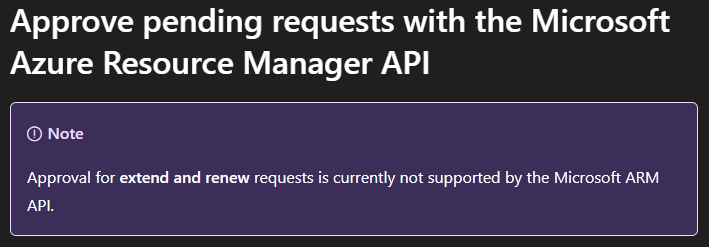
So I did what any responsible identity engineer does after spending too much time looking at Developer Tools in the browser. I found the API used by Microsoft’s own PIM portal. The internal api.azrbac.azure.com API allowed me to fetch the pending requests and approve or reject them programmatically. I authenticated using a Managed Identity with the required Azure RBAC permissions, and it worked great.
Yes, this was an undocumented and unsupported API. I knew that.
Then during the summer of 2026 something changed. Application authentication that previously worked against this internal API stopped working in my scenario, with the API now requiring a user token. I can’t really blame Microsoft for changing an internal API. It’s unsupported. The problem is that there is no supported API to migrate to. So my idea stranded there.
Using Microsoft’s PIM portal I can retrieve these requests and approve or reject them using click-ops (which I hate). The backend functionality exists, so please expose it. And while you’re at it, give workload identities a least-privileged read permission for PIM extension requests.
Even if Microsoft doesn’t want applications approving requests, I should at least be able to build automation saying:
There are seven extension requests waiting for approval.
Today PIM is very good at emailing humans about this. I’d like to let machines help too.
Fine. Put a Copilot in it
Maybe I’ve misunderstood the problem. It’s 2026. Perhaps PIM simply needs a Copilot. Microsoft has managed to put Copilot into approximately everything else, so surely we can find a licensing opportunity here too.
The annoying part is that I would actually use a PIM Copilot.
Imagine asking:
Show me everyone eligible for Owner or User Access Administrator on subscription X.
I need to whitelist this IP address on Key Vault X. Find the least-privileged role I’m eligible for on that scope and activate it for one hour.
Which privileged assignments haven’t been used for six months and could be removed?
That would actually be useful. PIM already knows a lot about roles, eligibility, scopes and activation requirements. Add proper inventory, permission analysis and automation around it and there are some genuinely interesting possibilities.
There’s just one small problem. Before we give PIM a Copilot, we need to give machines proper access to PIM: complete public APIs, a tenant-wide inventory and read-only permissions. Then you can slap a Copilot license requirement on it. Deal?
My PIM backlog
So here’s my PIM backlog:
- Complete public APIs. If the PIM portal UI can do it, there should be a supported way to automate it (e.g. for pending renewal requests).
- PIM Reader role. Let people and workload identities observe PIM without giving them permissions to administer access (e.g. for pending renewal requests).
- Delegated PIM governance. Let workload owners approve access without making them UAA, RBAC Administrator or Owner (e.g. for pending renewal requests).
- Index PIM eligible Azure RBAC roles in Azure Resource Graph. Make tenant-wide Azure RBAC reporting easy with KQL.
- A central operational dashboard. Show me more of what requires attention across PIM (expiring roles, pending renewals etc).
- Better UI. Resizable columns and column selection aren’t exactly futuristic features.
- Multi-role activation. PIM already lets me scope one activation down to selected resources. Let me activate several required roles in one workflow too.
- And yes, PIM Copilot. But please fix the plumbing first.
PIM doesn’t need to be reinvented. It needs to be finished.